Why Is My Treadmill Display Not Working
Your treadmill display just went black, and you're stuck wondering what happened. If you've been asking why is my treadmill display not working, you're in the right place. Most of the time, this is a simple home fix, not a major repair.
In our research, most dead display cases come down to one of three things: a power issue, a missing safety key, or a loose console cable. Manufacturer specifications from brands like NordicTrack and Sole list the internal circuit breaker as the first thing to check. Let's walk through the diagnosis together, step by step.
Image source: Bing (Web (fair-use with source credit))
The Quick Answer: What Usually Causes a Dead Treadmill Display
Why is my treadmill display not working? Usually it's power loss, a missing safety key, or a loose console cable. Check the wall outlet first.
Then confirm the safety key and inspect the ribbon cable. Most fixes take under ten minutes.
Diagnose It by Symptom: Dead Screen, Lights On, or Error Codes
Before you touch any wires, look at what the console is doing. The symptom narrows down the fault faster than guessing. Use this table as your first checklist.
| Symptom | Most Likely Cause | Next Step |
|---|---|---|
| Completely dead, no lights | No power to console | Check outlet, circuit breaker, power cord |
| Lights on, no text | Loose ribbon cable or failed console board | Reconnect cable, test board |
| Error code on screen | Sensor or control board issue | Find code in manual, test sensor |
| Flickering or dim | Backlight failing or voltage drop | Inspect wiring, replace backlight |
If the console is completely dead, the power path is the suspect. Test the wall outlet with a lamp. If that works, move to the treadmill's own circuit breaker, which sits under the motor hood.
Reset it if tripped. Then confirm the safety key is properly attached. A missing key leaves the console dark by design.
If lights are on but the display shows no numbers, you're dealing with a connection or board issue. The ribbon cable that links the console to the control board often works loose during use. Reseat it on both ends.
That solves many flickering or blank text problems.
Error codes like E1 or E6 change the story. Those pull from the speed sensor or incline motor. Look up the exact code in your owner's manual.
Each brand uses its own numbering, so don't guess.
Static electricity can also blank a screen mid-workout. This is more common in dry climates or on carpet. Grounding the treadmill through a three-prong outlet usually prevents it.
If you have a motor that runs but a screen that stays off, that points to the console cable, not the motor. The drive motor can run on a separate circuit. That distinction, per ASTM fitness equipment standards, keeps troubleshooting honest.
Step-by-Step Fixes: Power, Safety Key, Cable Checks, and Console Reset
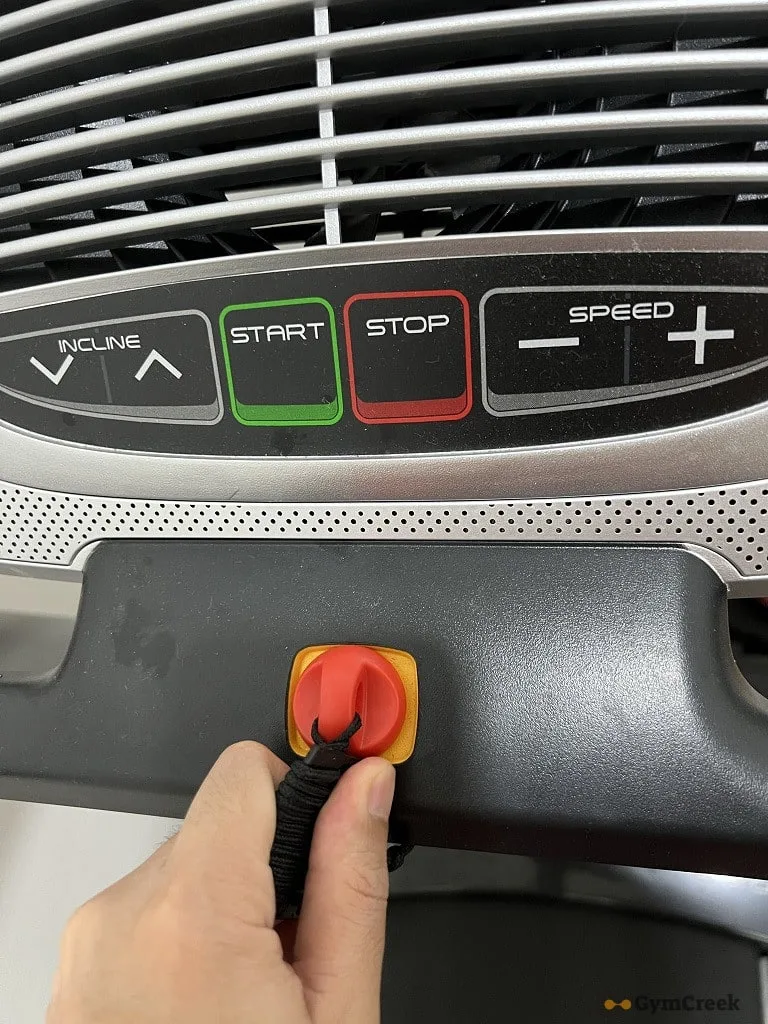
Image source: Bing (Web (fair-use with source credit))
Start safe. Unplug the treadmill and wait a full 60 seconds. This clears the console's memory and lets capacitors discharge.
Test the wall outlet with a phone charger or lamp. A dead outlet means nothing else matters. Then check the safety key.
The console won't turn on without it. Make sure the magnet clicks into place.
Find the reset switch under the motor hood. Many models have a circuit breaker button. If it's popped, press it back in.
Then open the console cover carefully. You'll see a wide, flat ribbon cable. Gently pull it out and push it back in until it clicks.
Do the same for any smaller wiring harnesses.
Look for a blown fuse on the control board. A charred or broken fuse means the board is stressed, and it may need replacement. Reset the console electronically if your model supports it.
Look for a small pinhole or hold the power button for 10 seconds.
Never work inside the console without unplugging first. Capacitors can hold a dangerous charge. If you're unsure about any step, stop and call a technician.
The same diagnostic approach applies to other home cardio gear, and a little routine maintenance goes a long way.
Common Mistakes That Make Treadmill Display Problems Worse
Many people turn a simple fix into a costly repair. Here are the traps we see most often.
- Ignoring the safety key. Without it, the console stays dead no matter what else you do.
- Using a damaged outlet. If the outlet drops voltage under load, the display flickers before failing.
- Vacuuming right under the treadmill. Static discharge from the belt can reset or blank the console.
- Replacing the console board before testing power. Most dead displays come from a failed control board, not the console itself.
- Catching ribbon cables with the hood. Pinched wires short out and cause intermittent errors.
Opening the console doesn't always void your warranty. But tearing the seals or cutting wires definitely does. Check your owner's manual first.
That avoids a painful cancellation of coverage.
Another mistake is diagnosing in a rush. People see a dead screen and order a new console immediately. Meanwhile, the real fault sits in a cheap reed switch.
Take the extra five minutes to test components in order.
Replacement Costs: When to Repair vs. Call a Technician
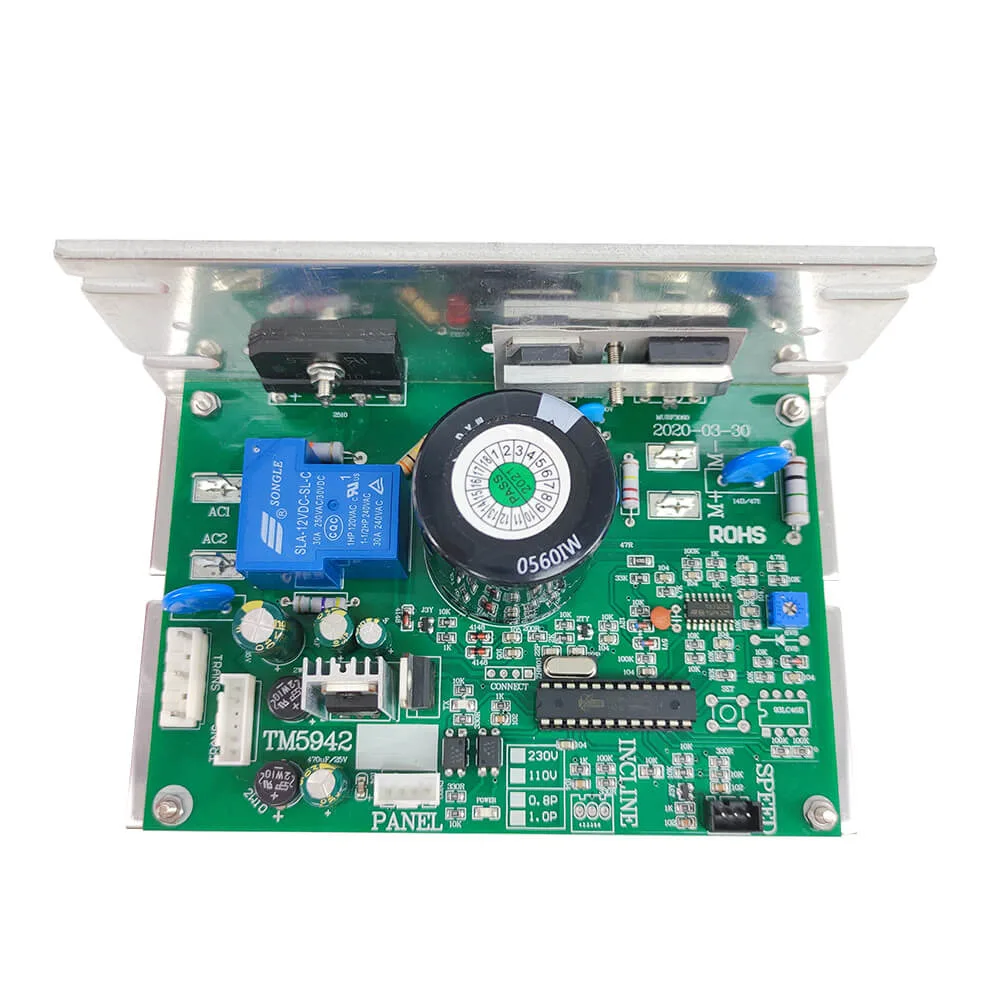
Image source: Bing (Web (fair-use with source credit))
Now you know the likely cause. But should you fix it yourself or call for help? Here's what repairs actually cost as of 2026.
| Repair Type | Part Cost | Labor Cost | Total Estimate |
|---|---|---|---|
| Control board replacement | $50 – $150 | $50 – $100 | $100 – $250 |
| Console assembly replacement | $100 – $300 | $50 – $100 | $150 – $400 |
| Technician service call | N/A | $100 – $150 | $100 – $150 |
| DIY cable reseat | $0 | $0 | $0 |
If the fix is a loose cable or safety key, it's free. Just your time. If you need a control board, weigh the part cost against the treadmill's age.
A board that costs $120 is worth it on a newer $1,200 treadmill. It's not worth it on a $300 model that's eight years old.
Call a technician if you're unsure about handling wiring. Also call if the treadmill still smells burnt after a reset. That indicates a short circuit that could cause a fire.
Replacing a console assembly is usually the last resort. For some older models, a new console costs more than a new treadmill. In that case, it's smarter to replace the machine.
Before buying parts, check the CPSC recall database for your model. A free safety recall may cover the fault, saving you money. You can also look up ASTM fitness equipment standards to understand what safe operation looks like.
Treadmill Display Problems: Your Top 5 Questions, Answered
Before you call a technician, here are the questions that come up most often.
Why won't my treadmill display turn on even after I press reset?
Reset only clears the console memory. If the display stays dead after a 60-second unplug, check the wall outlet and the internal circuit breaker next. If both behave, the control board likely needs testing.
A multimeter will confirm power delivery.
Is a dead treadmill display dangerous?
Usually not, but a burnt smell or repeated breaker trips is a real warning sign. Stop using the treadmill and call a technician if you smell smoke or see scorch marks. An unprotected surge can damage other electronics in the room.
Unplug the unit after testing. That same caution applies to other warning signs in home equipment.
Can I replace a treadmill console myself?
Yes, if you can handle the wiring and the console is in stock. Most consoles take two bolts and one ribbon cable. Match the model number on the old console label when ordering.
If you lack basic DIY skills, a technician costs less than buying the wrong part twice.
Why does my treadmill display flicker when I run?
A loose ribbon cable is the top cause. Static electricity from the belt running on carpet can also interfere with the signal. Ground the treadmill with a three-prong outlet and reseat the console cable.
That fixes most flickering, but a worn backlight may need replacement.
How much should I spend on repairs before buying a new treadmill?
A good rule of thumb: if the repair cost exceeds 50% of the treadmill's current value, replace it. A $150 control board makes sense on a newer $1,200 model. It doesn't make sense on an eight-year-old budget machine.
For a quick reference, compare what you'd spend on home cardio maintenance.
Avoiding the Dreaded Blank Screen: Prevention and Maintenance
The best repair is the one you never have to do. A few small habits keep your treadmill console alive for years. Start with power protection.
Plug your treadmill into a surge protector rated for motorized fitness equipment. A direct lightning strike is rare, but a brownout can fry a control board in an instant. As of 2026, most mid-range surge protectors handle treadmill draw without complaint.
Keep the console dry. Wipe sweat off the console after each workout. Moisture creeps into ribbon cable connectors and corrodes them over time.
That corrosion starts as a flicker and ends as a dead display.
Keep the belt clean and dry too. Static electricity builds up when the belt drags on the deck. That static discharges through the frame and can reset the display.
A light silicone lube keeps the belt gliding and reduces static. The same discipline that keeps a clean and smooth workout protects your electronics.
Add a belt check to your monthly routine. If the belt is too tight, the motor works harder and the control board runs hotter. Heat is a board killer.
Lubricate according to your owner's manual, usually every three months. That's where a lot of sudden display failures actually start.
Finally, know when to call it. If your console dies twice in a year, the machine may be aging out. At that point, you're better off weighing a replacement against a home gym upgrade.
Whatever you decide, always unplug the treadmill before any inspection. That one habit prevents injuries and protects your machine.