How to Troubleshoot a Toaster Oven
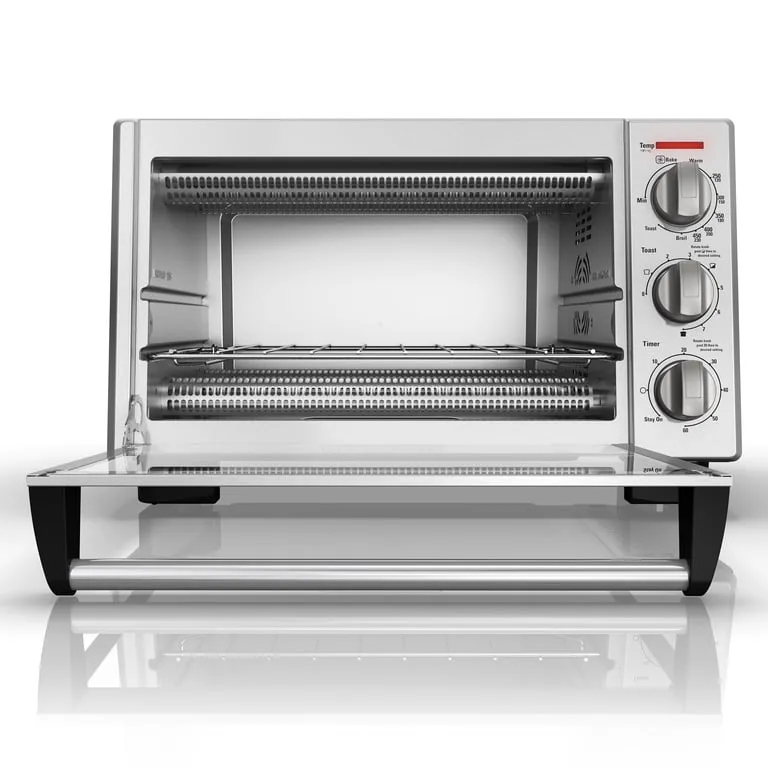
Image source: Bing (Web (fair-use with source credit))
Toaster Oven Not Working? Let's Fix It!
So, your toaster oven has decided to take an unexpected vacation from its cooking duties? It's a common kitchen woe, but before you resign yourself to burnt toast or a costly replacement, let's figure out what's going on. Many toaster oven issues are surprisingly simple to resolve with a little know-how.
This guide will walk you through the most frequent problems and offer clear, actionable steps to get your appliance back in working order. We'll cover everything from power failures to heating inconsistencies, aiming to get you cooking again quickly and safely.
Quick Answer
Troubleshooting a toaster oven typically involves checking the power cord and outlet, verifying the timer and function settings, and inspecting heating elements for visible damage. If the oven isn't heating, the issue might be a tripped breaker or a faulty thermostat. Safety first: always unplug the appliance before any internal inspection.
When Your Toaster Oven Won't Turn On At All
This is the most disheartening problem: you flick the switch, press the button, and… silence. No lights, no hum, nothing. The good news is that this is often the easiest fix.
Checking Power Source and Connections
The very first thing to confirm is that your toaster oven is actually getting power. It sounds basic, but it's the most common oversight.
- Secure the Plug: Make sure the power cord is firmly plugged into both the toaster oven itself and the wall outlet. Sometimes, the plug can subtly loosen from vibrations or accidental nudges. Give it a good, firm push to ensure it's seated properly.
- Test Another Outlet: The problem might not be the oven, but the outlet. Try plugging in another small appliance, like a lamp or a portable charger, into the same outlet. If that appliance also doesn't work, you've likely found the issue: the outlet itself.
- Check Your Home's Electrical Panel: If the outlet seems dead, head to your home's main electrical panel or breaker box. Look for any breakers that are in the "off" position or seem partially tripped (they might be in a middle position). If you find one, flip it completely off and then back on. If you're unsure about this process, it's always safer to consult a qualified electrician.
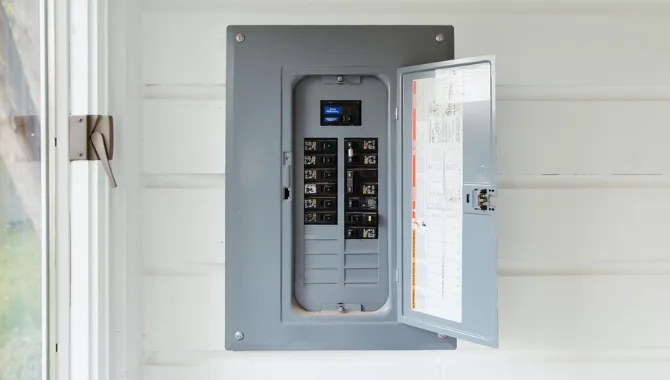
Image source: Web (Bing)
If you've tried these steps and still have no power, it could indicate a more serious internal issue with the appliance's wiring or power switch.
When Nothing Happens: What to Look For First
If your toaster oven remains unresponsive after checking the power supply, it’s time for a closer look. Often, a simple solution is overlooked in the initial frustration.
- GFCI Outlets: Many kitchen outlets are Ground Fault Circuit Interrupter (GFCI) protected, designed to shut off power if they detect an imbalance in current. These outlets have "Test" and "Reset" buttons. If your toaster oven is plugged into a GFCI outlet that has tripped, pressing the "Reset" button might restore power. These are common throughout kitchens.
- Built-in Circuit Breakers: Some toaster ovens have their own internal overload protection. Check the back or bottom of your appliance for a small reset button, often recessed and requiring a paperclip or pen tip to press. Refer to your owner's manual for its specific location if present.
Toaster Oven Heats Up, But Food Stays Cold
This is a confusing one: the oven seems to be on, lights are on, maybe you hear a fan, but the heating elements (the coils that get red-hot) remain stubbornly unlit and cool.
Investigating Heating Element and Timer Issues
When your toaster oven powers up but doesn't generate heat, the primary suspects are the heating elements themselves or the timer/function selector.
- Timer Engagement: Many toaster ovens, especially older models, won't begin heating until the timer is set for a specific duration. Ensure you've rotated the timer dial to your desired cooking time or set it to a continuous "on" mode if available. Simply turning on the power isn't always enough to activate the heating cycle.
- Function Selector: Similarly, the function selector dial needs to be set to the correct mode (e.g., Bake, Broil, Toast). If it's in between settings or on a "fan only" mode, the heating elements won't engage. Make sure it's firmly clicked into a heating position.

Image source: Web (Bing) / ar.inspiredpencil.com (Web image (fair-use with source credit))
No Heat? Common Culprits to Inspect
If the timer and function are correctly set, we need to look at the components responsible for generating heat.
- Visual Inspection of Heating Elements: Carefully examine the visible heating elements inside the toaster oven. Look for any obvious signs of damage such as cracks, breaks in the wire, or loose connections where they attach to the oven's interior. Manufacturer specifications often highlight that visible damage to these elements usually requires replacement.
- Internal Wiring: If the coils themselves look intact, the issue could be a loose wire connecting them to the power source or thermostat. This requires unplugging the oven and carefully removing the outer casing to inspect the internal wiring. If you're not comfortable with electrical components, this is a good point to consider professional help.
Toaster Oven Overheating or Underheating: Temperature Problems
It's frustrating when your toaster oven doesn't cook at the temperature you set. Food might burn on the outside while remaining raw inside, or it takes forever to cook. This often points to a calibration or thermostat issue.
Using an Oven Thermometer for Accuracy
One of the most effective ways to diagnose temperature discrepancies is by using an independent oven thermometer. These inexpensive tools sit inside your oven and provide a direct reading of the internal temperature.
- Placement: Position the thermometer in the center of the oven, away from the heating elements, to get the most accurate reading.
- Testing Protocol: Set your toaster oven to a common temperature, say 350°F (175°C), and let it preheat for at least 15-20 minutes. Then, check the thermometer's reading.
- If the thermometer reads significantly higher than your set temperature, your oven is running hot.
- If it reads significantly lower, your oven is running cool.
- A discrepancy of more than 25-50°F (15-30°C) typically indicates a problem.
Solving Temperature Swings and Inaccuracies
Once you've confirmed a temperature issue with an oven thermometer, you can start troubleshooting the cause.
- Thermostat Calibration: Many modern toaster ovens have a thermostat that can be calibrated. Consult your appliance's user manual to see if yours has this feature and follow the instructions precisely. Calibration usually involves adjusting a small screw or using a specific button combination.
- Thermostat Failure: If your oven doesn't have a calibration feature or if calibration doesn't resolve the issue, the thermostat itself might be faulty. This component regulates the oven's temperature by telling the heating elements when to turn on and off. A failing thermostat can cause erratic heating. Replacing a thermostat is a repair that may require professional assistance.
- Cleanliness Impact: Food debris and grease buildup inside the oven can sometimes interfere with heat distribution or sensor readings, affecting temperature accuracy. Ensure the interior of your toaster oven is clean. For best results, follow a regular cleaning schedule, similar to how you might maintain a wooden cutting board to ensure its longevity.
Controls Are Acting Up: Buttons, Dials, and Displays
Sticky buttons, a loose dial, or a flickering digital display can make operating your toaster oven a real hassle. These issues usually stem from simple wear and tear or accumulated grime.
Cleaning and Checking Control Panel Functionality
The control panel is your main interface with the appliance, and it can get dirty easily from cooking splatters and general use.
- Unplug First: Before you do anything, always unplug the toaster oven from the power outlet. Safety is paramount when working with any electrical appliance.
- Gentle Cleaning: Use a slightly damp, soft cloth to wipe down the buttons, dials, and display area. For stubborn grime, you can use a mild, non-abrasive cleaner. Avoid spraying liquid directly onto the panel; apply it to the cloth first. Ensure the control panel is completely dry before plugging the appliance back in.
- Check for Obstructions: Sometimes, a sticky control is simply due to food particles or debris lodged around a button or dial. Gently try to clear any visible obstructions with a soft brush or toothpick.
When Buttons Don't Respond or Displays Glitch
If cleaning doesn't solve the problem, the controls might be experiencing more persistent issues.
- Loose Dials: A dial that feels loose or wobbly might have a mounting screw that has loosened. With the oven unplugged, you can often access these screws from the back or underside of the appliance. Tightening them can restore stability.
- Display Issues: If a digital display is flickering, showing missing segments, or completely blank (even when the oven has power), it likely points to an internal electronic problem. This could be a loose connection to the display board or a failing component. Repairing display issues often requires technical expertise and specialized parts.
Strange Noises from Your Toaster Oven
That unexpected whirring, clicking, or grinding sound can be unsettling. While some noises are normal operational sounds, others indicate a problem that needs attention.
Identifying Common Operational Sounds
Most toaster ovens have a fan for convection cooking, which produces a normal whirring sound. You might also hear clicks from the timer or thermostat engaging and disenguating.
- Normal Fan Noise: A consistent, steady whirring noise during convection mode is typical. If the fan seems unusually loud or strained, it could be an early sign of wear or something impeding its rotation.
- Timer/Thermostat Clicks: Occasional clicking sounds when the timer is running or the thermostat cycles are also generally normal. These are the sounds of mechanical components doing their job.
Addressing Grinding, Whirring, or Clicking
Unusual or excessive noises often signal a specific problem within the appliance.
- Grinding Sounds: A persistent grinding noise, especially when the fan is running, usually means something is obstructing the fan blades or the fan motor bearings are worn out. Unplug the oven and carefully inspect the fan area for any foreign objects. If no obstruction is found, the fan motor itself may need replacement.
- Excessive Whirring: If the fan suddenly becomes much louder, it could be bearing wear or an imbalance in the fan blade. This is usually a sign of impending failure.
- Loud or Erratic Clicking: While some clicking is normal, a loud, sharp, or constant clicking that wasn't there before might indicate an issue with the timer mechanism or a stressed thermostat switch.
If you're hearing any of these noises and they seem unusual or are accompanied by other performance issues, it's worth investigating further or seeking professional advice. Sometimes, small issues like a loose fan blade can be fixed with minor adjustments, but more significant motor problems might make replacement the more practical choice.
When to Stop and Call for Help (or Replace It)
Sometimes, no matter how much you tinker, the problem persists, or it becomes clear that the repair isn't straightforward. This is the point where you need to assess whether it's worth continuing the troubleshooting effort or if it's time to consider a new appliance.
Recognizing Safety Hazards and Serious Issues
The biggest reason to stop troubleshooting is safety. If you smell burning plastic, see sparks, or notice any signs of electrical malfunction, unplug the appliance immediately. Continued use could lead to fire or electrical shock.
For instance, if a heating element has visibly frayed or a wire has melted, it's a clear sign of danger.
Furthermore, if the appliance's casing is cracked or significantly damaged, or if the door doesn't close securely, it can compromise insulation and lead to overheating or potential fire hazards. In such cases, the risk of repair outweighs the potential benefit.
Deciding Between Repair and Replacement
For minor issues, like a stuck button or a loose dial, DIY fixes are often feasible. However, when troubleshooting involves internal components like the thermostat, heating elements, or complex electronic boards, you have to weigh the cost and complexity of repair against the price of a new toaster oven. As of 2026, many basic toaster ovens retail for between $50 and $150.
Professional repair costs can often approach or exceed this range, especially for older or simpler models. If your appliance is several years old and showing multiple signs of wear, replacement is usually the more economical and reliable long-term solution.
Frequently Asked Questions About Toaster Oven Problems
My toaster oven smells like burning plastic. What should I do?
Unplug the toaster oven immediately and do not use it. Burning plastic smells indicate an electrical issue, potentially a melting wire or component, which is a serious fire hazard. Allow the oven to cool completely, then inspect for visible signs of damage.
If you cannot identify the cause or feel uncomfortable proceeding, it's best to replace the appliance.
The timer on my toaster oven stopped working. Can I still use it?
You can still use the toaster oven if it has manual "on" or "stay on" settings for the heating elements. However, you will need to manually time your cooking using a separate kitchen timer or clock, and be vigilant about turning the oven off to prevent burning your food or causing damage. If the timer is crucial to your cooking needs, consider repair or replacement.