Stand Mixer Making Noise
That strange grinding, whining, or clunking sound coming from your stand mixer is definitely a sign something needs attention. Don't panic; it's often a fixable issue that doesn't mean your trusty kitchen appliance is toast. We've gathered insights from various sources to help you understand what might be happening and how to address it.
Understanding the specific sound and when it occurs is key to diagnosing the problem. Our research indicates that many noises are tied to mechanical components like the motor or gears, and sometimes, the fix is surprisingly simple. Let’s figure out what your mixer’s trying to tell you.
Quick Answer
A stand mixer making noise often signals issues with its motor, gears, or assembly. Common sounds include grinding, whining, or clunking, typically caused by dry lubrication, worn parts, or improper attachment seating. Following a systematic troubleshooting process, starting with basic checks and moving to mechanical diagnostics, can help identify and resolve the noise.
Pinpointing the Noise: What Your Mixer's Trying to Tell You
When your stand mixer starts acting up, the first and most crucial step is to become a bit of a sound detective. The type of noise it's making can give us a significant clue about where the problem lies. Think of it like a doctor listening to your heart, the sound tells a story.
We've found that different noises often point to specific mechanical components or operational issues within the mixer. Paying close attention to when the sound occurs, is it constant, only on certain speeds, or when you add ingredients?, is also vital.
Grinding, Whining, or Clunking? The Sound Clues
Let's break down the most common sounds you might be hearing and what they generally indicate:
- Grinding or Scraping: This is often the most concerning sound. It typically suggests that metal is rubbing against metal without adequate lubrication, or that gears are worn or damaged. It can sound like sand in the works.
- Whining or High-Pitched Squeal: This could be coming from the motor itself, especially if it’s under strain. It might also indicate issues with the motor brushes or a bearing that’s starting to fail and needs more lubrication.
- Clunking or Knocking: A more percussive sound like a thud or a distinct knock might mean something is loose internally, a part has become slightly dislodged, or there's an imbalance in a rotating component.

Image source: Bing (Web (fair-use with source credit))
Quick Fixes: The Easiest Things to Check First
Before you even think about taking your mixer apart or calling for service, let's run through the simplest checks. Honestly, a surprising number of strange noises are resolved with these basic steps. It’s always best to rule out the easy stuff first.
These are things anyone can do in a minute or two, and they don't require any tools or technical know-how. Think of this as the "is it plugged in?" phase, but a little more involved.
Is Everything Snapped In Place?
A stand mixer has several parts that need to fit together snugly for it to operate correctly and quietly. An improperly attached component can easily lead to vibrations and noises.
- Bowl Locking Mechanism: Ensure the mixing bowl is correctly locked into its base. Many mixers have a twist-and-lock system; if it's not fully engaged, the bowl can vibrate and shift, causing the beater to hit the sides.
- Attachment Seating: Make sure the beater, whisk, or dough hook is properly inserted into the mixer's attachment hub. It should click or slot in securely. If it's loose, it can wobble and create a clanking sound.
- Accessory Hub Cover: If you’re not using a specific attachment at the top (like for a pasta maker), make sure the cover is securely in place. Sometimes, these can rattle if not fitted properly.
Bowl Level and Load Balance
How your bowl sits and how much you're asking the mixer to do can also cause unusual sounds. It’s not always a mechanical fault.
- Bowl Level: Even a slight tilt in the mixing bowl can cause the beaters or hooks to strike the sides or bottom unevenly. This repeated impact can create scraping or thudding noises. Check that the bowl is sitting flat and secure on its base.
- Load Balance: If you're mixing a very thick dough, like a dense sourdough or multiple pounds of cookie dough, the motor and gears are under immense strain. This can manifest as a louder-than-usual hum, a strained whine, or even a grinding sound as the motor fights the resistance. Manufacturer specifications often suggest maximum batch sizes and dough consistencies for optimal performance. For instance, some heavy-duty mixers can handle up to 5 pounds of dough, while lighter models might struggle with half that.
Digging Deeper: Mechanical Causes of Mixer Noise
If the simple checks didn't solve the mystery noise, it’s time to look at the internal workings. This is where things get a bit more technical, but understanding these components is key to diagnosing and potentially fixing the problem.
Most stand mixers rely on a system of gears and a motor to provide the power and speed variations needed for different tasks. When these parts aren't functioning optimally, noise is often the first symptom.
Understanding Gear Lubrication and Wear
The gears inside your stand mixer are what translate the motor's rotation into the controlled movement of your attachments. Like any mechanical parts that move against each other, they require lubrication to operate smoothly and quietly.
- Dry Gears: Over time, the grease that lubricates the gears can dry out, become depleted, or get contaminated with old food particles. When the metal teeth of the gears grind together without this essential lubricant, it creates a distinct grinding or scraping sound. This is particularly common in older mixers that haven't had their internal lubrication refreshed.
- Worn Gears: If the mixer has been used extensively or has been overloaded repeatedly, the gear teeth can start to wear down. This wear can cause them to mesh improperly, leading to a rougher operation and a noticeable grinding or chattering noise, even if there is some lubrication present. Identifying worn gears often requires disassembly and close inspection.
Motor Brushes and Their Role (For Older Models)
Many stand mixers, especially older or more robust models, use carbon brushes within the motor. These brushes conduct electricity to the motor's armature, allowing it to spin.
- Brush Wear: Carbon brushes are designed to wear down over time, much like a pencil lead. As they get shorter, they may not make consistent contact with the armature, leading to sputtering sounds, intermittent power, or even a high-pitched squeal. You might also notice small sparks from the motor housing if the brushes are worn.
- Replacement: Worn motor brushes are typically a replaceable part. If you hear unusual motor sounds like this, it's often a sign that these brushes need to be swapped out for new ones. This is a common maintenance task for those familiar with appliance repair.
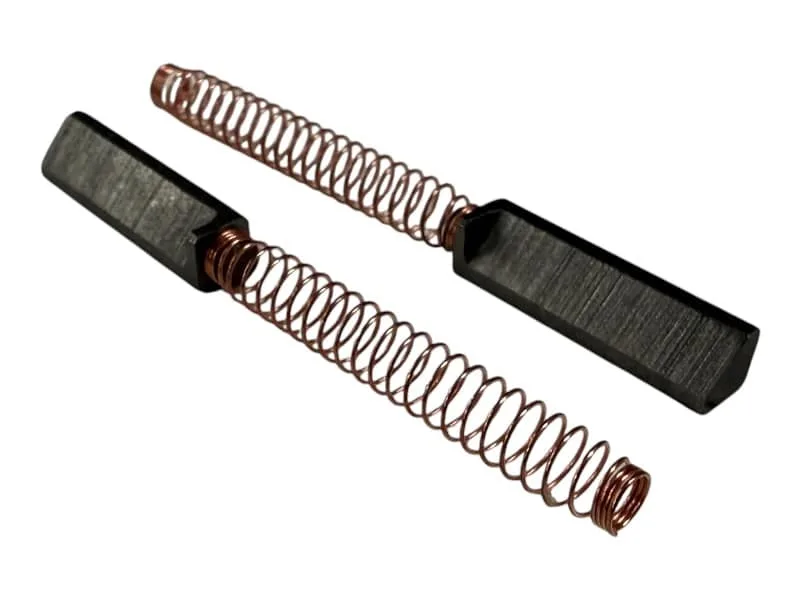
Image source: Bing (Web (fair-use with source credit))
Loose Parts and Internal Wear Signs
Beyond gears and brushes, other internal components can contribute to noise if they become loose or start to wear out.
- Bearings: Stand mixers have bearings that support rotating shafts (like the one for the attachment hub). If a bearing starts to fail, it can produce a rumbling, grinding, or a high-pitched whining sound that changes with speed.
- Fasteners: Over time, vibrations can cause internal screws or fasteners to loosen. If a component is no longer held as securely as it should be, it can rattle or clunk during operation. This is less common but can happen with heavily used or older machines.
Your Stand Mixer Troubleshooting Flow
When your stand mixer starts making a concerning noise, it's best to approach it systematically. Trying to fix it without a clear plan can sometimes lead to more problems or frustration. Think of this as a guided pathway to figuring out what’s going on.
This workflow helps you cover the most likely causes first, saving you time and effort. It’s designed to lead you from the simplest solutions to more complex diagnostics.
Step 1: Listen & Observe
The very first thing to do is pay close attention to the noise itself. What does it sound like? When does it happen?
- Identify the Sound: Is it a grinding, whining, clunking, or something else? Note the specific texture of the sound.
- Note the Timing: Does it happen on all speeds, only high speeds, only low speeds, or when you first turn it on? Does it occur when adding ingredients or while mixing a specific type of dough?
Step 2: Perform Basic Checks
Before you get too concerned, run through the most common and easiest fixes. These are often overlooked but can be the solution.
- Assembly: Double-check that the mixing bowl is securely locked in place and that the attachment (beater, whisk, dough hook) is fully seated in the head of the mixer.
- Bowl Level: Ensure the bowl is sitting perfectly flat on its base. An uneven bowl can cause the attachment to scrape.
Step 3: Inspect Attachments & Load
Consider what you’re actually asking the mixer to do. This is a frequent cause of strain and noise.
- Attachment Condition: Look at the attachment itself. Are there any visible bends, cracks, or damage that could cause it to strike the bowl unevenly?
- Batch Size: Are you mixing a very stiff dough or a large batch? Overloading the mixer can cause the motor to strain, leading to whining or grinding sounds. Check your manufacturer's specifications for maximum capacity. For instance, some models are rated for up to 7 quarts while others are closer to 4.5 quarts. If you're using a kitchen scale for precise measurements, ensure you're within the recommended limits for your model. You can find guidance on keeping the correct fluid level before each season for baking.
Step 4: Consider Internal Factors
If the external checks don’t reveal the issue, the problem likely lies within the mixer’s internal mechanics.
- Lubrication: Dry or old grease on the gears is a prime cause of grinding noises. This often requires accessing the mixer’s gear housing.
- Motor Brushes: For older models, worn motor brushes can cause sputtering and high-pitched noises.
- Loose Components: Internal parts or fasteners might have loosened over time due to vibrations.
Step 5: When to Get Help
If you’ve gone through the steps above and the noise persists, or if you’re uncomfortable with internal diagnostics, it’s time to seek external assistance.
- Consult Manual: Refer to your stand mixer's user manual for specific troubleshooting tips.
- Repair Shop: For complex internal issues, consider taking your mixer to a qualified appliance repair technician.
- Manufacturer Support: Contact the manufacturer for guidance or to inquire about warranty service if your mixer is still covered.
Common Stand Mixer Noises & What They Mean
Let's get specific about those sounds. Knowing what a particular noise usually signifies can save you a lot of guesswork and point you toward the right solution much faster. It’s like having a diagnostic cheat sheet for your kitchen appliance.
Different sounds are indicators of different components under stress or wearing out. By matching the sound to its typical cause, you can often predict the necessary repair or adjustment.
Grinding/Scraping: Gears or Lack of Lube?
A grinding or scraping noise is one of the most common complaints. It generally means that there's metal-on-metal friction happening where it shouldn't be.
- Primary Cause: The most frequent culprit is dried-out or insufficient gear lubrication. The gears, essential for transferring power from the motor to the attachment, need a food-grade grease to move smoothly. When this grease breaks down or runs out, the gear teeth will grind against each other.
- Secondary Cause: Worn gear teeth can also cause grinding. If the mixer has been used heavily or for many years, the teeth might become damaged or rounded, leading to rough meshing.
- What to Check: You’d typically need to access the gear housing (often at the top of the mixer head) to inspect the grease. If it looks dry, dark, or crumbly, it needs to be cleaned out and replaced with fresh, appropriate lubricant. For a visual on what this looks like, imagine metal teeth rubbing without oil, that’s the sound you’re hearing.
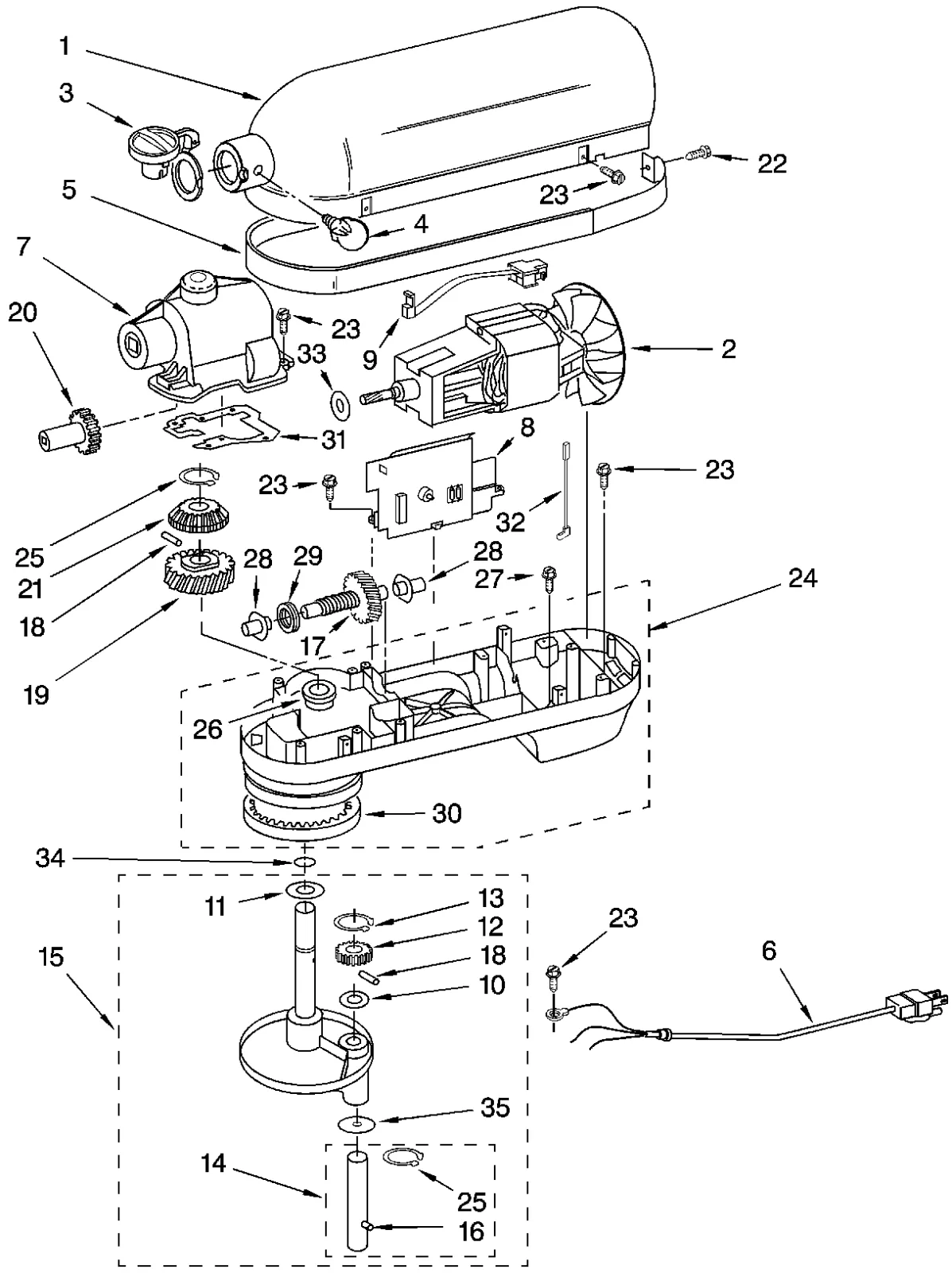
Image source: Bing (Web (fair-use with source credit))
Whining/Squealing: Motor Strain or Wear?
A high-pitched whine or a distinct squeal often points towards the motor or components directly related to its operation.
- Motor Strain: This sound is frequently heard when the motor is working very hard, such as when mixing a very thick dough or a large batch. The motor is essentially struggling against resistance, and the sound is its way of telling you it's under stress. If the sound disappears when you reduce the load, this is likely the issue.
- Motor Brushes: In mixers that use them, worn-out carbon motor brushes can cause a high-pitched squeal or a sputtering noise as they lose good contact with the armature. This is more common in older models.
- Bearings: A failing bearing in the motor assembly or supporting the drive shaft can also produce a persistent whine or squeal that might change pitch with speed.
Clunking/Knocking: Loose Bits or Bearing Issues?
A more abrupt, percussive sound like a clunk or knock suggests something is loose or has a sudden impact within the mixer’s mechanism.
- Loose Fasteners: Internal screws or bolts that hold various components together can vibrate loose over time. If a part isn't held firmly, it can bang against other parts as it moves.
- Component Impact: The attachment itself might be striking the side of the bowl if the bowl isn't perfectly seated, or if the attachment is slightly bent. This creates a distinct knocking sound with each rotation.
- Bearing Failure: While often associated with whining, a severely damaged bearing can also cause a noticeable clunking or knocking as a part of it breaks away or the shaft becomes significantly unstable. This is usually accompanied by other symptoms like excessive wobble.
Mistakes to Avoid When Your Mixer Gets Loud
Learning to troubleshoot your stand mixer's noise also means knowing what not to do. Some common mistakes can actually worsen the problem or even damage your appliance further. It’s easy to overlook these, but they’re critical for a successful fix.
These are the pitfalls that can turn a simple noise issue into a costly repair or a premature replacement. By avoiding them, you protect your investment and get your mixer back to quiet operation.
Forcing Overloaded Batches
One of the biggest mistakes is continuing to run the mixer when it’s clearly struggling. Pushing a mixer beyond its capacity, especially with very stiff doughs, puts immense strain on the motor and gear system.
- The Problem: This overworking can cause overheating, premature wear on motor brushes, and even strip or damage gear teeth. The noise you hear is the machine's way of signalling it's at its limit.
- What to Do Instead: If you notice the motor whining intensely or the mixer slowing significantly, stop it immediately. Reduce the batch size or the stiffness of the dough. For very tough doughs, consider using a commercial mixer or a different preparation method.
Ignoring Early Warning Sounds
Many mechanical issues start small. A slight grind or an occasional squeak might seem minor, but they can be early indicators of a developing problem.
- The Risk: If you ignore these subtle sounds, they can escalate into more serious damage. A little bit of dry grease can lead to significant gear wear if left unaddressed.
- What to Do Instead: Treat any new or unusual noise as a cue to investigate. Run through the basic checks first. If the noise persists, plan to address it before it becomes a more significant, and potentially more expensive, problem. As of 2026, appliance repair costs can vary, but proactive maintenance is generally more economical.
Ignoring Burning Smells or Smoke
This is a critical warning. If you smell burning plastic or oil, or if you see smoke coming from your stand mixer, stop using it immediately.
- The Danger: These are signs of serious electrical or mechanical failure, potentially involving overheating motor components or internal wiring. Continuing to run the mixer could lead to a fire hazard or irreversible damage.
- What to Do Instead: Unplug the mixer right away. Do not attempt to use it again. At this point, it almost certainly needs professional repair, or it may be beyond repair and require replacement.
When to Call a Pro or Consider a Replacement
Sometimes, the best solution isn’t a DIY fix. There comes a point where the complexity or severity of the issue makes professional help the wisest choice, or when the cost of repair outweighs buying a new machine.
Deciding whether to repair or replace often hinges on a few key factors: the age of the mixer, the likely cost of parts and labor, and the availability of qualified technicians.
Signs It's Beyond a Simple Fix
Some noises are clear indicators that you're dealing with something more than just a lack of lubrication or a loose part. If you notice any of these, it’s probably time to seek expert advice.
- Persistent, Loud Noises: If the grinding, whining, or clunking is extremely loud, constant, and doesn't change with speed or load, it suggests significant internal damage.
- Smoke or Burning Smells: As mentioned, any smell of burning or visible smoke is an immediate stop sign for DIY repair. This points to electrical issues within the motor.
- Excessive Wobble: If the attachment head or the beaters wobble dramatically, it could mean a bearing has failed or the main drive shaft is damaged.
- Intermittent Power or Speed Issues: If the mixer cuts out, struggles to maintain speed even under light loads, or has inconsistent power, it might be a motor control board or complex motor issue.
Weighing Repair Costs vs. New Mixer
Once you know a repair is likely needed, it’s smart to get an estimate. Then, compare that estimate to the cost of a new stand mixer.
- Age of Mixer: If your mixer is many years old (say, over 10 years) and showing significant wear, even a successful repair might just be a temporary fix. Newer models often have updated features and improved efficiency.
- Cost of Repair: Get a quote from a reputable appliance repair shop. If the repair cost is more than 50% of the price of a comparable new mixer, replacement is often the more economical choice. For example, a high-end mixer might cost $400 new, but a complex gear replacement could be quoted at $250.
- Availability of Parts: For very old or niche models, replacement parts might be difficult to find, making repair impractical.
- New Features: Consider if newer models offer features that would genuinely benefit your baking, such as improved motor efficiency or enhanced bowl-drive systems. If you’re looking at purchasing a new machine, exploring options for a reliable kitchen scale for baking or a compact stand mixer might be part of your upgrade.
Stand Mixer Noise Troubleshooting FAQs
### What is the most common reason a stand mixer makes noise?
The most frequent cause is a lack of or dried-out lubrication on the internal gears, leading to a grinding or scraping sound. Other common issues include an improperly seated bowl or attachment, or motor strain from overloading.
### Can I fix a grinding noise by adding oil myself?
Adding just any oil is not recommended. Stand mixers require specific, food-grade grease for their gears. Simply adding liquid oil might not be effective and could potentially make matters worse or contaminate food.
It's best to use the correct lubricant as specified by the manufacturer or consult a repair guide for your model.
### How often should stand mixer gears be lubricated?
Manufacturer recommendations vary, but for most home-use stand mixers, lubricating the gears every 2-5 years is a good general guideline. Heavy use or mixing very stiff doughs may necessitate more frequent maintenance. Refer to your appliance's manual for specific intervals.
### Is it safe to use a stand mixer that is making a loud noise?
It is generally not recommended to use a stand mixer that is making loud or unusual noises, especially if the sound is grinding, clunking, or accompanied by smoke or burning smells. Continued use could lead to further damage or a safety hazard. Stop using it and investigate the cause.
### What if my stand mixer is still under warranty and making noise?
If your stand mixer is still within its warranty period, contact the manufacturer immediately. They will guide you through the troubleshooting process and arrange for repair or replacement if the issue is covered under the warranty terms. Avoid attempting any internal repairs yourself, as this could void the warranty.