Autel MaxiCOM MK808 Vs ThinkDiag: Which Is Better?
Autel MaxiCOM MK808 is better for workshop depth, while ThinkDiag is cheaper and more portable for basic daily diagnostics.
Choosing between the Autel MaxiCOM MK808 vs ThinkDiag can feel like comparing a compact tool chest with a smart phone app. Both can read fault codes, view live data, and run useful service functions. However, they differ in hardware, software access, cost, updates, and long-term value. This guide explains the real-world strengths and limits of each tool so you can choose with confidence.
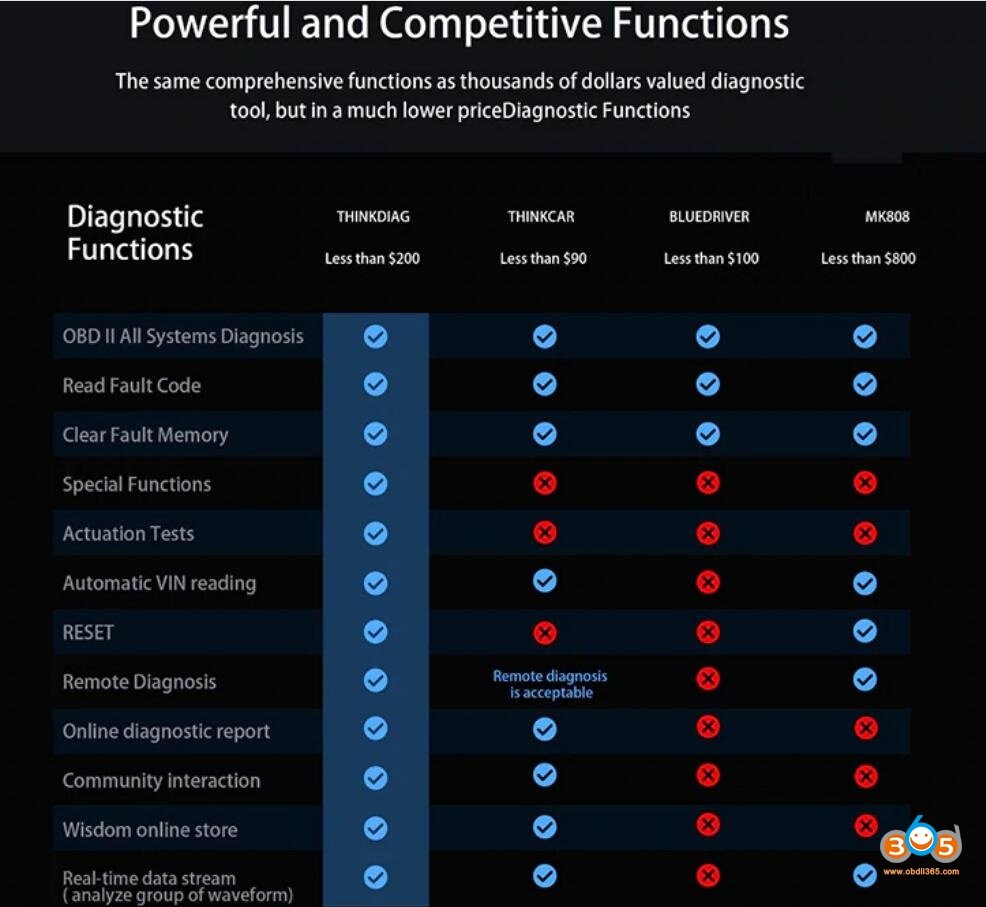
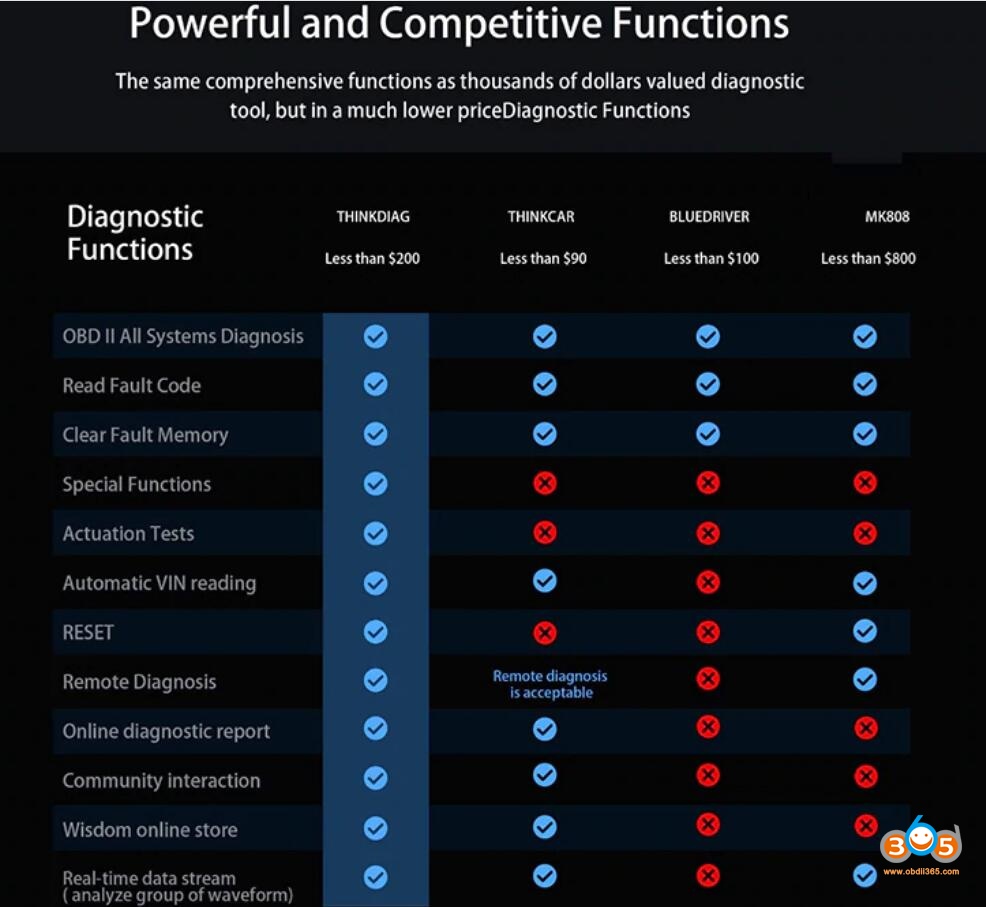
Autel MaxiCOM MK808 vs ThinkDiag at a Glance
The Autel MaxiCOM MK808 is a dedicated Android diagnostic tablet. ThinkDiag is a small vehicle interface that connects to a phone or tablet through an app. That basic difference shapes the entire user experience.
The MK808 feels more like a professional scan tool. ThinkDiag feels more like a portable diagnostic accessory. Both can be useful, but they suit different drivers, technicians, and repair needs.
| Feature | Autel MaxiCOM MK808 | ThinkDiag |
|---|---|---|
| Design | Dedicated touchscreen tablet | Small Bluetooth vehicle adapter |
| Connection | Wired vehicle cable | Wireless connection to a mobile device |
| Main software | Autel diagnostic software | ThinkDiag mobile app |
| Code reading | Broad system coverage | Broad coverage, depending on vehicle and plan |
| Live data | Yes | Yes |
| Service resets | Many common functions | Many functions, often subscription-based |
| Special functions | Available on supported vehicles | Available on supported vehicles and software plans |
| Internet required | Mainly for updates and some features | Often needed for app access and cloud functions |
| Portability | Moderate | Excellent |
| Screen quality | Built in | Depends on your phone or tablet |
| Update model | Tool update system | App and subscription model |
| Best user | DIY owner or repair shop | Mobile user or occasional DIY owner |
The most important point is simple: vehicle coverage and function access can change by make, model, year, region, and software version. Always check the official coverage list before buying either device.

What Is the Autel MaxiCOM MK808?
The Autel MaxiCOM MK808 is a mid-level diagnostic tablet built for vehicle troubleshooting and routine service work. It uses a color touchscreen and a dedicated diagnostic cable. This makes it ready to use without pairing another device.
The MK808 is commonly used for:
• Reading and clearing diagnostic trouble codes
• Viewing live sensor data
• Running active tests on supported systems
• Resetting oil service indicators
• Registering batteries on supported vehicles
• Performing electronic parking brake service
• Completing steering angle resets
• Resetting diesel particulate filter systems on supported vehicles
• Handling some injector, throttle, and tire pressure functions
The exact service menu depends on the vehicle. A function shown in a product listing may not work on every car. This is a common mistake among first-time scan tool buyers.
In daily work, the MK808 is useful because it keeps the scan process in one place. You do not need to unlock your phone, manage Bluetooth settings, or worry about a call interrupting the diagnostic session.
Strengths of the MK808
The MK808 has several practical advantages:
• Its dedicated screen is easy to read in a garage.
• The wired connection is usually stable.
• It provides a more structured workflow for professional testing.
• It offers broad vehicle system access for its price class.
• It can display multiple live data values at once.
• It is easier to share with customers during an inspection.
The tablet format also helps when you are testing a car with a weak battery. A phone may lose power or close the app. A dedicated tool usually gives you a more controlled setup.
Limits of the MK808
The MK808 is not a factory scan tool. It may not perform every coding, programming, or advanced module function offered by a dealer tool.
Common limitations include:
• Some advanced functions require active software updates.
• Vehicle coverage varies by region.
• It may not support every new model without a software update.
• It is larger than a Bluetooth adapter.
• Certain functions may require security access or special credentials.
The MK808 also belongs to an older product family. Buyers should confirm whether they are purchasing the original MK808, the MK808S, or another updated version. The name can look similar, while the hardware and software support may differ.
What Is ThinkDiag?
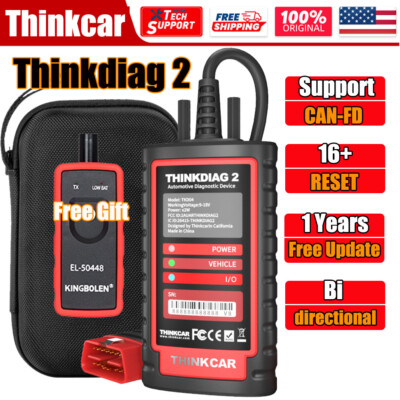
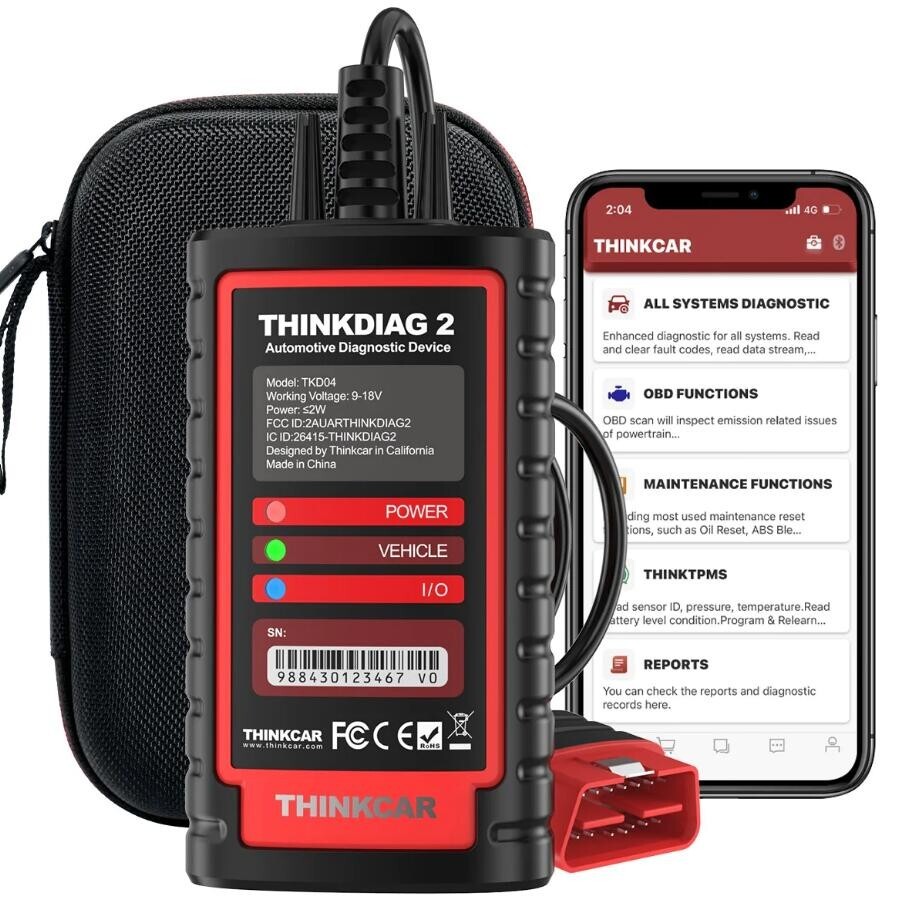
ThinkDiag is a compact diagnostic adapter made by THINKCAR. It plugs into the vehicle diagnostic port and connects to a phone or tablet through the ThinkDiag app.
The adapter can support many common tasks, such as:
• Reading and clearing fault codes
• Viewing live data
• Running system scans
• Resetting service lights
• Performing some actuator tests
• Supporting selected special functions
• Checking emissions-related systems
ThinkDiag is attractive because it is small and easy to carry. It can stay in a glove box, tool bag, or laptop case. For a driver who wants a basic emergency scanner, that size is a major benefit.
The tradeoff is that ThinkDiag relies heavily on the app and software plan. Your experience depends on your phone, Bluetooth connection, account, internet access, and the vehicle package you have purchased.
Strengths of ThinkDiag
ThinkDiag works well for users who value mobility and low entry cost.
Its main benefits include:
• Small size
• Simple wireless connection
• Use with a familiar phone or tablet
• Lower upfront cost in many markets
• Useful basic diagnostics
• Access to selected professional functions
• Easy storage in a vehicle
For example, a driver may use ThinkDiag to check an engine warning light before visiting a repair shop. The code does not always identify the failed part, but it can provide a useful starting point.
Limits of ThinkDiag
ThinkDiag can become less attractive when you need frequent or advanced use.
Important limits include:
• Some functions require a paid subscription.
• App support may vary between Android and iOS devices.
• Bluetooth pairing can fail at the worst time.
• Phone notifications may interrupt the session.
• The small adapter has no built-in display.
• Coverage and special functions depend on the selected software package.
ThinkDiag is best viewed as an app-based diagnostic platform. It is not simply a cheaper tablet. Its total cost depends on how often you use paid vehicle software.

Autel MaxiCOM MK808 vs ThinkDiag: Diagnostic Coverage
Coverage is one of the hardest parts of comparing scan tools. A device may support a vehicle brand but still lack a specific module or special function.
The MK808 generally provides a strong balance of full-system diagnostics and service functions. It can often scan systems beyond the engine, such as:
• Transmission
• Anti-lock braking system
• Airbag system
• Body control module
• Instrument cluster
• Climate control
• Electronic parking brake
• Steering and suspension systems
ThinkDiag can also access many of these systems on supported vehicles. However, access may depend on an active brand package, subscription, or function license.
When comparing Autel MaxiCOM MK808 vs ThinkDiag for a specific car, check these details:
-
Vehicle make, model, and year
-
Engine size and fuel type
-
Available control modules
-
Required special functions
-
Software subscription status
-
Region and market specification
For example, a tool may reset the oil light on a 2018 vehicle but fail to register its battery. Another tool may access the battery module but not perform a throttle relearn. This is why broad marketing claims should not replace a vehicle-specific coverage check.
Autel MaxiCOM MK808 vs ThinkDiag: Special Functions
Special functions are reset, relearn, and test procedures beyond basic code reading. They are often the reason people buy a professional scan tool.
The MK808 may support functions such as:
• Oil service reset
• Battery registration
• Electronic parking brake reset
• Steering angle calibration
• Throttle relearn
• Diesel particulate filter regeneration
• Tire pressure system learning
• Injector coding on selected vehicles
ThinkDiag may support similar tasks. The key difference is how access is delivered. ThinkDiag commonly links functions to software packages and subscriptions. The MK808 usually presents functions within its installed vehicle software, subject to update status and coverage.
Neither device should be treated as a universal coding tool. Coding changes vehicle configuration. A wrong setting can create new faults or disable a feature. Save the original values when the software allows it, and use a stable battery charger during module work.
Autel MaxiCOM MK808 vs ThinkDiag: Ease of Use
The MK808 is usually easier for long diagnostic sessions. Its screen is always ready, and the cable provides a direct connection. The menus are designed around vehicle diagnosis rather than general phone use.
ThinkDiag is easy to carry but takes more setup. You must:
-
Install the app.
-
Create or sign in to an account.
-
Pair the adapter.
-
Select the vehicle.
-
Confirm the correct software package.
-
Keep the phone connected during testing.
That process is not difficult. Still, it can feel slow when you are standing beside a customer’s vehicle in the rain.
A personal lesson many technicians learn is that convenience is not only about size. A tiny adapter is convenient to carry, but a dedicated tablet is often more convenient to operate. The best tool is the one that removes friction from your normal work.
Autel MaxiCOM MK808 vs ThinkDiag: Update Costs
Software updates are a major part of the ownership cost. Diagnostic tools need current vehicle data because new models, control modules, and security systems change over time.
The MK808 uses Autel software updates. Depending on the product version and market, updates may be included for a limited period. After that period, renewal may be needed for continued access to new coverage and improvements.
ThinkDiag uses an app-based update model. Some basic functions may be available with limited access, while full brand coverage and advanced functions may require a subscription or package purchase.
Before buying, calculate the three-year cost:
• Purchase price
• Update or subscription fees
• Required cables or accessories
• Phone or tablet costs
• Battery charger or support equipment
A low purchase price does not always mean a low total cost. ThinkDiag may be cheaper for occasional use, while the MK808 may offer better value for a busy user who wants a dedicated tool.
Autel MaxiCOM MK808 vs ThinkDiag: Hardware and Connection
Hardware affects reliability more than many buyers expect.
The MK808 uses a wired connection. Wired tools are not always as convenient, but they avoid Bluetooth pairing issues. The tablet also has its own battery, screen, and operating system.
ThinkDiag uses a wireless connection. This keeps the cabin tidy and lets you stand away from the diagnostic port. However, Bluetooth depends on the phone, app, adapter, and vehicle connection working together.
A wired connection is often the safer choice for:
• Long active tests
• Module scans
• Battery registration
• Workshop use
• Testing in areas with wireless interference
A wireless adapter is often better for:
• Roadside checks
• Quick code scans
• Personal vehicles
• Carrying in a small bag
• Sharing with family members
Do not use either device as a substitute for a battery charger during long sessions. Low voltage can cause communication errors and false faults. This is one of the most important practical tips in the Autel MaxiCOM MK808 vs ThinkDiag comparison.
Autel MaxiCOM MK808 vs ThinkDiag for DIY Car Owners
For a home user, ThinkDiag is appealing because it is affordable and compact. It can help identify why the check engine light is on and confirm whether a repair cleared the code.
The MK808 is a better choice when the owner works on several vehicles or wants access to more service functions. It also makes more sense for someone who dislikes subscriptions and prefers a dedicated device.
Choose ThinkDiag if:
• You scan one or two personal vehicles.
• You already own a good phone or tablet.
• You want a small tool for occasional checks.
• You accept app and subscription limits.
Choose the MK808 if:
• You maintain several vehicles.
• You want full-system scans.
• You perform regular service work.
• You prefer a built-in screen.
• You want a more workshop-style experience.
Remember that a diagnostic code is a clue, not a final diagnosis. For example, an oxygen sensor code may result from a vacuum leak, exhaust leak, wiring fault, or fuel problem. Always test the related circuit before replacing a part.
Autel MaxiCOM MK808 vs ThinkDiag for Professional Technicians
A repair shop needs more than a code reader. It needs speed, stable communication, clear reports, and predictable access to service functions.
The MK808 is usually the stronger shop tool in this comparison. Its dedicated design supports repeated scans and makes it easier to move from a system scan to live data and then to a service function.
ThinkDiag can still help a mobile technician or small shop. Its low size makes it useful as a backup tool. It may also be convenient when a technician already carries a phone or tablet.
For professional use, consider:
• How many vehicles you scan each week
• Which brands you service
• Whether you need active tests
• Whether paid software packages fit your budget
• How quickly you need technical support
• Whether you need printed or digital reports
• Whether the tool supports current vehicle security systems
In a busy shop, a few minutes lost to pairing or account problems can add up. In occasional mobile work, the same wireless design may save space and time.
Autel MaxiCOM MK808 vs ThinkDiag: Pros and Cons
Autel MaxiCOM MK808 pros
• Dedicated diagnostic tablet
• Stable wired connection
• Strong coverage for common systems
• Useful service and reset functions
• Good fit for regular DIY work
• Better workshop ergonomics
Autel MaxiCOM MK808 cons
• Larger than ThinkDiag
• May require paid updates
• Advanced coding and programming are limited
• Vehicle coverage can vary
• Older versions may have slower hardware
ThinkDiag pros
• Very small and portable
• Works with a phone or tablet
• Often lower upfront cost
• Useful for basic scans
• Can offer advanced functions through packages
ThinkDiag cons
• Requires a compatible mobile device
• Bluetooth and app issues can occur
• Subscription costs may affect value
• No built-in screen
• Function access depends on the selected plan
The clear winner depends on how you define value. Low price, portability, and occasional use point toward ThinkDiag. Stability, dedicated operation, and regular service work point toward the MK808.
Which One Should You Buy?
The Autel MaxiCOM MK808 vs ThinkDiag decision becomes easier when you match the tool to your work.
Buy the Autel MaxiCOM MK808 when you want a dependable tablet for regular diagnostics. It is the more practical choice for home mechanics, used-car inspections, and small repair shops.
Buy ThinkDiag when you want a compact scanner for occasional checks. It is a good fit for drivers who want to carry a tool in the glove box and use a phone as the display.
Before placing an order, take these steps:
-
Check coverage for your exact vehicle.
-
Confirm the needed service functions.
-
Review update and subscription prices.
-
Check Android or iOS compatibility.
-
Look at warranty and support options.
-
Decide whether you need a dedicated screen.
-
Confirm that the tool supports your vehicle’s communication protocols.
Do not choose only by the number of advertised functions. A smaller list that works on your car is more valuable than a large list that does not.
Common Mistakes to Avoid
Many scan tool problems come from buying assumptions rather than checking details.
Avoid these mistakes:
• Assuming every function works on every vehicle
• Treating a fault code as proof that a part has failed
• Ignoring battery voltage during module tests
• Buying an old model without checking update support
• Forgetting subscription renewal costs
• Using a phone with poor battery health for long scans
• Clearing codes before saving freeze-frame data
• Attempting coding without recording original settings
Freeze-frame data can show engine speed, temperature, load, and other conditions from the moment a fault occurred. Save this information before clearing codes. It can make diagnosis much faster.
Frequently Asked Questions About Autel MaxiCOM MK808 vs ThinkDiag
Is the Autel MaxiCOM MK808 better than ThinkDiag?
The MK808 is usually better for regular diagnostics, service resets, and workshop use. ThinkDiag is better for portability and occasional scans, especially when the buyer already owns a compatible phone.
Can ThinkDiag clear check engine codes?
Yes, ThinkDiag can read and clear many engine fault codes on supported vehicles. Clearing a code does not repair the cause, and the warning light may return if the fault remains.
Does the Autel MaxiCOM MK808 require a subscription?
The MK808 may include a limited update period, depending on the version and seller. Continued updates and newer vehicle coverage may require a renewal, so check the current regional terms before buying.
Can the MK808 program vehicle keys?
The standard MK808 is not a full key-programming tool. Key programming often requires dedicated hardware, security access, and brand-specific functions.
Does ThinkDiag work without a phone?
No. ThinkDiag relies on a compatible phone or tablet for its display and app. The adapter alone cannot show codes or live data.
Which tool is better for battery registration?
Both tools may support battery registration on selected vehicles. The MK808 often offers a more direct workflow, but exact support depends on the vehicle and software version.
Can either tool perform ECU programming?
Neither device should be assumed to support full ECU programming. Programming usually needs stable power, secure manufacturer access, special software, and hardware designed for that task.
Are Autel MaxiCOM MK808 and ThinkDiag suitable for ABS and airbag faults?
They can access ABS and airbag modules on many supported vehicles. Coverage varies, so confirm the exact make, model, year, and system before purchase.
Conclusion
The Autel MaxiCOM MK808 vs ThinkDiag comparison is really a choice between a dedicated diagnostic tablet and a mobile app-based adapter. The MK808 offers a steadier workshop experience, while ThinkDiag wins on size, portability, and lower entry cost.
For frequent repairs, full-system scans, and service work, the MK808 is the safer all-around choice. For occasional checks, roadside use, and simple diagnostics, ThinkDiag can provide strong value.
Check your vehicle coverage, calculate update costs, and list the functions you truly need before buying. Then choose the tool that fits your work, not just the one with the lowest price.