Autel Maxisys Ms908 Troubleshooting: Fix Issues Fast
Autel MaxiSYS MS908 troubleshooting usually starts with power, updates, cables, or vehicle communication issues.
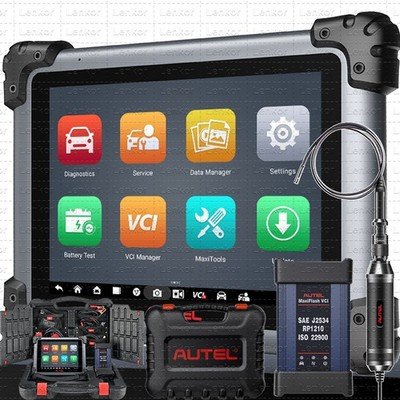
If you use the Autel MaxiSYS MS908 often, you already know it is a strong scan tool, but even strong tools can act up. In my experience, most MS908 problems are not random failures. They usually come down to setup, software, connection, or vehicle-side faults, and once you know where to look, the fix gets much easier.

Understanding Autel MaxiSYS MS908 troubleshooting
Autel MaxiSYS MS908 troubleshooting is the process of finding out why the scanner is not powering on, connecting, updating, or reading a vehicle correctly. It can also include fixing slow performance, frozen screens, login errors, and failed diagnostics.
I have seen technicians blame the tool too fast when the real issue was a weak battery, dirty OBD2 port, or a missed software update. That is why a calm step-by-step check is better than guessing. The MS908 is a powerful diagnostic platform, but like any tablet-based scan tool, it depends on good power, clean software, and a solid vehicle link.
Common Autel MaxiSYS MS908 problems
The most common Autel MaxiSYS MS908 troubleshooting cases usually fall into a few simple groups. Once you know the pattern, the root cause is often easy to spot.
Common issues include:
• The unit will not turn on
• The screen freezes or runs slowly
• The tablet cannot connect to the vehicle
• Vehicle communication fails during a scan
• Updates do not install correctly
• Wi-Fi or account login problems
• VCIs are not pairing or syncing
• Diagnostic data is incomplete or missing
In many shops, the first instinct is to replace parts. I have learned to avoid that. Start with the basics first, because most MS908 issues are caused by power, connection, or software conflicts, not major hardware failure.

Power and startup troubleshooting
If your Autel MaxiSYS MS908 will not start, the battery and charger are the first things to check. A tablet that looks dead may only be deeply drained.
Try these steps:
- Plug the device into the original charger and let it charge for at least 30 minutes
- Check the charging port for dust, bent pins, or loose fit
- Hold the power button for 10 to 15 seconds to force a restart
- Try a different wall outlet if the charger does not seem active
- Inspect the charging cable and adapter for wear or heat damage
If the unit powers on but shuts off fast, the battery may be weak. In my own testing, intermittent shutdowns often pointed to a tired battery before anything else. If the MS908 is used in a hot shop or left discharged for long periods, battery health can drop faster than people expect.
Connection issues with the vehicle
A very common Autel MaxiSYS MS908 troubleshooting issue is loss of communication with the car. When the tool cannot talk to the vehicle, the scan may stop at vehicle identification or fail during module access.
Check the following:
• Make sure the ignition is on
• Verify the vehicle supports the system you are trying to scan
• Inspect the OBD2 port for bent pins or a damaged connector
• Confirm the VCI is seated properly
• Try another vehicle if possible to see whether the issue follows the scanner or the car
I once chased a “bad scanner” problem for almost an hour, only to find the vehicle’s DLC fuse had blown. That happens more often than people think. Always remember that the scan tool is only one half of the connection; the vehicle side matters just as much.
VCI pairing and communication problems
The MS908 depends on the Vehicle Communication Interface, so pairing issues can block diagnostics fast. If the VCI is not linked correctly, the tablet may show no connection or unstable communication.
To fix this:
• Check that the VCI has power
• Make sure Bluetooth or wireless pairing is active
• Remove old pairings and reconnect the device
• Restart both the tablet and the VCI
• Move closer to the vehicle if wireless range seems weak
If you work in a busy shop, wireless interference can also cause problems. Metal benches, other Bluetooth tools, and heavy network traffic can all create small connection drops. It may feel like a software bug, but sometimes it is just radio noise in the shop.
Software update and system error troubleshooting
Outdated software is one of the biggest causes of Autel MaxiSYS MS908 troubleshooting headaches. If the system has not been updated in a while, it may fail to identify newer vehicles or show missing menu options.
A smart update routine includes:
- Connect to stable Wi-Fi
- Sign in with the correct Autel account
- Check for system updates first
- Install vehicle brand updates next
- Restart the tablet after the update finishes
If updates fail, clear space on the device and try again. Slow or unstable internet is another common reason. I have seen technicians think the update file was bad when the real issue was a weak Wi-Fi signal or a nearly full internal drive.
Frozen screen, lag, or app crash fixes
A slow or frozen MS908 can make a simple job feel much longer. Tablet-based tools work best when they have enough memory, clean storage, and current software.
Try this troubleshooting path:
• Close unused apps running in the background
• Restart the tablet
• Free up storage space
• Delete old files or unused logs if the system allows it
• Reinstall a faulty app if one specific function keeps crashing
If the screen freezes during a live data stream, the problem may also be too much data at once. Narrow the PIDs you watch so the tool is not overloaded. It is a bit like trying to listen to ten conversations at the same time; the signal gets messy fast.
Diagnostic function errors and incomplete scan results
Sometimes the MS908 works, but the scan results do not look right. You may see missing modules, no live data, or error messages that seem confusing.
Useful checks include:
• Confirm the vehicle year, make, and model are selected correctly
• Make sure the ignition mode matches the vehicle requirements
• Run a global scan again after clearing communication errors
• Check whether the vehicle battery voltage is stable
• Review if the problem is limited to one control module or many
Low vehicle voltage can cause false communication errors. This is one of the most overlooked parts of Autel MaxiSYS MS908 troubleshooting. If the car battery is weak, the scanner may look faulty when the real issue is unstable power in the vehicle.
Cleaning, care, and prevention tips
Good care prevents many Autel MaxiSYS MS908 troubleshooting problems before they begin. The tool is built for daily work, but it still needs protection.
Best practices include:
• Store the tablet in a dry place
• Keep the charging port clean
• Use the original charger when possible
• Avoid dropping the VCI or letting it hang by the cable
• Update the system regularly
• Restart the device after long sessions
I recommend a quick end-of-day check. Charge it, close the apps, and verify Wi-Fi and VCI pairing before you leave the shop. That tiny habit has saved me time more than once the next morning.
When the problem may be hardware-related
Not every issue can be solved with a reboot. If the MS908 keeps failing after power checks, updates, and pairing steps, hardware damage may be involved.
Signs of possible hardware trouble:
• The touchscreen does not respond in certain areas
• The battery drains very quickly
• The charging port feels loose
• The VCI will not power on at all
• The unit overheats during normal use
At this point, it is best to check warranty coverage or contact a qualified service channel. I always tell people not to keep forcing a damaged connector or swollen battery. That can turn a small issue into a bigger one fast.
Practical troubleshooting workflow I use
When I troubleshoot an Autel MaxiSYS MS908, I follow the same order every time. It keeps me from wasting time and helps separate device problems from vehicle problems.
My usual workflow is:
- Check power and battery condition
- Restart the tablet and VCI
- Confirm Wi-Fi and account access
- Verify software updates
- Test the OBD2 cable and connector
- Check the vehicle battery and ignition status
- Try another vehicle if needed
- Decide whether the fault is software, vehicle, or hardware
This method works because it starts with the easiest fixes first. Think of it like following a map. If you skip steps, you can end up far from the real problem.
Benefits and limits of the MS908 in troubleshooting
The Autel MaxiSYS MS908 is valuable because it offers broad vehicle coverage, strong diagnostics, and advanced service functions. It can save time in the shop and help you see system faults faster than basic code readers.
Still, it has limits:
• It depends on vehicle condition and battery health
• Some functions require subscriptions or updates
• Wireless communication can be affected by interference
• Certain vehicle-specific issues may still need dealer-level tools
• Hardware wear can create misleading symptoms
Knowing these limits helps you trust the tool without expecting magic. A good scan tool is powerful, but it is still part of a larger diagnostic process.
Frequently Asked Questions of Autel MaxiSYS MS908 Troubleshooting
Why is my Autel MaxiSYS MS908 not turning on?
The most common reason is a drained battery or charger issue. Try charging it for at least 30 minutes and check the cable, port, and adapter before assuming the device is damaged.
Why does the MS908 fail to communicate with my vehicle?
This usually happens because of an ignition issue, a bad OBD2 connection, a blown vehicle fuse, or a pairing problem with the VCI. Start by checking the vehicle power, then inspect the port and communication interface.
How do I fix a frozen Autel MaxiSYS MS908 screen?
Force a restart by holding the power button, then close unused apps and free up storage space. If freezing keeps happening during scans, the problem may be software overload or a weak tablet battery.
Why won’t my MS908 update properly?
Updates often fail because of unstable Wi-Fi, low storage, or an account login problem. Make sure your internet is stable, remove unnecessary files, and restart the tablet before trying again.
Can a weak car battery affect Autel MaxiSYS MS908 troubleshooting?
Yes, a weak vehicle battery can cause communication failures, false codes, and incomplete scans. I have seen many cases where the scan tool was fine, but the car’s voltage was too low for stable diagnostics.
Conclusion
Autel MaxiSYS MS908 troubleshooting gets much easier when you treat it like a step-by-step diagnosis instead of a guessing game. In most cases, the fix comes down to power, pairing, updates, vehicle voltage, or a simple connection issue.
If you remember one thing, make it this: start with the basics, check the vehicle as carefully as the tool, and move in a clear order. That approach saves time, reduces stress, and helps you get the most out of the MS908. If you found this guide useful, keep learning, test these steps in your own workflow, and leave a comment or explore more diagnostic tips to sharpen your repair process.