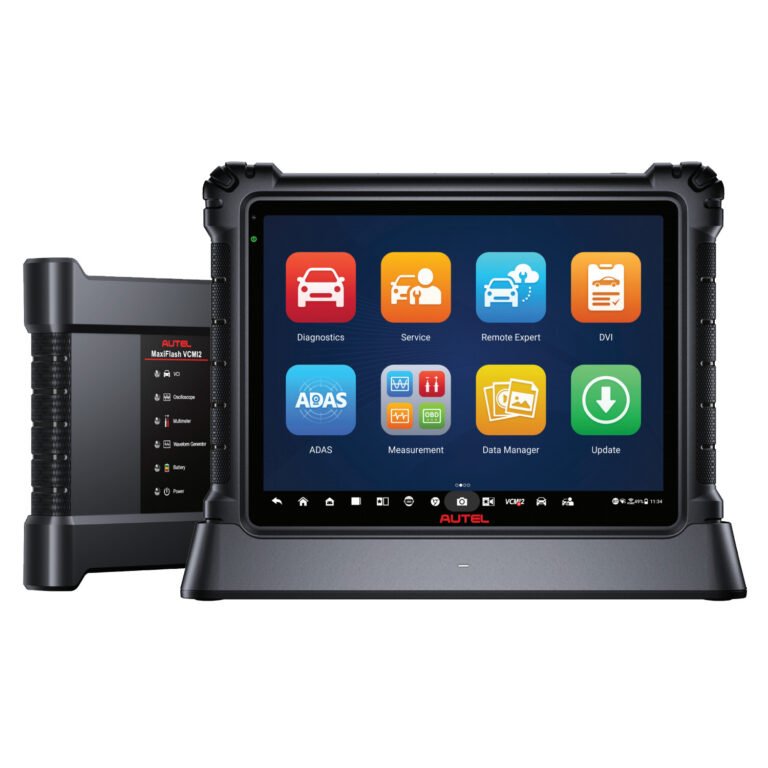
Autel MaxiCOM MK808TS Troubleshooting: Quick Fixes
Autel MaxiCOM MK808TS Troubleshooting usually comes down to power, updates, vehicle communication, or TPMS setup issues.
If you work with diagnostic tools often, you know the Autel MaxiCOM MK808TS can feel like a trusted co-pilot when it works well. But when it freezes, won’t connect, or fails to read a vehicle, it can stop your whole job cold. This guide walks through Autel MaxiCOM MK808TS Troubleshooting in a clear, practical way, so you can find the cause fast and get back to scanning with confidence.
Common Autel MaxiCOM MK808TS Problems
Most Autel MaxiCOM MK808TS Troubleshooting starts with a small group of repeat issues. In my experience, the tool rarely fails for a strange reason. More often, the problem comes from a weak battery, outdated software, a bad cable connection, or a vehicle-side communication issue.
Here are the problems users run into most often:
- The tablet will not power on
- The screen freezes or responds slowly
- The scanner cannot communicate with the vehicle
- Wi-Fi will not connect
- The device says the software is expired or needs an update
- TPMS functions do not complete
- The Autel diagnostic app crashes or loads very slowly
A lot of these problems look serious at first. But many are simple to fix if you work step by step and avoid guessing.

Check Power First
Before you chase software or vehicle faults, check the power source. A surprising number of Autel MaxiCOM MK808TS Troubleshooting cases start with low battery voltage or a bad charging setup. If the tool is not getting stable power, everything else becomes harder to diagnose.
Try these steps:
- Plug the unit into a known working charger
- Let it charge for at least 30 minutes before testing again
- Inspect the charging cable for bent pins, cuts, or loose ends
- Check the wall outlet or USB power source
- If the tablet only works while plugged in, the internal battery may be weak
I once spent too long looking at software when the real issue was a worn charging cable. That taught me a simple rule: always test power before anything else. It saves time and keeps you from making the problem bigger than it is.
Fix Wi-Fi and Update Issues
Wi-Fi problems are common in Autel MaxiCOM MK808TS Troubleshooting because the tool depends on network access for updates, account sync, and some online features. If Wi-Fi is unstable, the device may fail during downloads or stop mid-update.
Use this checklist:
- Move closer to the router
- Restart the tablet and the router
- Forget the network and reconnect
- Confirm the Wi-Fi password is correct
- Test another network, such as a mobile hotspot
- Make sure the date and time are set correctly
If updates fail, do not force random taps or shut the tablet off too quickly. That can interrupt the software process. A stable internet connection is like a steady road for a delivery truck. If the road shakes, the package does not arrive cleanly.
Solve Vehicle Communication Problems
One of the most common reasons for Autel MaxiCOM MK808TS Troubleshooting is a failure to communicate with the vehicle. The tablet may power up fine, but the scan tool cannot establish a link with the car’s control modules. This usually points to the OBD2 connection, the adapter, the vehicle’s fuse, or the ignition state.
Check these items:
- Make sure the diagnostic connector is fully seated
- Confirm the ignition is on if the vehicle requires it
- Inspect the OBD2 port for bent or dirty pins
- Test the same vehicle with another tool if available
- Try another vehicle to see whether the issue is tool-related or car-related
- Check for blown fuses tied to the diagnostic port or cigarette lighter circuit
In my own work, I have seen vehicle communication fail because of something as simple as a loose adapter. The tool looked fine, but the connector was not locked in. This is why a careful physical check matters before you assume the tablet has a bigger fault.
Troubleshoot TPMS Function Errors
Because the MK808TS is built for tire pressure work, TPMS problems are a major part of Autel MaxiCOM MK808TS Troubleshooting. These problems often happen when the sensor is not responding, the vehicle is not in the correct learning mode, or the wrong procedure is selected.
Common TPMS issues include:
- No sensor data
- Wrong sensor ID
- Incomplete relearn process
- Sensor wake-up failure
- Incorrect make, model, or year selection
Helpful steps:
- Confirm the vehicle profile is correct
- Make sure the TPMS sensor is compatible with the vehicle
- Check battery life on the sensor if it is an older unit
- Follow the exact relearn method for that vehicle
- Re scan after rotating or replacing tires
TPMS work is a lot like following a recipe. One missed step can spoil the whole result. The device may be fine, but if the vehicle needs a special relearn method, the tool cannot guess that for you.
Update the Software the Right Way
Outdated software can cause slow performance, missing functions, or failed vehicle coverage. In many Autel MaxiCOM MK808TS Troubleshooting cases, the real fix is simply updating the system and reloading the latest vehicle data. That said, updates should be done carefully.
Best practices:
- Connect to stable Wi-Fi
- Charge the tablet before starting
- Clear enough storage space for the update
- Close other apps while updating
- Let the process finish without interruption
- Restart the unit after the update completes
If updates keep failing, check whether the Autel account is active and properly linked. Also confirm that the device is registered correctly. A tool with old data can behave like a map from years ago. It may still look useful, but it will not guide you well in the real world.
Deal With Freezing, Lag, and App Crashes
Slow performance can make the MK808TS feel unreliable, even when the hardware is still fine. For this part of Autel MaxiCOM MK808TS Troubleshooting, the issue may be storage overload, too many background tasks, or a software glitch after an update.
Try these fixes:
- Restart the tablet
- Close unused apps
- Clear cached data where possible
- Remove unused files and old reports
- Make sure the system software is current
- If needed, perform a factory reset after backing up important data
I have found that these tools perform better when they are treated like a workbench, not a storage closet. Too many saved reports and unused files can slow things down more than most people expect. A clean device often runs smoother and lasts longer.
Reset and Restore When Needed
Sometimes Autel MaxiCOM MK808TS Troubleshooting needs a deeper reset. This should not be your first move, but it can help when the tablet has repeated errors that do not respond to normal fixes. Think of it as a last-resort refresh, not a magic button.
Before resetting:
- Back up reports and key files
- Confirm your account login details
- Make sure you know how to reconnect the device afterward
- Save important vehicle records if you need them later
After the reset:
- Reconnect Wi-Fi
- Log back into your Autel account
- Update the software
- Test basic vehicle communication before starting a live job
A reset can clear out hidden glitches, but it also wipes convenience. That is why I only recommend it after the easy checks fail.
Prevent Future Problems
Good Autel MaxiCOM MK808TS Troubleshooting is not just about fixing problems. It is also about preventing them. A little maintenance can keep the device working better and reduce downtime during busy days.
Use these habits:
- Charge the tablet regularly
- Update the software on a schedule
- Keep the OBD2 connector clean
- Store the tool in a dry, protected case
- Avoid dropping the tablet or yanking the cable
- Check sensor compatibility before TPMS work
- Review the correct vehicle procedure before starting
In practice, this is the difference between a tool that feels dependable and one that seems random. Most issues do not appear out of nowhere. They build slowly from skipped updates, rough handling, or rushed setup.
When to Contact Support
Not every problem should be solved at the bench. If basic Autel MaxiCOM MK808TS Troubleshooting steps do not work, the issue may involve a hardware fault, software corruption, or account problem that needs service help. That is especially true if the screen stays black, the battery will not hold charge, or the unit fails across multiple vehicles.
Reach out for support when:
- The device will not boot after charging
- The diagnostic port works with other tools but not this one
- Updates fail repeatedly on a stable internet connection
- The touch screen stops responding
- The tablet shows error codes you cannot clear
The honest truth is that some issues are beyond simple field repair. A good technician knows when to keep digging and when to hand the problem to the right support channel. That saves time and protects the tool.
Frequently Asked Questions of Autel MaxiCOM MK808TS Troubleshooting
Why does my Autel MaxiCOM MK808TS not turn on?
A dead battery or faulty charger is the most common reason. Try a different power source and let it charge for at least 30 minutes before testing again.
Why won’t the MK808TS connect to my vehicle?
This usually means there is a communication issue at the OBD2 port, adapter, or ignition state. Check the cable, the vehicle fuse, and whether the ignition is turned on.
How do I fix TPMS sensor reading problems?
First confirm the vehicle profile and sensor type are correct. Then follow the exact relearn procedure for that make and model, since TPMS steps can vary a lot.
Why is my MK808TS running so slowly?
Slow speed often comes from low storage, outdated software, or too many open apps. Restart the tablet, clear unused files, and install available updates.
Do I need Wi-Fi for Autel MaxiCOM MK808TS Troubleshooting?
Wi-Fi is not needed for every scan, but it is important for updates, account access, and some online functions. A weak connection can cause update failures and app issues.
What should I do if the software update fails again and again?
Check your internet connection, free up storage, and make sure the device is fully charged. If it still fails, the problem may be tied to the account or a deeper software issue.
Conclusion
Autel MaxiCOM MK808TS Troubleshooting becomes much easier when you work in the right order. Start with power, then check Wi-Fi, vehicle communication, TPMS setup, software updates, and only then move to resets or support. That simple process can save a lot of frustration and keep your scan tool performing the way it should.
The big lesson is this: most problems are fixable when you slow down and check the basics. If you keep your device updated, handle the connectors carefully, and follow the right vehicle procedure, you will avoid a lot of wasted time. Try these steps the next time your MK808TS acts up, and if you have your own fix that worked well, share it with other readers and keep the knowledge moving.