How To Use A Wireless Car Charger: Easy Guide
A wireless car charger lets you power your phone by placing it on the charging pad correctly.
If you have ever plugged in a cable while driving and wished for something simpler, a wireless car charger is one of those small upgrades that makes a big difference. I have used several car phone chargers over the years, and the best results always came from knowing how to position the phone, match the charger to the device, and avoid the common setup mistakes that slow charging down. This guide walks you through how to use a wireless car charger the right way, so you can charge safely, keep your phone steady, and get the most out of every drive.

What a wireless car charger does
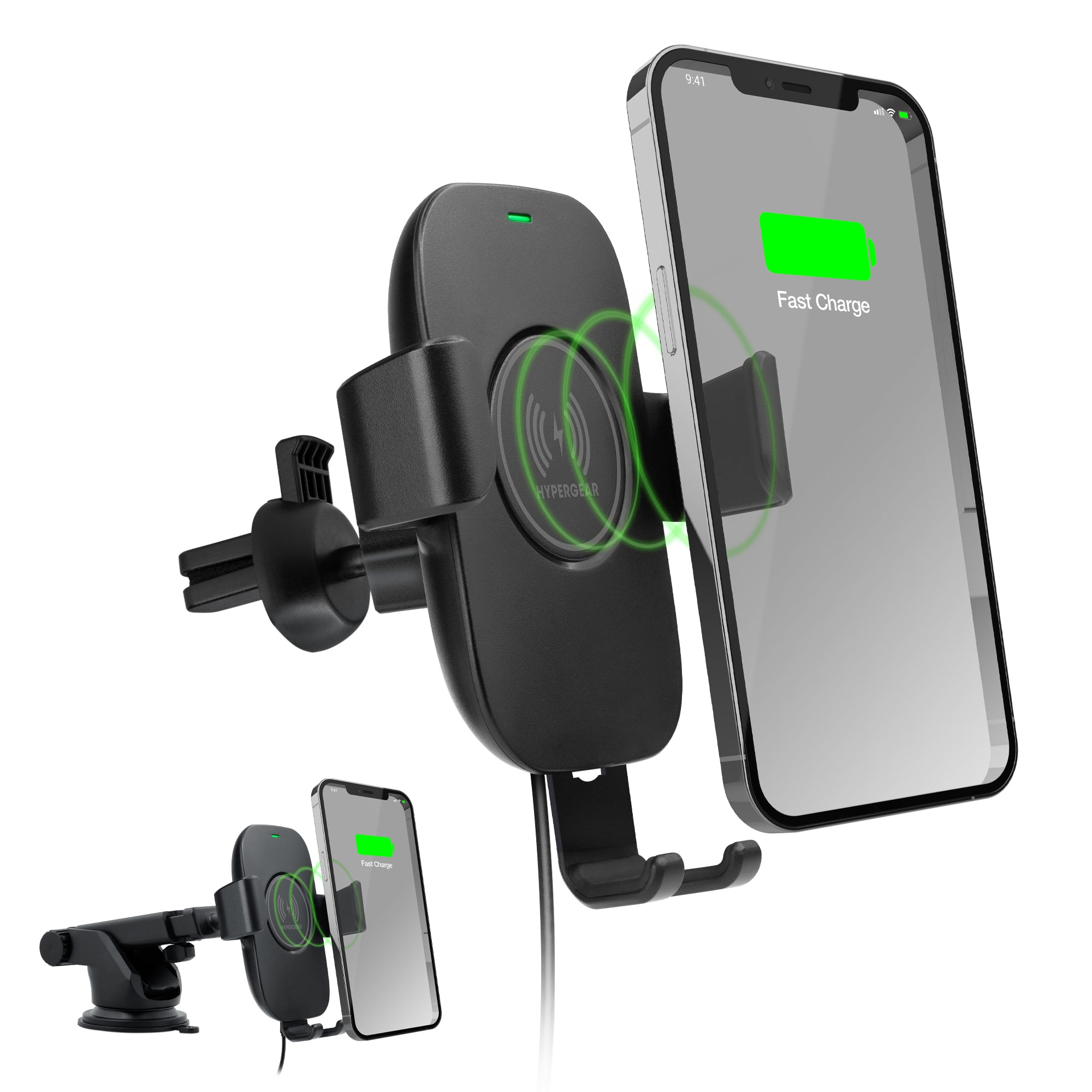
A wireless car charger uses inductive charging to send power from the charging pad to your phone without a cable. Most models use the Qi standard, which is the most common wireless charging technology for smartphones. You place your phone on the charger, and the coils inside the charger and phone work together to transfer energy.
In simple terms, it is like placing two magnets in the right spot so they can work together. When the phone is centered properly, charging starts. When it is off balance, charging may be slow, weak, or stop completely.
Wireless car chargers are popular because they reduce cable clutter and make it easier to keep your phone charged during navigation, music streaming, or hands-free calls. Many models also double as mounts, so your phone stays visible and secure while driving.

How to use a wireless car charger step by step
Using a wireless car charger is easy once you know the basic steps. The setup may look different depending on the model, but the process is usually the same.
-
Install the charger in the right spot
Attach it to your dashboard, windshield, air vent, or cup holder, depending on the design. Make sure it feels stable and does not block your view of the road. -
Connect the power cable
Plug the charger into a USB port or a 12V car adapter that provides enough power. Some chargers need Quick Charge or USB-C PD for better performance. -
Place your phone on the charging pad
Center your phone on the pad or mount. If the charger has arms or clamps, open them first and let the phone sit where the charging coils line up. -
Wait for the charging indicator
Most wireless car chargers have a light that shows charging has started. If your phone supports wireless charging, you should also see the battery icon change. -
Check alignment if charging is slow
If the phone does not charge well, move it slightly up or down. Even a small shift can improve coil alignment.
From my own experience, the biggest mistake people make is assuming any placement will work. Wireless charging is a little picky. Think of it like a key in a lock: close is not enough, but the right position works instantly.
Before you start: what you need
A wireless car charger is only part of the setup. To make it work well, you need the right phone, the right power source, and a good mounting position.
Here is a simple checklist:
- A phone that supports wireless charging, usually Qi compatible
- A wireless car charger that matches your phone size and power needs
- A strong mounting location in your vehicle
- A car power adapter or USB port with enough output
- A case that does not block wireless charging too much
Some thick cases, metal plates, pop sockets, or credit cards can interfere with charging. I learned that the hard way when a phone case looked harmless but made charging stop every few seconds. If your charger seems weak, the case is one of the first things to check.

Best ways to position your phone
Positioning matters more than most people expect. Wireless charging depends on the charging coils inside the phone and charger lining up well.
A few simple tips help a lot:
- Center the phone on the charging area
- Avoid letting the phone tilt too far
- Keep the case thin and nonmetallic
- Use the charger’s built-in guides or arms
- Check if the screen is facing you or the charger base, depending on the model
If you use a magnetic wireless car charger, the magnets usually help with alignment. That makes the process easier, especially on rough roads. Still, alignment can shift if you hit a bump or turn sharply, so a secure mount matters just as much as the charger itself.
How to choose the right wireless car charger
Not all wireless car chargers are equal. Some are made for speed, some for stability, and some for convenience. The best one depends on how you drive and what phone you use.
Look for these features:
- Qi certification for broader compatibility
- Fast charging support if your phone allows it
- Strong vent clip, suction cup, or dashboard mount
- Automatic clamping arms for easier one-hand use
- Adjustable viewing angles
- Heat protection and foreign object detection
- USB-C power input for better efficiency
If you drive often, a charger with stronger grip and better cooling is usually worth it. I have found that a slightly more expensive charger often saves more frustration in the long run than a cheap one that slips, overheats, or disconnects on the first bumpy road.

Tips for faster and safer charging
Wireless car charging is convenient, but speed can vary. The charger, phone, case, and car power source all affect performance.
To improve charging:
- Use a high-output car adapter
- Keep your phone case thin
- Remove metal accessories from the back of the phone
- Avoid using the phone heavily while it charges
- Keep the charging area cool
- Make sure the charger is not blocked by sunlight or vents that blow hot air
Safety matters too. Wireless chargers can warm up during use, and that is normal to a point. But if your phone gets very hot, stop using it and check the setup. Heat can reduce charging speed and may affect battery health over time.
Battery experts and phone makers generally agree that moderate heat is one of the biggest long-term stress factors for lithium-ion batteries. That is why a well-ventilated, properly aligned setup is better than forcing fast charging in poor conditions.

Common mistakes to avoid
Even a good wireless car charger can feel disappointing if it is used the wrong way. These are the mistakes I see most often.
- Using a low-power car adapter that cannot support the charger
- Placing the phone off-center on the charging pad
- Leaving a thick or metal case on the phone
- Mounting the charger where it shakes too much
- Assuming all phones charge at the same speed
- Ignoring heat buildup during long drives
One of the most common problems is expecting instant full-speed charging. Wireless charging is often a little slower than wired charging. That does not mean it is bad. It just means the setup has to be realistic and used the right way.

Benefits of using a wireless car charger
A wireless car charger is popular for good reason. It solves several everyday driving problems at once.
Here are the main benefits:
- No cable clutter in the car
- Easier one-handed phone placement
- Better convenience for navigation and calls
- Cleaner dashboard and console space
- Reduced wear on charging ports
- Safer access to the phone when mounted properly
For commuters and rideshare drivers, the convenience can be a real time-saver. You get a phone mount and charger in one device, which keeps your car simpler and more organized. That small bit of convenience can make every trip feel smoother.
Limitations you should know about
Wireless car chargers are useful, but they are not perfect. Knowing the limits helps you avoid disappointment.
Some limits include:
- Slower charging than many wired chargers
- Possible heating during use
- Compatibility issues with some phone cases
- Alignment problems on rough roads
- Lower efficiency than cable charging
These limits are normal and widely recognized in wireless power systems. The key is to choose a charger that fits your phone and driving style. If you need the fastest possible charge on a short drive, a cable may still be the better backup option.
Real-world use: what works best in daily driving
In daily use, the best wireless car charger is the one you barely have to think about. It should hold your phone firmly, start charging fast, and stay stable through turns and stops.
A setup that works well in real life usually has these traits:
- A secure mount that does not wobble
- Automatic alignment or a strong magnetic hold
- Enough power for your phone model
- A clear view for maps and calls
- Easy removal when you park
I have found that simple setups often work better than fancy ones with too many moving parts. If the charger takes too long to place the phone or keeps slipping, it becomes annoying fast. The best charger should feel natural, almost invisible, like it belongs in the car.
Frequently Asked Questions
FAQ: How to use a wireless car charger
How do I know if my phone supports a wireless car charger?
Check your phone specs for Qi wireless charging support. Most newer iPhones and many Android phones include it, but some budget models do not.
Why is my wireless car charger not charging my phone?
The phone may be off-center, the case may be too thick, or the power adapter may not provide enough output. Try repositioning the phone and testing without the case.
Can I use a wireless car charger with a phone case?
Yes, most thin plastic or silicone cases work fine. Thick, metal, or magnetic accessories can reduce charging performance or stop it completely.
Is wireless car charging safe while driving?
Yes, when the charger is mounted securely and does not block your view. The main safety concern is driver distraction, so use a mount that keeps the phone easy to glance at, not handle.
Does wireless car charging damage the battery?
Not by itself, but extra heat can affect battery health over time. Good alignment, proper ventilation, and a quality charger help keep temperatures under control.
How fast does a wireless car charger work?
Speed depends on your phone, charger, and car power source. Many wireless car chargers charge more slowly than wired fast chargers, but they are usually good enough for daily driving and navigation.
Conclusion
Using a wireless car charger is all about good placement, the right power source, and a setup that fits your phone. Once you understand how alignment, heat, and case thickness affect performance, the whole process becomes simple and reliable. A well-chosen charger can make every drive cleaner, easier, and more convenient.
If you are ready to get more out of your commute, start by checking your phone compatibility and choosing a charger that matches your daily needs. Then test the positioning, watch for heat, and fine-tune the setup until it feels effortless. If this guide helped, explore more car tech tips, subscribe for updates, or leave a comment with the charger you use.