How To Use A Bluetooth FM Transmitter: Easy Guide
A Bluetooth FM transmitter pairs your phone to your car radio by broadcasting audio on a clear FM frequency.
If your car does not have Bluetooth, this little device can feel like a lifesaver. I’ve used Bluetooth FM transmitters in older cars, rental cars, and even in a backup vehicle, and the setup is usually simple once you know the right steps. In this guide, I’ll walk you through how to use a Bluetooth FM transmitter the easy way, plus the small details that make the sound cleaner, the connection steadier, and the whole experience much less frustrating.
What a Bluetooth FM transmitter does
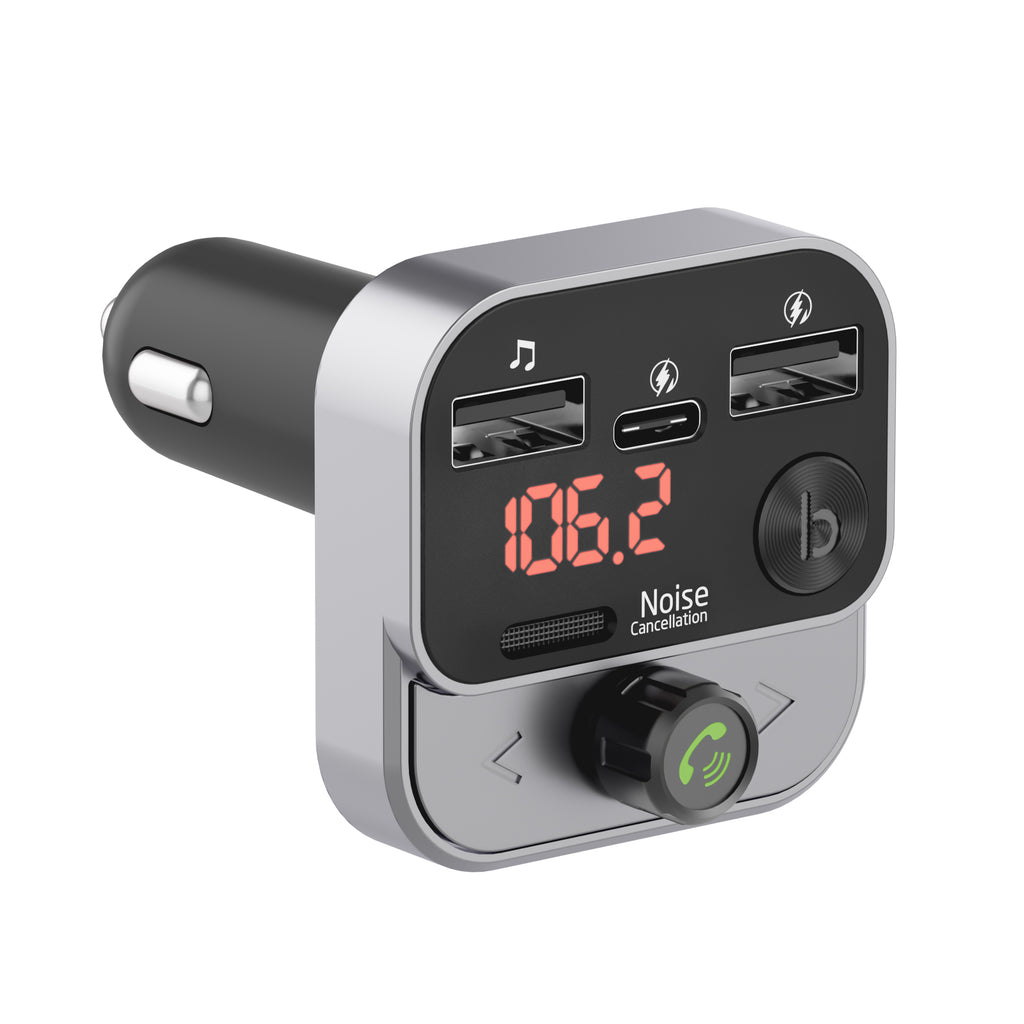
A Bluetooth FM transmitter lets you play audio from your phone through your car speakers. It works by receiving sound from your phone over Bluetooth, then sending that sound to your car radio over an empty FM station.
Think of it like a tiny middleman. Your phone talks to the transmitter, and the transmitter “talks” to your radio on a frequency you choose. This is why a Bluetooth FM transmitter is so useful in older vehicles without built-in Bluetooth.
In most cars, the device plugs into the 12V power outlet, also called the cigarette lighter socket. Many models also include USB charging ports, a display, and call controls. Some even support hands-free calls, USB music playback, and voice assistants.

How to use a Bluetooth FM transmitter step by step
Using a Bluetooth FM transmitter is usually very easy, but the best results come from doing it in the right order. I learned this the hard way after skipping a few steps and getting static, weak audio, and a connection that kept dropping.
1. Plug the transmitter into the power outlet
Insert the Bluetooth FM transmitter into your car’s 12V socket. Most devices power on right away once they get electricity from the car.
If your transmitter has a screen, it should light up. Some models also announce that they are ready to pair. If nothing happens, check the socket, the fuse, or whether the car ignition needs to be on.
2. Turn on Bluetooth on your phone
Open Bluetooth settings on your phone and make sure it is discoverable. Then look for the transmitter’s name in the device list.
Tap to pair. In many cases, the transmitter will connect automatically after the first setup. If it asks for a PIN, common codes are 0000 or 1234, though many newer models do not require one.
3. Pick an empty FM frequency
This is one of the most important steps. Set your car radio and the transmitter to the same unused FM station.
Choose a frequency with little or no local radio signal. Common options are around 88.1, 88.3, 88.5, 107.7, or 107.9, but the best one depends on where you live. If you hear a station, even a faint one, move to another frequency.
4. Match the transmitter and radio frequency
Use the transmitter’s buttons or dial to set the FM frequency. Then tune your car radio to that exact same number.
Once both match, your phone audio should play through the car speakers. Start with a low volume on your phone and radio, then raise both slowly until the sound is clear and balanced.
5. Play audio from your phone
Open your music app, podcast app, audiobook app, or navigation app. The audio should now come through the transmitter and out of the car speakers.
If you use maps, the directions will usually interrupt music just like normal car audio. This is one of the biggest benefits of using a Bluetooth FM transmitter for daily driving.
6. Adjust volume and clean up the sound
Fine-tune the volume on three places:
• Your phone
• The transmitter, if it has volume control
• Your car stereo
I usually keep my phone volume near 70 to 90 percent and use the car stereo for final adjustment. That often gives a cleaner signal and helps reduce hiss or distortion.
7. Use calling features if your model supports them
Many Bluetooth FM transmitters support hands-free calling. When a call comes in, music usually pauses and the transmitter switches to speakerphone mode.
Speak clearly and stay close to the built-in microphone if the model has one. In my experience, call quality is decent for quick calls, but it is rarely as strong as a factory-installed car Bluetooth system.

How to find the best FM frequency
A Bluetooth FM transmitter works best when the chosen station is quiet. That means no music, no talk radio, and no strong static.
Here’s a simple way to find a good station:
• Scan your car radio slowly across the FM band
• Stop on blank spots between stations
• Listen for hiss, voice, or music
• Pick the quietest frequency possible
• Test it while driving to see if it stays clear
In busy cities, finding a truly empty station can be harder. If that happens, try stations near the edge of the FM range or move a little farther from dense radio areas. A weak station may sound fine in one neighborhood and terrible in another, so a little testing goes a long way.
Tips for better sound quality
A Bluetooth FM transmitter can sound surprisingly good when set up well. But it is still using radio waves, so your environment matters.
Here are a few practical tips I’ve found useful:
• Use the shortest possible Bluetooth path by keeping your phone close
• Avoid stations that overlap with local broadcasts
• Keep the transmitter away from strong electrical noise if possible
• Charge phones from the transmitter only if the charger is stable
• Lower bass-heavy equalizer settings if audio sounds muddy
If your music sounds fuzzy, the problem is usually not Bluetooth itself. It is often the FM station, the volume balance, or interference from nearby signals. Think of it like trying to whisper across a crowded room. The clearer the path, the better the message.
Common mistakes to avoid
A lot of people think the transmitter is broken when the real issue is setup. I’ve made most of these mistakes myself at least once.
Watch out for these common problems:
• Choosing a station that is not truly empty
• Setting the radio and transmitter to slightly different frequencies
• Turning phone volume too low
• Using a weak car power outlet
• Leaving the transmitter too close to other electronics
• Expecting perfect sound in an area with heavy radio traffic
Another mistake is not checking whether your phone is still connected. Sometimes a phone reconnects to another Bluetooth device, especially if you have wireless earbuds, a smartwatch, or another car nearby. If the sound suddenly stops, Bluetooth settings are the first place I check.
When a Bluetooth FM transmitter makes sense
A Bluetooth FM transmitter is a smart choice if your car lacks modern infotainment features. It is also a good option if you want a low-cost way to stream music and make hands-free calls.
It makes sense for:
• Older cars without Bluetooth
• Rideshare drivers using a backup vehicle
• Rental cars where you do not want to install anything
• Drivers who need a simple, portable solution
• People who want phone audio without replacing the stereo
It may not be the best choice if you want premium audio quality. In that case, an AUX input, an aftermarket head unit, or a direct Bluetooth adapter may sound better. Still, for convenience and price, the Bluetooth FM transmitter is hard to beat.
Safety and legal notes
Using a Bluetooth FM transmitter is usually legal, but driving laws vary by location. Hands-free calling and audio streaming are generally safer than holding your phone while driving.
A few simple safety habits help a lot:
• Set the station before you start driving
• Pair your phone while parked
• Keep your eyes on the road, not on the display
• Use voice commands when possible
• Do not adjust settings in traffic
It is also worth checking your local rules on mobile device use while driving. Even if your transmitter supports calls, safe driving should always come first.
Features worth looking for
Not all Bluetooth FM transmitters are equal. If you are buying one, a few features can make daily use much better.
Look for these helpful extras:
• Dual USB charging ports
• Fast charging support
• Clear screen with readable frequency display
• Hands-free calling
• Noise reduction or echo cancellation
• USB drive music playback
• Voice assistant support
From my experience, the most useful feature after basic Bluetooth is stable charging. If the charger is flaky, the whole device becomes annoying fast. A transmitter should feel like a helper, not another problem in the car.
Frequently Asked Questions of How to use a Bluetooth FM transmitter
How do I connect my phone to a Bluetooth FM transmitter?
Turn on Bluetooth on your phone and pair it with the transmitter from your device list. Once connected, tune both the transmitter and your car radio to the same empty FM frequency.
Why is my Bluetooth FM transmitter staticky?
Static usually means the FM station is crowded or the frequency does not match exactly. Try another empty station and make sure both the transmitter and radio are set to the same number.
Can I use a Bluetooth FM transmitter for calls?
Yes, most models support hands-free calling through the car speakers. Sound quality is usually fine for short calls, though it may not match a built-in car Bluetooth system.
Does a Bluetooth FM transmitter drain my car battery?
It uses very little power while the car is on, so it usually is not a problem. If you leave it plugged in while the car is off for a long time, some models may still draw a small amount of power.
What FM frequency should I use?
Use the clearest empty station in your area. The best frequency depends on where you live, so test a few open spots on the FM band and pick the one with the least interference.
Why does my music cut in and out?
This can happen if your phone moves out of range, if there is radio interference, or if the chosen FM station is weak. Re-pairing the device or switching to a clearer frequency often fixes the issue.
Conclusion
A Bluetooth FM transmitter is one of the easiest ways to bring modern audio features to an older car. Once you understand how to pair it, choose a clean FM station, and balance the volume, it becomes a simple tool for music, maps, and hands-free calls.
The key is to set it up carefully the first time. A few small choices, like picking a quiet frequency and keeping your phone volume at a good level, can make a big difference in sound quality.
If you have been putting off using one, now is a great time to try. Set it up, test a few stations, and see how much easier your drives feel.