How To Use A Tpms Tool: Easy Step-By-Step Guide
A TPMS tool helps you read, diagnose, and relearn tire pressure sensor data fast and accurately.
If you have ever dealt with a tire pressure warning light that would not go away, you already know how frustrating TPMS problems can be. I have worked through plenty of sensor resets, relearns, and scan sessions, and the biggest lesson is simple: when you know how to use a TPMS tool the right way, the job gets much easier and far less stressful.

What a TPMS tool does
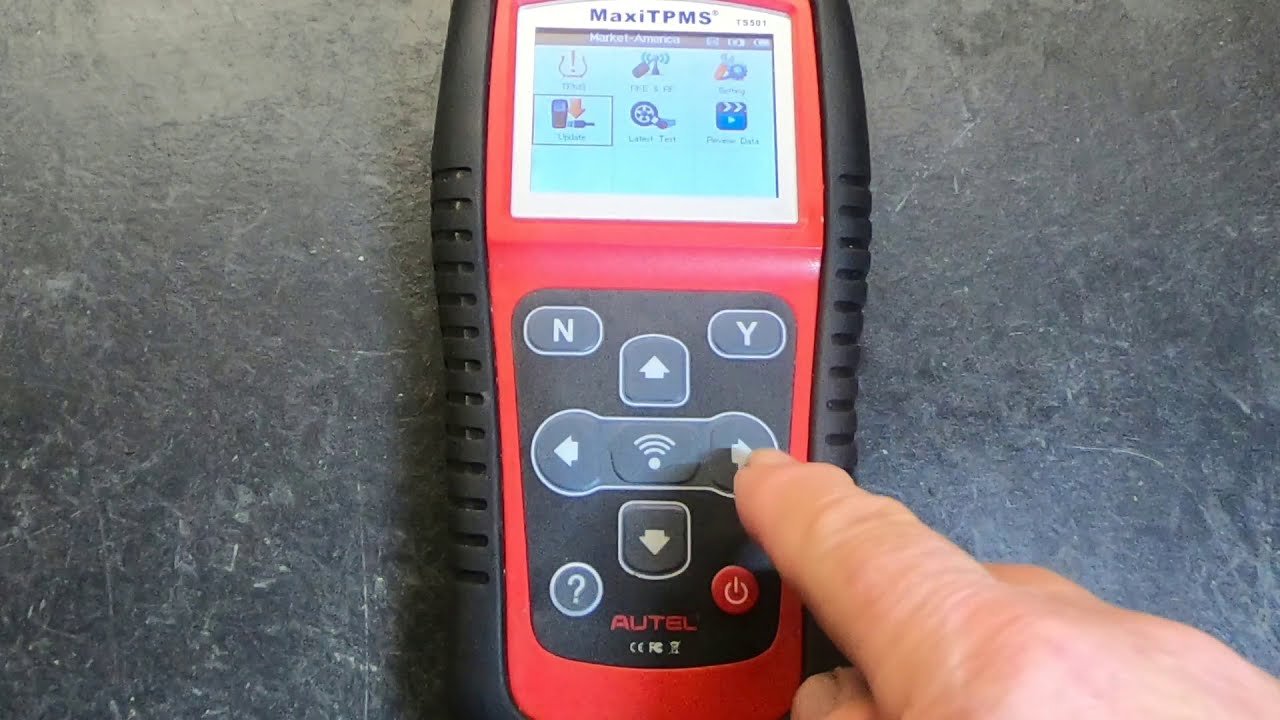
A TPMS tool is a handheld or tablet-style device used to work with tire pressure monitoring system sensors. It can activate sensors, read sensor IDs, check battery status, view pressure and temperature, and help with relearn procedures after tire service.
Most modern vehicles use either direct TPMS or indirect TPMS. A TPMS tool is mainly used with direct systems, where each wheel has a sensor inside or near the valve stem. In my experience, this tool is one of the most useful pieces of equipment in a tire shop because it removes guesswork.
Here is what a TPMS tool can usually do:
• Wake up a sensor and read live data
• Show sensor ID, pressure, temperature, and battery condition
• Diagnose a dead or weak sensor
• Trigger a vehicle relearn procedure
• Clone or program new sensors on supported systems
• Help confirm whether the issue is the sensor, tire, or vehicle module

When you need a TPMS tool
You need a TPMS tool any time a tire pressure light stays on, a wheel sensor is replaced, or a new set of tires or wheels is installed. It is also useful if a sensor is not being detected after rotation, or if you want to confirm which sensor is mounted on which wheel.
I have seen many people assume the sensor is bad when the real problem was a skipped relearn step. A TPMS tool saves time because it tells you what the vehicle sees instead of making you guess.
Common situations include:
• Replacing one or more TPMS sensors
• Installing winter tires or aftermarket wheels
• Rotating tires and needing a relearn
• Diagnosing a flashing or solid TPMS light
• Checking for low battery sensors before they fail
• Verifying that cloned sensors match the original IDs
Types of TPMS tools
Not all TPMS tools work the same way. Some are basic and only trigger sensors, while others are advanced and can program sensor IDs or perform full diagnostics.
The main types are:
• Basic activation tools, which wake up the sensor and display data
• Diagnostic TPMS tools, which read sensor values and vehicle faults
• Programming tools, which write new sensor IDs to programmable sensors
• Relearn tools, which guide the vehicle through sensor registration
• All-in-one scan tools, which include TPMS plus ABS, engine, and service functions
If you only do a few tire jobs a year, a simple activation tool may be enough. If you work on multiple vehicles, especially different makes and models, a full-featured TPMS tool is often worth it.
How to use a TPMS tool step by step
Using a TPMS tool is not hard, but it does help to follow a clean process. The tool is only as good as the steps you take before and after it.
1. Check the vehicle information
Start by confirming the year, make, and model. TPMS systems vary a lot, and the relearn method can change from one vehicle to another. I always check the service information first because skipping this step is one of the easiest ways to waste time.
Look for:
• Required sensor type
• Relearn procedure
• Correct tire pressure setting
• Whether the vehicle needs stationary, automatic, or OBD relearn
2. Turn on the TPMS tool and select the vehicle
Power up the tool and choose the correct vehicle profile. Most tools ask for the year, brand, model, and sometimes trim level. This matters because the wrong vehicle setup can give you bad readings or the wrong relearn instructions.
If the tool offers multiple sensor protocols, make sure the selected one matches the sensor you are testing. That is a small step, but it matters a lot.
3. Test each sensor at the wheel
Hold the TPMS tool near the valve stem area and trigger the sensor. On many vehicles, the sensor is inside the tire near the valve stem, so that is the best place to aim.
Watch for these readings:
• Sensor ID
• Tire pressure
• Temperature
• Battery status
• Frequency or sensor type
I like to test all four wheels in order and write down the readings. That makes it easier to spot a weak sensor or a wheel that was swapped in the wrong position.
4. Compare the readings
Look at the sensor data and compare it with what the vehicle should have. If one tire reads much lower or does not respond at all, that wheel may have a bad sensor, a dead battery, or incorrect placement.
A sensor that shows no data at all can mean:
• Dead battery
• Sensor damage
• Wrong sensor frequency
• Sensor not waking up
• Tool not set to the right mode
This is where the TPMS tool really proves its value. It separates a real sensor issue from a simple setup mistake.
5. Replace or program the sensor if needed
If the sensor has failed, install a new one that matches the vehicle. Some sensors are preprogrammed. Others need to be cloned or programmed before installation.
Before I install a replacement, I always verify:
• Correct frequency
• Correct protocol
• Valve stem style
• Compatibility with the vehicle
• Whether cloning is needed
A mismatch here can cause repeated warning lights and extra labor.
6. Perform the relearn procedure
Once the sensor work is done, complete the relearn. Some vehicles relearn automatically after driving. Others need a manual reset or an OBD-based procedure.
Common relearn methods include:
• Automatic relearn by driving
• Stationary relearn using the vehicle controls
• OBD relearn with a TPMS tool connected to the port
This step is where many DIY repairs go wrong. The sensor may be fine, but the vehicle still needs to learn the new IDs before the warning light turns off.
7. Confirm the repair
After relearn, test the sensors again with the TPMS tool. Make sure every wheel reports the correct pressure and the warning light is off.
I always do one final full scan before handing the vehicle back. That last check catches small issues before they become big comebacks.
How to use a TPMS tool for relearn procedures
A relearn is the process of syncing the sensor IDs with the vehicle’s TPMS module. This is one of the most important jobs a TPMS tool can help with.
The exact process depends on the car, but the general idea is the same. You either trigger each sensor in a certain order or connect the tool through the OBD port so the vehicle stores the sensor data.
Typical relearn steps include:
• Confirm the correct tire pressure in all four tires
• Put the vehicle into relearn mode
• Trigger the sensors in the required order
• Use the horn, light flash, or screen message as a signal
• Drive the vehicle if an automatic relearn is needed
One mistake I see often is people trying to relearn before fixing tire pressure. That can confuse the system and prolong the warning light. Set the pressures first, then do the relearn.
How to use a TPMS tool to diagnose problems
A TPMS tool is not only for resets. It is also a diagnostic aid. If the light stays on after service, the tool can show where the real problem is hiding.
Use it to check for:
• Sensor battery failure
• Sensor communication issues
• Wrong sensor ID
• Low tire pressure
• Module communication faults
• Interference or signal loss
If one wheel reports data and another does not, the problem may be that sensor or the installation itself. If all wheels report correctly but the light stays on, the issue may be in the vehicle module or relearn process.
Best practices for using a TPMS tool
A good habit saves time and avoids repeat work. After using a TPMS tool for years, I have learned that the small details matter most.
Follow these best practices:
• Always check the vehicle-specific relearn procedure
• Use the correct sensor frequency and type
• Inspect the tire and valve stem for damage
• Set tire pressures before relearning
• Keep the tool updated with current software
• Test all four sensors after any service
• Replace aging sensors before they fail in the field
Another tip: keep notes. Writing down the sensor IDs and positions helps a lot if the vehicle comes back later with the same complaint.
Common mistakes to avoid
It is easy to make a mistake with TPMS if you rush. I have done it myself early on, and most of those errors came from skipping one simple check.
Avoid these mistakes:
• Selecting the wrong vehicle profile
• Using the wrong sensor frequency
• Forgetting to check tire pressure first
• Assuming every TPMS light means a bad sensor
• Skipping the final verification scan
• Ignoring a weak sensor battery until it fails completely
A TPMS tool is a bit like a flashlight in a dark garage. It only helps if you point it at the right place.
Benefits of using a TPMS tool
There are real advantages to learning how to use a TPMS tool well. It saves time, reduces comebacks, and gives you more confidence in the repair.
Main benefits include:
• Faster diagnosis
• Better accuracy
• Fewer unnecessary part replacements
• Easier tire rotations and wheel changes
• Cleaner, more professional service
• Lower chance of a comeback visit
For shops, that means better efficiency. For vehicle owners, it means safer tires and less frustration when the warning light pops up.
Limits and things to watch for
A TPMS tool is powerful, but it is not magic. It cannot fix a worn sensor battery, a broken module, or a damaged antenna by itself. It also may not support every vehicle function, depending on the tool’s software level.
Keep in mind:
• Some vehicles need manufacturer-specific procedures
• Some sensors are not reusable
• Some aftermarket sensors need extra setup
• Tool accuracy depends on correct vehicle selection
• Software updates can affect compatibility
That is why I always recommend checking the service data or user manual before starting. A little prep prevents a lot of frustration.
Frequently Asked Questions of How to use a TPMS tool
How do I know if my TPMS tool is working correctly?
If the tool wakes up the sensor and displays pressure, temperature, and ID data, it is working properly. If it keeps failing on every wheel, check the vehicle selection, battery level, and sensor type.
Can a TPMS tool reset the tire pressure light?
Yes, but only if the underlying issue is fixed and the relearn is completed correctly. If a sensor is dead or the tires are not inflated properly, the warning light may stay on.
Do all cars use the same TPMS relearn process?
No, each vehicle can use a different method. Some relearn automatically, while others need a manual procedure or OBD connection with a TPMS tool.
Can I use a TPMS tool on aftermarket sensors?
Yes, as long as the tool supports the sensor’s frequency and protocol. Some aftermarket sensors also need programming or cloning before they will work on the vehicle.
How often should TPMS sensors be replaced?
Most TPMS sensor batteries last about 5 to 10 years, depending on driving conditions and sensor quality. If a sensor starts dropping signal or reading incorrectly, replacement is usually the best fix.
Conclusion
Learning how to use a TPMS tool gives you a much clearer way to handle tire pressure problems, sensor replacement, and relearn procedures. Once you understand the steps, the process becomes straightforward: identify the vehicle, read the sensors, fix the issue, and confirm the repair.
The biggest takeaway is this: do not guess when the TPMS light comes on. Use the tool, follow the procedure, and verify the result so the repair actually sticks. If you want to get better results with your own TPMS work, start by practicing on one vehicle and building a simple checklist you can use every time.