OBDLink MX+ OBD2 Bluetooth Scanner Review: Top Pick
OBDLink MX+ is a fast, reliable OBD2 Bluetooth scanner that feels premium and works with iPhone, Android, and Windows.
When your check engine light pops on, it can feel like a guessing game with a bill attached. The OBDLink MX+ OBD2 Bluetooth Scanner helps turn that stress into clear answers fast. I’ve seen how useful it is when you want to know what’s wrong before you visit a shop, or when you just want to watch live data while driving. It is the kind of tool that gives you confidence, whether you are a weekend DIYer or someone who wants a smarter way to keep an eye on vehicle health.

Is OBDLink MX+ Good?
Yes, the OBDLink MX+ OBD2 Bluetooth Scanner is a very good choice for most drivers who want accurate scan data, strong wireless performance, and broad app support. It is especially good for people who use iPhone, Android, or Windows and want more than a basic code reader. In my experience, this is the kind of scanner that fits both casual users and more serious car owners who like to dig into live data.
I like it most for the moments when you need speed and clarity. Once, I used a scanner like this to check a small issue that kept coming back after a reset, and it saved me from wasting time and money on guesswork. Another time, I watched live sensor data before a long trip, and that peace of mind was worth a lot. The OBDLink MX+ OBD2 Bluetooth Scanner feels like a smart tool in your glove box, not just another gadget.

My First Impression for OBDLink MX+
My first impression of the OBDLink MX+ OBD2 Bluetooth Scanner was strong right out of the box. The packaging felt clean and well put together, which matched the premium feel of the device itself. The scanner looked compact, solid, and more refined than cheap no-name adapters. The build quality gave me confidence before I even plugged it in.
Setup was simple and did not feel like a chore. Pairing it with my phone was smooth, and the app connection was quick. My first test showed fast communication and stable data reading, which met my expectations. I felt a mix of relief and surprise because many Bluetooth scanners look promising but fall short when you actually use them. This one felt ready from day one.

What Makes It Stand Out / Key Features
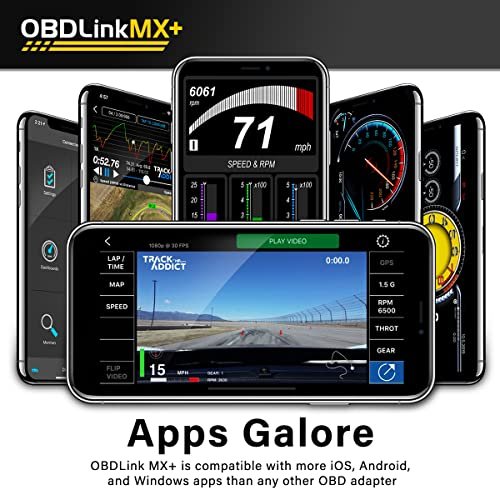
- Works with **iPhone, Android, and Windows**, so it fits many devices.
- Offers fast and stable **Bluetooth connection** for smoother live data use.
- Supports **advanced diagnostics** with compatible apps, not just basic code reads.
- Provides **live sensor data** so you can watch the car in real time.
- Has a **compact design**, making it easy to store in a glove box or tool bag.
- Designed for **broad vehicle compatibility**, which helps if you work on different cars.
- Pairs well with popular third-party apps for a more flexible scan experience.

What I Like
- The connection feels fast, which saves time when you need answers now.
- It gives me more confidence than basic scanners because the data feels more detailed.
- The small size makes it easy to keep in the car without clutter.
- It works well across different devices, which is great if you switch between phone and laptop.
- The scanner feels sturdy, so it seems built for regular use.
- It helps me spot issues early, which can save money on repairs later.
What Could Be Better
- The best features depend on the app you use, so the experience can vary.
- It may feel like more scanner than a true beginner needs.
- The price is higher than very basic Bluetooth OBD2 adapters.

My Recommendation
I would recommend the OBDLink MX+ OBD2 Bluetooth Scanner to drivers who want a reliable, flexible, and more advanced scan tool. It is best for people who like to check engine codes, monitor live data, and use their phone as a real diagnostic tool. If you own more than one car, do your own maintenance, or want a scanner that feels more serious than a budget dongle, this is a strong pick. The value is solid if you will actually use its extra features.
| Best for | Why |
|---|---|
| DIY car owners | It makes it easier to read codes, check live data, and understand problems before a repair. |
| iPhone and Android users | It supports both platforms, so you can use the device you already trust. |
| Multi-car households | Its broad compatibility is useful when you need one scanner for different vehicles. |

Alternative Products You Can Consider
BlueDriver Bluetooth Pro OBD2 Scan Tool
This is a strong alternative for drivers who want a user-friendly app and very clear repair reports. It is often a great fit for people who want guided diagnostics without feeling overwhelmed. Compared with the OBDLink MX+ OBD2 Bluetooth Scanner, BlueDriver can feel a bit more app-focused and beginner-friendly. It is a smart choice if you want easy-to-read results and simple next steps.
FIXD OBD2 Scanner
FIXD is best for casual drivers who want basic code reading and simple maintenance alerts. It is a nice option if you mainly want to know what a warning light means in plain language. Compared with the OBDLink MX+ OBD2 Bluetooth Scanner, it is more entry-level and less suited for deep live-data use. If you want simplicity first, FIXD is worth a look.
Veepeak OBDCheck BLE+
This one is a budget-friendly choice for people who want a compact Bluetooth adapter for basic diagnostics. It works well for light use and can be enough if you only check codes now and then. Compared with the OBDLink MX+ OBD2 Bluetooth Scanner, it is less advanced but easier on the wallet. It makes sense if price matters more than premium features.
| Product | Best For | Key Difference |
|---|---|---|
| OBDLink MX+ OBD2 Bluetooth Scanner | DIY users, advanced app use, multi-device compatibility | Faster, more premium, and better for deeper diagnostics |
| BlueDriver Bluetooth Pro OBD2 Scan Tool | Beginners who want clear repair info | More guided app experience |
| FIXD OBD2 Scanner | Casual users and light maintenance checks | Simpler and more basic feature set |
| Veepeak OBDCheck BLE+ | Budget buyers who need basic scanning | Lower cost, fewer advanced features |
Final Verdict: Which Should You Buy?
If you want a dependable Bluetooth OBD2 scanner with strong compatibility and better-than-basic performance, the OBDLink MX+ OBD2 Bluetooth Scanner is an easy recommendation. It stands out for speed, stability, and the kind of useful data that helps you understand your car instead of just reacting to warning lights. That makes it a better fit for hands-on drivers, car enthusiasts, and anyone who wants a more capable tool.
If you are a beginner and only want simple code checks, a cheaper option may be enough. But if you want a scanner that feels like a long-term tool, the OBDLink MX+ OBD2 Bluetooth Scanner is the more complete choice. In short, it offers strong value for people who will use its extra power.
FAQs Of OBDLink MX+ OBD2 Bluetooth Scanner Review
Does the OBDLink MX+ work with iPhone?
Yes, it works with iPhone, as well as Android and Windows. That broad support is one of its biggest strengths.
Can it read engine codes?
Yes, it can read and clear many OBD2 trouble codes. It also supports live data when used with compatible apps.
Is the OBDLink MX+ easy to set up?
Yes, setup is simple for most users. Pairing is quick, and the device is designed for easy wireless use.
Is it worth the higher price?
For many users, yes. The better build, faster connection, and wider feature support help justify the cost.
Who should buy the OBDLink MX+?
It is best for DIY car owners, tech-savvy drivers, and anyone who wants a stronger Bluetooth scan tool. If you want more than basic code reading, it is a smart buy.