Is Garmin LiveScope Plus Worth It: Honest Buying Guide
Yes, Garmin LiveScope Plus is worth it for serious anglers who value real-time detail, target separation, and better fish-finding control.
Is Garmin LiveScope Plus worth it for every angler? No. The LVS34 transducer and GLS 10 sonar module cost more than many traditional fish finders, and they require practice, a stable mount, and a compatible Garmin display. However, for bass, crappie, walleye, and ice anglers who want to watch fish react to a lure in real time, LiveScope Plus can change the way they fish. This guide explains its strengths, limits, cost, setup, and best use cases so you can make a smart choice.
What Is Garmin LiveScope Plus?
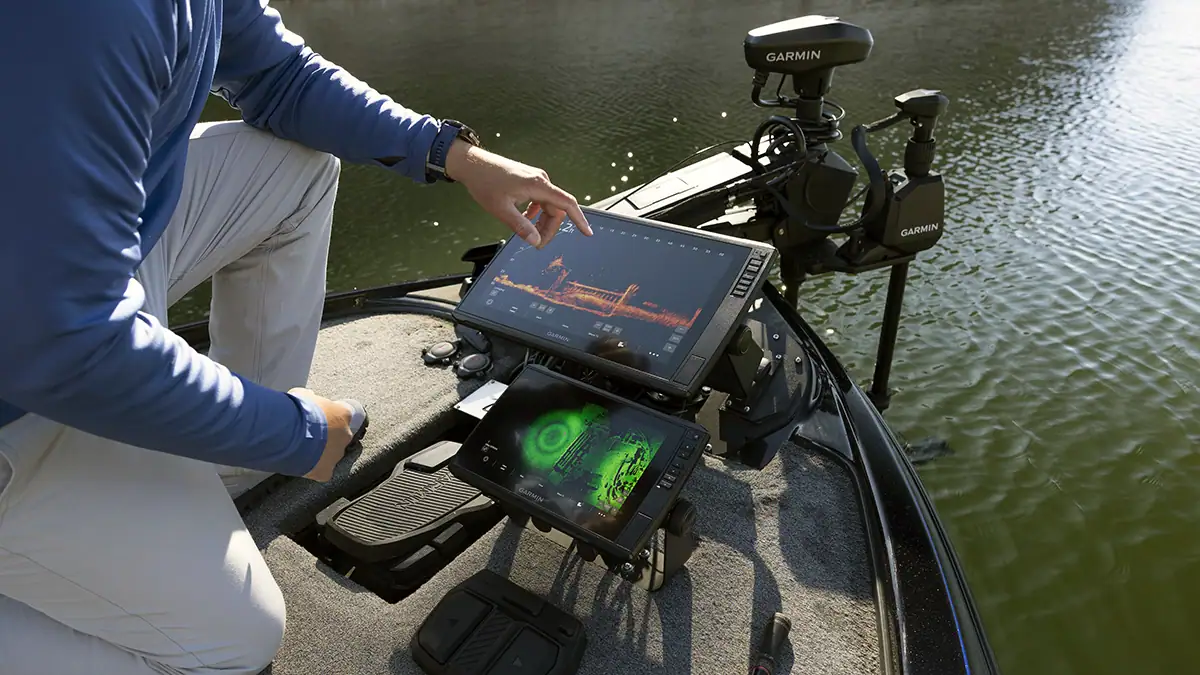
Garmin LiveScope Plus is a live-scanning sonar system. It shows fish, structure, bait, and your lure as they appear in real time. Instead of viewing only a historical sonar trail, you can aim the transducer and watch what is happening near your boat.
The system uses two main parts:
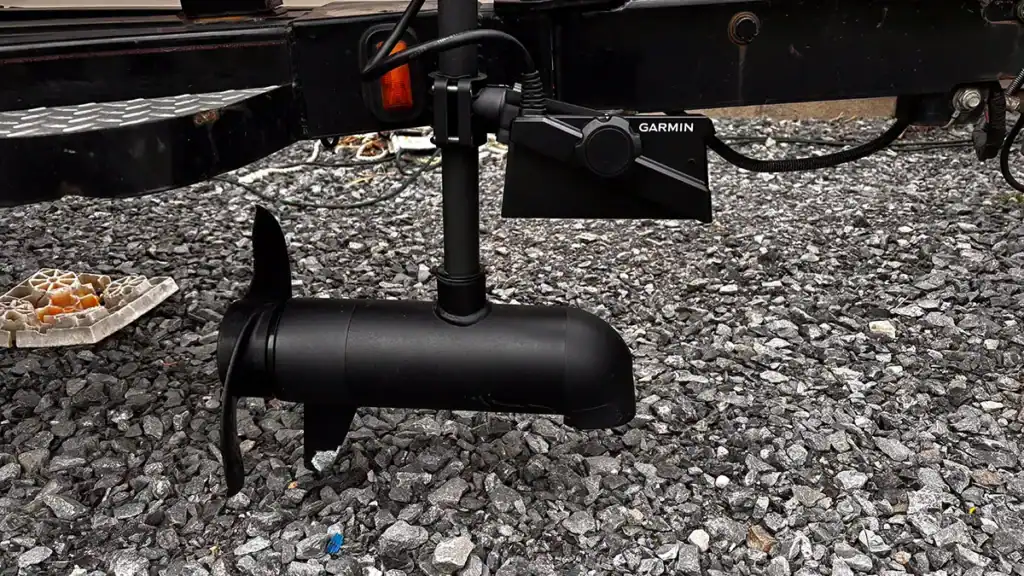
• The LVS34 LiveScope Plus transducer sends and receives the sonar signal.
• The GLS 10 sonar module processes that signal and connects it to a compatible Garmin chartplotter.
You also need a compatible Garmin display, a power source, and a solid mounting system. LiveScope Plus is not a stand-alone fish finder that works by itself.
Garmin LiveScope Plus offers three main viewing modes:
• Forward mode scans the water in front of the boat.
• Down mode scans below the boat.
• Perspective mode scans shallow water from above when the transducer is mounted properly.
The biggest upgrade over the original LiveScope is improved image clarity and target separation. Small fish, brush limbs, and individual bait fish can look less merged together. That does not mean every image will be perfect. Water depth, temperature, bottom type, boat movement, and setup still affect the picture.

Is Garmin LiveScope Plus Worth It for the Image Quality?
For many anglers, image quality is the main reason to buy LiveScope Plus. It gives you a moving view of the water that feels more like a live underwater camera than a standard sonar screen.
The system can help you see:
• Fish near brush, grass, rock, and timber
• Individual fish within a school
• Your lure moving through the water
• Fish that follow, strike, or ignore your bait
• The direction of a fish or bait school
• The shape and distance of underwater cover
This detail can save time. Instead of casting around a large area and hoping fish are present, you can scan first. If you see fish near a tree, you can place the lure beside the cover and watch the presentation.
The improved target separation is useful when fish hold close to cover. With older sonar images, a fish and a branch may appear as one unclear mark. LiveScope Plus often gives you a better chance to tell them apart. Still, you should treat the screen as a tool, not an oracle. A clear mark does not always mean a catchable fish.
From a practical angling view, the image becomes most useful when paired with good boat control. A poor mount can cause vibration and image shake. A transducer pointed at the wrong angle can make fish appear farther away or in a different direction than expected.

LiveScope Plus vs. Original LiveScope
The original LiveScope was already a major step forward in live sonar. LiveScope Plus builds on that design rather than replacing the basic concept.
The key improvements include:
• Better image resolution
• Improved target separation
• Reduced visual noise in many conditions
• More defined fish and lure marks
• A clearer view of small objects near cover
The difference may seem modest on a calm day in open water. It becomes easier to notice when you scan brush, docks, grass, or a dense bait school. LiveScope Plus can make the screen feel less crowded, which helps you read what is happening.
That said, original LiveScope remains useful. If you already own the earlier system and fish mostly open water, upgrading may not transform your results. The value depends on the price of the upgrade, your current equipment, and how often you use live sonar.
If you are buying new, LiveScope Plus usually makes more sense than choosing the older system at a similar price. If you already own the original LiveScope, compare the cost of the LVS34 transducer, installation, and any required accessories before upgrading.

What Makes Garmin LiveScope Plus Different?
LiveScope Plus stands out because it lets you control the direction of the sonar view. You can point the transducer toward a target instead of relying only on a fixed cone below the boat.
This changes how you search:
-
Start in Forward mode to scan around the boat.
-
Find fish, cover, or bait.
-
Turn the trolling motor toward the target.
-
Cast beyond the fish.
-
Watch the lure move into the strike zone.
-
Adjust the retrieve based on the fish response.
This process gives you information that traditional sonar cannot provide in the same way. You can see whether a fish moves toward the lure, follows it, or turns away.
LiveScope Plus also works well with modern Garmin chartplotters. The display can show sonar data alongside mapping, waypoints, and boat movement. This helps you mark productive areas and return to them later.
However, live sonar has a learning curve. At first, many anglers mistake clutter for fish. Others struggle to match the screen image with the real direction of the boat. It may take several trips to understand the difference between a fish, a lure, a tree limb, and sonar noise.
Is Garmin LiveScope Plus Worth It for Bass Fishing?
For bass fishing, Garmin LiveScope Plus can be highly valuable. Bass anglers often target isolated cover, suspended fish, rock piles, brush, and small bait groups. These targets are well suited to forward-facing sonar.
You can use it to study:
• Bass near brush piles
• Suspended bass in open water
• Fish under docks
• Schooling fish chasing bait
• Fish around submerged grass
• Bass following a swimbait or jig
A common example is offshore bass fishing. You may find fish on a point, but traditional sonar does not always show whether they are active. With LiveScope Plus, you can cast to the area and watch the fish respond. If they ignore the bait, you can change the lure or retrieve before wasting several dozen casts.
Still, LiveScope does not replace fishing skill. You need to understand seasonal patterns, water temperature, forage, depth, and weather. A screen may show fish that are inactive or difficult to catch. The best anglers use live sonar to support sound decisions, not to replace them.
For tournament anglers and serious bass fishermen, that extra information can be worth the investment. For casual anglers who fish a few times each year, a traditional sonar and good map may offer better value.

Is Garmin LiveScope Plus Worth It for Crappie and Panfish?
Crappie anglers often get some of the clearest benefits from LiveScope Plus. Crappie may suspend around brush, trees, docks, and creek channels. Their position can change during the day, which makes live scanning useful.
With LiveScope Plus, you can:
• Find suspended crappie without dropping a marker buoy
• See how fish relate to brush
• Place a jig near fish instead of casting blindly
• Watch crappie move toward or away from the bait
• Stay on productive fish while slowly moving
This is especially useful when spider rigging, single-pole fishing, or casting small jigs. You can observe the depth and behavior of fish in real time.
Ice anglers may also benefit from the system when local conditions allow it. A suitable ice mount can help you watch a jig below the hole and see fish approach. Battery planning becomes important because cold weather can reduce battery performance.
For anglers who mainly target crappie, the cost can still be hard to justify. A good traditional sonar can locate brush and depth at a much lower price. LiveScope Plus becomes more compelling when you fish often, compete, or enjoy the visual challenge of watching fish react to your lure.

Is Garmin LiveScope Plus Worth It for Walleye and Pike?
Walleye and pike anglers can use LiveScope Plus to find suspended fish, weed edges, rocky areas, and bait schools. Forward mode helps when fish are away from the boat, while Down mode works well when you are directly over a target.
Walleye fishing often involves subtle changes. A fish may move a few feet to follow a jig or minnow. Seeing that movement can help you change speed, color, or depth.
Pike are larger targets, so they are often easy to identify. LiveScope Plus can help you watch pike around weeds and see how they react to moving baits. It can also reveal whether a weed edge holds fish before you spend time working it.
The system is most useful when fish are visible and active enough to produce a clear return. Muddy water, heavy vegetation, strong waves, and deep water can reduce the benefit. As with any sonar, the screen shows information, but it does not guarantee a bite.

Key Benefits of Garmin LiveScope Plus
The value of Garmin LiveScope Plus comes from several benefits working together. No single feature makes it perfect, but the full system can improve your efficiency on the water.
Real-Time Lure Tracking
You can watch your lure sink, rise, move through cover, and reach fish. This helps you learn what your bait is doing below the surface.
Better Target Separation
LiveScope Plus can separate nearby fish and structure more clearly than the original system in many situations. This is useful around brush, timber, and bait schools.
Active Fish Selection
You can choose which fish to target. Instead of casting randomly, you can look for fish that move toward bait or hold in a productive position.
Flexible Scanning Modes
Forward, Down, and Perspective modes support different fishing styles. You can scan ahead, inspect the area below, or look across shallow water.
Improved Practice
The system can teach you how fish react to lure movement. Over time, that knowledge can help even when you fish without electronics.
Better Search Efficiency
Live sonar can reduce wasted casts. If a bank or brush pile looks empty, you can move to a more promising area.
These benefits matter most when you use the system as part of a complete approach. Boat control, lure choice, water reading, and patience still matter.

Limitations and Problems to Consider
Before deciding whether Garmin LiveScope Plus is worth it, consider its weaknesses. Live sonar is powerful, but it is not effortless.
High Total Cost
The purchase price includes more than the transducer. You may also need:
• A compatible Garmin chartplotter
• The GLS 10 sonar module
• A trolling motor mount
• A perspective mount, if needed
• Extra wiring and fuses
• A quality marine battery
• A screen mount or larger display
• Professional installation in some boats
The full setup can cost much more than the advertised price of one component. Prices change by retailer and package, so check the complete system cost before buying.
Learning Curve
The screen may look simple, but reading it takes practice. You must learn how distance, angle, gain, color, and sensitivity affect the image.
Power Use
Live sonar and a bright display can use a significant amount of battery power. A weak or undersized battery may cause voltage drops and shorter trips.
Mounting Challenges
The transducer must remain stable. Trolling motor movement, rough water, and loose brackets can create poor images.
Screen Dependence
Some anglers begin watching the screen too much. They stop reading the shoreline, wind, weather, and water. That can make fishing less enjoyable and may reduce their natural skill.
Not a Fish-Catching Guarantee
LiveScope Plus shows fish. It does not make inactive fish bite. You still need the right lure, presentation, depth, and timing.
Setup Tips for Better LiveScope Plus Results
A careful setup can make a larger difference than many anglers expect. Poor installation can make excellent equipment look disappointing.
Use these practical tips:
-
Mount the transducer as firmly as possible. Avoid loose brackets and flexible mounts.
-
Keep the transducer away from turbulence caused by the hull, propeller, or trolling motor.
-
Run clean power to the sonar module. Follow Garmin’s wiring and fuse guidance.
-
Keep power and sonar cables organized. Avoid careless routing near sources of electrical interference.
-
Start with factory settings. Change one setting at a time so you understand the result.
-
Adjust the range to match the fishing situation. A shorter range often gives a clearer image.
-
Use Forward mode to search and Down mode when positioning directly over fish.
-
Keep the transducer angle consistent while learning.
-
Practice with known objects such as docks, trees, or buoys.
-
Record waypoints when you find productive fish and structure.
One mistake many new users make is setting the range too far. A long range may look impressive, but it can reduce detail. Start close, learn the image, and expand the range only when needed.
Another common mistake is changing gain too often. If the screen looks noisy, reduce clutter step by step. If small fish disappear, increase sensitivity carefully. There is no single setting that works in every lake or depth.
How Much Does Garmin LiveScope Plus Cost?
The cost of Garmin LiveScope Plus depends on the bundle, display, mount, battery, and installation. The transducer and sonar module are only part of the investment.
A complete setup may include:
• LVS34 transducer
• GLS 10 black box
• Garmin chartplotter
• Transducer mount
• Trolling motor accessories
• Marine battery
• Wiring and installation parts
• Protective cases or storage solutions
Retail prices also change during fishing season, holiday sales, and product updates. Compare full package prices rather than focusing on one advertised component.
A useful way to judge the cost is to ask how often you will use it. If you fish weekly, compete, guide others, or spend long periods locating suspended fish, the cost may be easier to justify. If you fish only a few weekends each year, the same money may provide more value through a good chartplotter, mapping card, trolling motor, or boat maintenance.
Garmin LiveScope Plus vs. Other Live Sonar Systems
Garmin LiveScope Plus is not the only forward-facing sonar system. Lowrance ActiveTarget and Humminbird MEGA Live are major alternatives. Each system works best within its own electronics ecosystem.
When comparing live sonar, look at:
• Image clarity
• Target separation
• Range
• Mounting options
• Display compatibility
• Mapping features
• Trolling motor integration
• Software support
• Total package price
• Ease of use
Garmin LiveScope Plus often appeals to anglers who already use Garmin chartplotters or Garmin trolling motor equipment. The integration can simplify control and reduce the need to mix brands.
Lowrance and Humminbird systems may be a better fit for anglers already invested in those platforms. Switching brands only for live sonar can create extra cost and installation work.
Avoid choosing based only on online screenshots. Images vary with water clarity, depth, settings, boat movement, and display size. If possible, watch each system in person or speak with a local dealer who can explain how it performs on water similar to yours.
Real-World Lessons From Using Live Sonar
The most important lesson with Garmin LiveScope Plus is that the screen can show more than you know how to interpret. Early users often expect instant success. In practice, the first trips may feel like learning a new language.
Start with simple goals. Look at a dock, brush pile, or open-water bait school. Try to match the screen image with what you know is below the boat. Then move your lure and watch how the image changes.
Another lesson is to avoid chasing every fish. A screen full of marks can create false excitement. Some fish are too small, inactive, or poorly positioned to target. Focus on fish that relate to cover, show movement, or respond to bait.
Boat control also matters more than expected. If the boat turns constantly, the target moves across the screen. A steady trolling motor speed and a stable transducer angle make the picture much easier to read.
Finally, keep looking at the water around you. Live sonar is like a flashlight, not a replacement for outdoor awareness. Wind, shade, current, bird activity, and shoreline cover still provide important clues.
Who Should Buy Garmin LiveScope Plus?
Garmin LiveScope Plus is a strong choice for certain anglers.
It may be worth buying if you:
• Fish several times each month
• Target suspended fish
• Fish brush, docks, grass, or open-water bait
• Enjoy learning electronics
• Want to watch lure and fish behavior
• Compete in tournaments
• Already own a compatible Garmin display
• Have the budget for a complete setup
It may not be worth buying if you:
• Fish only a few times per year
• Prefer simple equipment
• Mostly fish shallow banks without electronics
• Have no compatible Garmin display
• Do not want to manage extra batteries and wiring
• Expect sonar to produce automatic catches
Your fishing style matters more than brand loyalty. A simple sonar that you understand can be more useful than an advanced unit that stays in the garage.
How to Decide if Garmin LiveScope Plus Is Worth It
Use this simple decision process before you buy.
Step 1: Check Your Current Electronics
Confirm that your Garmin chartplotter supports LiveScope Plus. If not, include the price of a compatible display.
Step 2: Calculate the Full Cost
Add the transducer, GLS 10 module, display, mount, battery, wiring, and installation. The real cost is the complete working system.
Step 3: Match It to Your Fishing Style
LiveScope Plus is most useful for fish that suspend, relate to isolated cover, or move away from the boat.
Step 4: Consider Your Time on the Water
Frequent use spreads the cost across more trips. Occasional use may favor a less expensive sonar system.
Step 5: Try It Before Buying
Visit a tackle shop, boat show, fishing expo, or local guide who uses the system. A short demonstration can reveal whether the image and controls suit you.
Step 6: Set a Learning Plan
Plan several practice trips. Learn the modes, range settings, mounting angle, and basic sonar returns before judging the system.
This approach gives you a clearer answer than asking whether LiveScope Plus is universally worth it. The right question is whether it is worth it for your boat, budget, and fishing goals.
Frequently Asked Questions About Is Garmin LiveScope Plus Worth It?
Is Garmin LiveScope Plus better than the original LiveScope?
Yes, LiveScope Plus generally offers improved resolution and target separation compared with the original system. The upgrade is most noticeable around cover, bait schools, and small targets.
Does Garmin LiveScope Plus work without a Garmin fish finder?
No. The system requires a compatible Garmin chartplotter and the GLS 10 sonar module. Check compatibility before buying any part of the system.
How far can Garmin LiveScope Plus see?
The usable range depends on depth, water clarity, settings, transducer angle, and interference. A shorter range often provides better detail, while a longer range helps with broad scanning but may reduce image clarity.
Is Garmin LiveScope Plus useful in shallow water?
Yes, especially with Perspective mode and careful transducer placement. Shallow water can create clutter, but the system can still help locate fish around grass, docks, and cover.
Can Garmin LiveScope Plus show a lure?
Yes, the system can often show a properly sized lure, especially when it moves against a clear background. Small jigs may be harder to see, and visibility depends on distance, depth, water conditions, and sonar settings.
Does Garmin LiveScope Plus scare fish?
The sonar signal itself is not usually considered a major fish-spooking issue, but boat noise, trolling motor vibration, and sudden movement can affect fish. Use a stable mount and approach shallow targets with care.
Is Garmin LiveScope Plus worth it for casual anglers?
It may not be the best value for anglers who fish only a few times each year. A quality traditional sonar and detailed lake map may provide enough information at a lower total cost.
Conclusion
Garmin LiveScope Plus is worth it when real-time fish tracking, lure visibility, and target separation match the way you fish. It is especially useful for anglers who target suspended bass, crappie, walleye, bait schools, brush, and isolated cover.
The system still has limits. It costs a lot, uses power, needs careful mounting, and takes practice. It also cannot replace knowledge of fish behavior or guarantee a bite.
If you fish often and want to study what happens below the surface, Garmin LiveScope Plus can be a powerful investment. Check compatibility, calculate the full setup cost, and try the system on the water before making your decision. Share your experience or explore more fish-finder guides to choose the electronics that fit your boat and fishing style.