XTOOL A30M Vs ThinkDiag: Which Scanner Wins?
XTOOL A30M is the better choice for deeper diagnostics, while ThinkDiag suits drivers who want a lower-cost, app-based scanner.
Choosing between XTOOL A30M vs ThinkDiag depends on more than the number of features listed on the box. Both tools connect to a phone or tablet, read fault codes, show live data, and support service functions. Yet they target different users.
The XTOOL A30M is aimed at serious DIY users, mobile mechanics, and small repair shops. ThinkDiag is smaller, simpler, and often cheaper at the start. This detailed XTOOL A30M vs ThinkDiag comparison explains their scan depth, bidirectional tests, special functions, subscription costs, ease of use, and real-world value.
XTOOL A30M vs ThinkDiag at a glance
XTOOL A30M and ThinkDiag are both wireless diagnostic tools. They use a mobile app instead of a built-in screen. This keeps the hardware small, but your phone or tablet becomes an important part of the experience.
The biggest difference is their design goal:
• XTOOL A30M focuses on broad system coverage, active tests, service resets, and more advanced vehicle diagnosis.
• ThinkDiag focuses on convenient mobile scanning for common repairs and maintenance.
• XTOOL often provides stronger value for users who need several systems and functions in one device.
• ThinkDiag can be a good fit for occasional users who want a compact tool and are comfortable with app-based features or subscriptions.
| Feature | XTOOL A30M | ThinkDiag |
|---|---|---|
| Connection | Bluetooth wireless connection | Bluetooth wireless connection |
| Vehicle coverage | Broad coverage, depending on software and vehicle | Broad coverage, depending on software and subscription |
| Full-system scan | Generally supported on many vehicles | Supported on many supported vehicles |
| Active tests | A major strength | Available on supported makes and systems |
| Service functions | Oil, battery, steering, EPB, DPF, and more, depending on vehicle | Common resets and service functions, depending on plan |
| Coding or advanced functions | Available in selected vehicle systems | More limited or vehicle dependent |
| Built-in display | No | No |
| Best for | Advanced DIY work and small shops | Home users and basic mobile diagnosis |
| Main concern | App learning curve and software limits | Subscription value and feature access |
Specifications can change with firmware, region, vehicle year, and software updates. Always check the current coverage list before buying. This is one of the most important lessons in the XTOOL A30M vs ThinkDiag decision.

Diagnostic coverage and system access
A basic code reader usually checks the engine computer. A more capable scan tool can reach the transmission, ABS, airbag, body control module, electronic parking brake, and other systems. This is where the XTOOL A30M vs ThinkDiag comparison becomes more useful.
XTOOL A30M generally offers full-system diagnostics on many supported vehicles. That means you may scan several control modules, view live data, clear codes, and review system information. It can help you find faults that a simple OBD2 reader will never see.
ThinkDiag also supports more than engine codes. Its coverage can include ABS, SRS, transmission, body systems, and other modules. However, access may depend more heavily on the selected vehicle software package and subscription status.
For example, a check engine light may come from a weak engine sensor. But a warning message may also be linked to low battery voltage, a lost network signal, or a fault in another module. Full-system scanning gives you a wider view instead of looking through one small window.
Which tool has better vehicle coverage?
Neither tool is automatically best for every car. Coverage depends on the make, model, year, engine, market, and installed software.
Before buying, check:
• Whether your exact vehicle is listed.
• Whether the required system is supported.
• Whether active tests are available.
• Whether the feature is included or requires an extra purchase.
• Whether the vehicle uses newer protocols such as CAN FD.
The XTOOL A30M vs ThinkDiag result can change when you compare a 2012 sedan with a 2023 vehicle. Always check the exact application, not only the brand name.

Source: com.au
Active tests and bidirectional control
Bidirectional control is one of the most valuable features in a professional scan tool. It lets the scanner send commands to a vehicle system. Instead of only asking, “What code is stored?” you can ask, “Can this component respond when commanded?”
The XTOOL A30M is usually the stronger choice for active tests. On supported vehicles, it may command items such as:
• Cooling fans
• Fuel pumps
• Relays
• Injectors
• Door locks
• Windows
• Horns
• Lamps
• EGR components
• ABS actuators
• Air-conditioning components
ThinkDiag also supports active tests on selected vehicles and systems. Its performance can be useful for common checks, but the exact depth varies. Some functions may appear in the app only after selecting the correct vehicle software or subscription.
A practical example is an electric cooling fan that never runs. A code reader may show a fan-related fault, but an active test can help separate a bad fan motor from a wiring issue, relay fault, or control problem. Always use a wiring diagram and follow safe test steps. A scan tool can command a part, but it cannot replace electrical testing.
For the XTOOL A30M vs ThinkDiag decision, choose XTOOL if active tests are central to your work. Choose ThinkDiag if you need them only from time to time and your vehicles are fully supported.

Source: youtube.com
Service functions and special resets
Modern vehicles need more than code reading. After maintenance, a technician may need to reset a service reminder, register a battery, retract an electronic parking brake, or perform a diesel particulate filter procedure.
The XTOOL A30M commonly supports a wide range of service functions, such as:
• Oil service reset
• Battery registration
• Electronic parking brake reset
• Steering angle calibration
• Diesel particulate filter service
• Throttle relearn
• ABS bleeding on supported vehicles
• Injector coding
• Tire pressure system functions
• Transmission adaptation reset
ThinkDiag also offers many common maintenance functions. Its available list depends on the vehicle and the active software plan. Some functions may be enough for home use, while others may not match the depth of a shop-focused tool.
Do not treat a service function as a guaranteed repair. For example, a battery registration process tells the vehicle that a new battery was installed. It does not fix a weak ground cable, incorrect battery type, or charging system fault.
In this part of the XTOOL A30M vs ThinkDiag comparison, XTOOL usually has the edge for users who perform frequent repairs. ThinkDiag remains practical for oil resets, battery work, brake service, and other routine tasks.

Source: obdii365.com
Coding, adaptations, and advanced functions
Coding and adaptations can change how a vehicle module behaves. These procedures may activate features, match replacement parts, or teach a module new values. They are more advanced than clearing a trouble code.
The XTOOL A30M may support selected coding, adaptation, or special procedures. Coverage is highly vehicle specific. Some jobs require stable battery voltage, a reliable internet connection, or a security gateway connection.
ThinkDiag may provide coding and advanced functions on selected makes. However, these features can be more restricted by software access, subscription level, or vehicle security systems.
This is an area where buyers should avoid broad claims. No aftermarket scanner can perform every factory function on every vehicle. Security access, module design, regional software, and manufacturer rules all create limits.
A safe workflow is:
- Save the original coding and fault report.
- Connect a battery maintainer when the procedure requires it.
- Confirm the vehicle identification.
- Read the tool’s instructions before starting.
- Avoid disconnecting the device during programming.
- Scan again after the procedure.
The XTOOL A30M vs ThinkDiag winner for advanced functions depends on your vehicle list. XTOOL is often the better investment for deeper work, but neither device should be treated as a universal factory tool.

Source: youtube.com
App design, setup, and daily use
Both devices depend on a smartphone or tablet. That makes setup important. You need Bluetooth, a stable app, a supported operating system, and enough battery power for the vehicle test.
ThinkDiag is known for its small dongle and simple mobile format. It can fit in a glove box and work well for drivers who want basic scanning without carrying a larger tablet.
XTOOL A30M also uses a mobile app, but its wider feature set may take more time to learn. New users should spend a few minutes reviewing the menu structure, vehicle selection process, report tools, and update settings.
During hands-on scan-tool work, one common mistake is blaming the scanner when the real problem is poor setup. Check these points first:
• Turn off other Bluetooth connections if pairing fails.
• Use the latest app version.
• Keep the phone close to the vehicle.
• Make sure the vehicle battery is healthy.
• Do not switch off the ignition during an active test.
• Record codes before clearing them.
ThinkDiag may feel easier for a quick check. XTOOL A30M may feel more capable after you learn its menus. The better user experience depends on whether you value simplicity or diagnostic depth.
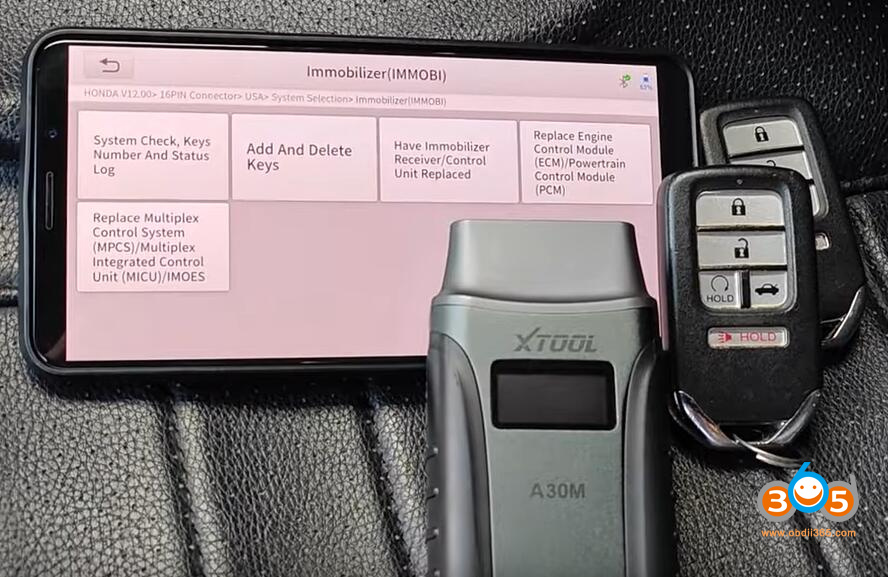
Source: obdii365.com
Subscription costs and long-term value
The purchase price is only one part of the XTOOL A30M vs ThinkDiag decision. Software access can have a greater effect on long-term cost.
ThinkDiag commonly uses a subscription or software activation model. The exact terms can change by region, product version, and software package. Some buyers may receive a limited period of access, while continued use of certain brands or functions may require renewal.
XTOOL product software policies also vary by model and market. Some updates or brand packages may be included for a period, while later updates may require payment. Confirm the current policy from the seller or manufacturer before purchase.
Think about how often you will use the tool:
• Occasional home use: ThinkDiag may offer enough value.
• Several family vehicles: Compare the cost of adding makes and functions.
• Regular repair work: XTOOL A30M may offer better value if its coverage meets your needs.
• Long-term ownership: Review update fees before focusing on the initial price.
A cheap scanner that cannot perform the needed function is not a bargain. In the same way, an advanced tool is not good value if it spends most of its life in a drawer. The best XTOOL A30M vs ThinkDiag choice matches your actual repair habits.

Source: youtube.com
Vehicle communication and reliability
Modern vehicles use several communication networks. Older vehicles may rely on standard CAN systems, while newer models can use faster networks and additional security controls. A scanner must support the right communication method to work correctly.
The XTOOL A30M may support newer vehicle communication needs on compatible applications, but buyers should confirm CAN FD and other protocol support for their exact vehicles. ThinkDiag versions may also differ in hardware and software support.
Connection problems do not always mean the tool is defective. Low voltage, poor diagnostic connector contact, aftermarket wiring, and a sleeping vehicle network can all cause trouble.
For reliable scans:
• Use a fully charged phone.
• Keep vehicle voltage stable.
• Avoid scanning during battery replacement.
• Inspect the diagnostic connector for bent pins.
• Use a quality USB power source for your phone or tablet.
• Keep software and firmware updated.
In the XTOOL A30M vs ThinkDiag comparison, reliability is often similar when the setup is correct. The vehicle and network condition may matter more than the brand printed on the dongle.
Pros and limitations of the XTOOL A30M
The XTOOL A30M is a strong choice when you want more than basic code reading. It can support a deeper repair process and may reduce the need for several single-purpose tools.
Advantages include:
• Broad system access on supported vehicles.
• Strong active-test capability.
• Many service and maintenance functions.
• Useful live-data views.
• Good fit for advanced DIY users and small shops.
• Wireless operation through a mobile device.
Limitations include:
• Coverage varies by vehicle and software.
• Some functions may require paid access.
• The app can take time to learn.
• Advanced procedures may need stable voltage and internet access.
• It is not a replacement for factory equipment in every situation.
The XTOOL A30M is best viewed as a capable diagnostic assistant. It can guide a repair, but it cannot make a mechanical judgment for you.

Source: youtube.com
Pros and limitations of ThinkDiag
ThinkDiag is attractive because it is small and easy to carry. It can give drivers more information than a basic code reader and may support useful service functions through the app.
Advantages include:
• Compact design.
• Convenient wireless connection.
• Useful full-system scanning on supported vehicles.
• Access to common service functions.
• Good option for home mechanics and occasional users.
• Often a lower entry cost.
Limitations include:
• Subscription rules can affect long-term value.
• Advanced functions vary by vehicle.
• Active tests may not be as broad as those on a shop-focused tool.
• A phone or tablet is required.
• App access and software packages may change.
ThinkDiag works best when you already know which vehicles you will scan. It is less appealing if you expect one small device to cover every brand and every advanced repair task.
XTOOL A30M vs ThinkDiag: which one should you buy?
Choose the XTOOL A30M if you:
• Diagnose several vehicle systems.
• Need bidirectional tests.
• Perform battery, brake, DPF, steering, or transmission services.
• Work on cars for friends, family, or customers.
• Want a tool with more room to grow.
Choose ThinkDiag if you:
• Want a compact scanner for home use.
• Mainly read codes and view live data.
• Need common maintenance resets.
• Own one or two supported vehicles.
• Prefer a simple app-based tool.
My practical advice is to write down your top five planned jobs before buying. If three or more require active tests, module access, or advanced service routines, the XTOOL A30M is likely the safer choice. If your list contains basic warning-light checks and routine resets, ThinkDiag may save money without leaving you frustrated.
How to use either scanner safely
A scan tool is a diagnostic aid, not a magic answer. A stored code identifies a system or condition. It does not always identify the failed part.
Use this process:
- Confirm the customer or vehicle complaint.
- Check battery voltage and basic fuses.
- Scan all available systems.
- Save the fault codes and freeze-frame data.
- Review live data.
- Test the suspected circuit or component.
- Repair the root cause.
- Clear codes only after recording them.
- Perform a road test when safe.
- Scan again and confirm the repair.
For example, a mass airflow code may result from a sensor problem, an air leak, wiring damage, or incorrect engine operation. Replacing the sensor without testing can waste money. This simple habit improves results with both the XTOOL A30M and ThinkDiag.
Frequently Asked Questions of XTOOL A30M vs ThinkDiag
Is XTOOL A30M better than ThinkDiag?
The XTOOL A30M is generally better for deeper diagnostics, active tests, and frequent repair work. ThinkDiag can be better for occasional users who want a smaller and simpler tool.
Can XTOOL A30M and ThinkDiag read ABS and airbag codes?
Both may read ABS, SRS, transmission, and other system codes on supported vehicles. Confirm coverage for the exact year, make, model, and software package before purchase.
Does ThinkDiag require a subscription?
ThinkDiag software access may use subscriptions or separate brand packages, depending on the version and region. Check the current terms before buying because access rules can change.
Can XTOOL A30M perform bidirectional tests?
The XTOOL A30M supports active or bidirectional tests on many compatible vehicles. The available tests depend on the vehicle system, software coverage, and security requirements.
Do both scanners reset oil and battery service functions?
Both tools may support oil resets, battery registration, electronic parking brake service, and other maintenance functions. Availability varies by vehicle, so verify the function before starting the repair.
Can either tool program a vehicle key?
Neither tool should be assumed to provide universal key programming. Key work often requires special coverage, security credentials, stable power, and separate equipment.
Will either scanner diagnose every car?
No. Vehicle coverage is never universal, especially for advanced coding, security systems, and newer models. Use the official coverage information for your exact vehicle before making a purchase.
Conclusion
The XTOOL A30M vs ThinkDiag choice comes down to diagnostic depth, cost, and how often you will use the tool. XTOOL A30M is the stronger match for active tests, full-system work, service functions, and serious DIY repairs. ThinkDiag is a convenient option for basic diagnosis, common resets, and occasional use.
Before you buy, check exact vehicle coverage, active-test support, software fees, and update terms. Choose the tool that matches your real repair list, then use it with proper testing instead of replacing parts based only on a code. Explore the latest coverage details, compare current software plans, and share your experience with the XTOOL A30M vs ThinkDiag in the comments.