Can An Obd2 Scanner Reset Service Reminders: Easy Guide
Yes, many OBD2 scanners can reset service reminders, but only if the vehicle supports it.
If you have ever seen a service light pop up right after an oil change, you already know how annoying it can be. An OBD2 scanner can often clear that reminder, but the real answer depends on the car, the scanner, and the type of service message you are trying to reset. In this guide, I will walk you through what OBD2 scanners can do, where they fall short, and how to avoid the common mistakes I have seen many drivers make.

What a service reminder actually is
A service reminder is not always the same as a check engine light. It is usually a maintenance alert set by the car’s computer to remind you about oil changes, tire service, inspections, or other scheduled work. Think of it like a digital sticky note from your car.
Some reminders are simple. Others are tied to the vehicle’s body control module, instrument cluster, or maintenance menu. That is why one scanner may reset a reminder on one car, while another scanner cannot touch it at all.
Can an OBD2 scanner reset service reminders?
Yes, an OBD2 scanner can reset service reminders in many cases, but not all of them. Basic code readers usually clear diagnostic trouble codes and turn off the check engine light. More advanced OBD2 scanners, especially those with service functions or bi-directional controls, can also reset oil life monitors, maintenance lights, and some inspection reminders.
In my experience, this is where buyers get tripped up. A cheap scanner may read codes fine, but when it comes to resetting a service reminder, it may only say “function not supported.” That does not mean the car is broken. It usually means the scanner does not have the right service menu or software support.

How OBD2 scanners reset service reminders
An OBD2 scanner communicates with the vehicle’s onboard computer. When the scanner supports service reset functions, it sends a command that tells the module to clear or reinitialize the maintenance interval. The exact process depends on the make and model.
Here is what usually happens:
• You connect the scanner to the OBD2 port under the dashboard
• You turn the ignition on, and in some cases start the engine
• You choose the service or maintenance reset menu
• You select the correct vehicle system, such as oil life or service interval
• You confirm the reset command
• The scanner sends the request and the car updates the reminder
Some vehicles need a manual reset procedure after the scan tool clears the data. Others require the scanner to access a specific module. That is why reading the instructions for both the car and the scanner matters.
What kinds of reminders can be reset
A proper OBD2 scanner with service functions can often reset several types of reminders. The exact list depends on the tool and the vehicle, but common examples include:
• Oil change reminders
• Maintenance due lights
• Tire rotation alerts
• Brake service notices
• Inspection reminders
• Some battery registration or reset functions on supported vehicles
• Electronic parking brake service mode on certain advanced scanners
Not every scanner can handle all of these. Basic models usually do not have enough control. Professional tools often do, especially those made for specific brands or with enhanced service software.
When an OBD2 scanner cannot reset the reminder
Sometimes the answer is no. Even a good OBD2 scanner may not reset a service reminder if:
• The vehicle uses a brand-specific system not supported by the scanner
• The reminder must be reset manually through dashboard buttons
• The scanner only supports engine codes, not service functions
• The vehicle needs a dealer-level tool or manufacturer software
• The reminder is tied to a module that requires coding or adaptation
This is one of those areas where more expensive does not always mean better. I have seen mid-range scan tools reset oil life on one car and fail on another, even though both were from the same year range. Vehicle support matters more than price alone.
Difference between clearing codes and resetting service reminders
This is a big one. Clearing a code and resetting a service reminder are not the same thing.
Clearing a code means erasing a stored fault code from the engine or another module. That is often used after repairing a problem. Resetting a service reminder means zeroing out a maintenance counter, like the oil life monitor.
Here is the simple difference:
• Clearing codes deals with faults
• Resetting reminders deals with scheduled maintenance
A scanner may do one, both, or neither, depending on its design. This is why many drivers buy a basic OBD2 reader, expect it to reset the oil light, and then feel disappointed when it cannot.
What features to look for in an OBD2 scanner
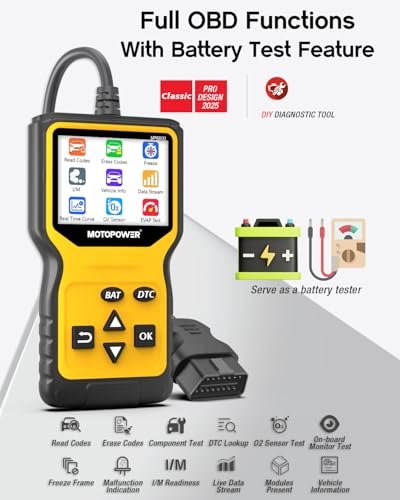
If your goal is to reset service reminders, look for a scanner that includes maintenance reset functions. The box or product listing should clearly mention features like oil reset, service reset, or special functions.
Good features to look for include:
• Oil reset function
• Maintenance light reset
• Full system diagnostics
• Bi-directional control
• Vehicle-specific coverage
• ABS, SRS, and transmission access
• Battery registration or EPB functions if needed
A scanner with only generic code reading may not be enough. If you work on your own car often, spending a little more on a tool with service support can save a lot of time and frustration later.
My real-world takeaway from using these tools
One lesson I learned early is that the menu matters just as much as the scanner itself. I once used a scanner that was excellent for reading fault codes, but it failed on a simple oil reset because the vehicle required a brand-specific service path. I wasted time trying the same reset in different menus before realizing the tool simply did not support that model.
The best habit is to check compatibility before you buy or before you start the reset. A few minutes of prep can save you from thinking the car is “fighting” you when it is really just a tool mismatch.
How to reset a service reminder safely
If your scanner supports the function, follow these simple steps:
- Park the car on a level surface
- Turn the ignition to the correct position
- Plug the scanner into the OBD2 port
- Open the maintenance or service reset menu
- Select the correct vehicle make and model
- Choose the reminder you want to reset
- Confirm the reset
- Turn the ignition off, then back on to check the result
If the reminder comes back right away, do not keep forcing it. That can mean the service was not completed, the reset method was wrong, or the vehicle requires a different procedure.
Common reasons a reset fails
A failed reset is frustrating, but it usually has a clear cause. The most common reasons include:
• Wrong vehicle profile selected
• Scanner does not support that model
• Ignition position was incorrect
• Service interval was not fully completed
• The reminder needs a manual reset procedure
• A deeper fault is still stored in the system
If the light returns after resetting, check whether the car needs actual maintenance first. For example, some vehicles will not clear an oil reminder properly if the oil level sensor still sees a problem.
Are OBD2 scanners worth it for service resets?
Yes, if you plan to maintain your own vehicle. A good scanner can save time, reduce trips to the shop, and help you understand what your car is trying to tell you. It also gives you more control over routine maintenance.
That said, the value depends on your needs. If you only want to clear one dashboard light once a year, a basic scanner may not be enough. If you maintain multiple cars or do your own service work, a scanner with reset functions is a smart investment.
Tips before buying a scanner for service reminders
Before you buy, make sure the scanner can actually do what you need. I always suggest checking the exact vehicle coverage first, not just the brand name or product rating.
Use this checklist:
• Confirm it supports your car’s make, model, and year
• Look for oil reset or service reset in the specs
• Read whether it supports manufacturer-specific systems
• Check if updates are included
• Make sure the display and menu are easy to use
• Avoid tools that only promise “basic code reading” if you need reset functions
A little research now usually beats a return later.
Frequently Asked Questions
Can a basic OBD2 scanner reset an oil change light?
Sometimes, but not always. Basic scanners often clear trouble codes, but many do not include oil reset features. If the tool does support maintenance functions, it may work on some vehicles and fail on others.
Why does my service light come back after I reset it?
The reminder may return if the service was not fully completed, the reset procedure was wrong, or the vehicle still detects a problem. Some cars also need a manual reset or a brand-specific scanner to clear the interval properly.
Do I need a dealer scanner to reset service reminders?
Not always. Many aftermarket OBD2 scanners can reset common maintenance lights, especially oil life monitors. However, some vehicles with advanced systems may still require dealer-level tools or manufacturer software.
Can an OBD2 scanner reset the check engine light and service light?
Yes, many scanners can do both if they support those functions. Clearing the check engine light is different from resetting a service reminder, so make sure the scanner includes maintenance reset features too.
Is it safe to reset a service reminder myself?
Yes, as long as the maintenance has really been done and you follow the correct reset steps. If the light is tied to a deeper issue, resetting it without fixing the problem can hide important warning signs.
Conclusion
An OBD2 scanner can reset service reminders, but only when the scanner and the vehicle both support that function. The key is knowing the difference between a simple code reader and a tool with real service reset capability. Once you understand that, it becomes much easier to pick the right scanner and avoid wasted time.
If you want to handle your own maintenance with confidence, start by checking your vehicle’s reset method and your scanner’s feature list. That small step can make routine service much smoother. If this helped, keep learning about your car’s maintenance system and choose tools that truly match your needs.