Can An Obd2 Scanner Read Live Data: What To Know
Yes, most OBD2 scanners can read live data, but not every model supports it.
If you’ve ever wondered what is really happening under the hood while your engine runs, live data is where the story shows up in real time. I’ve used OBD2 scanners on everything from rough idles to stubborn check engine lights, and live data is often the fastest way to separate a small sensor glitch from a real mechanical issue. In this guide, I’ll walk you through what live data means, which scanners can show it, what to look for, and how to use it without getting lost in numbers.
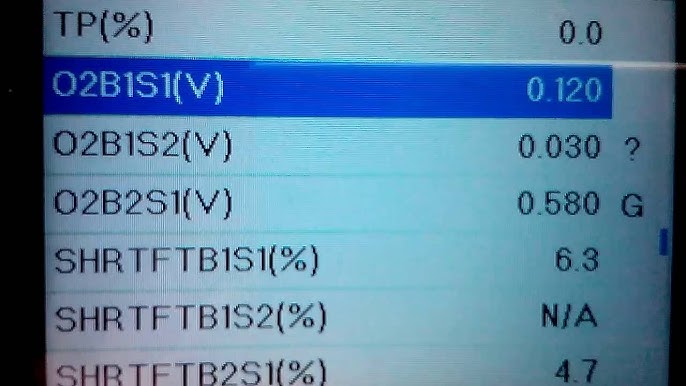
What live data means on an OBD2 scanner
Live data is the stream of information your car sends while it is running. It can show things like engine speed, coolant temperature, fuel trims, throttle position, oxygen sensor readings, and more. Instead of only seeing stored trouble codes, you get a moving picture of how the vehicle is behaving right now.
That matters because a car can pass a basic scan and still have a problem. A sensor may be acting up only when the engine is hot, under load, or at idle. Live data helps you catch those moments.
Think of it like checking your heart rate while you exercise instead of only looking at a doctor’s report later. The live reading gives you context. That context often makes diagnosis much easier.

Can an OBD2 scanner read live data?
Yes, many OBD2 scanners can read live data, but the feature depends on the scanner type and the vehicle. Basic code readers often show only fault codes and maybe a few simple values. More advanced OBD2 scanners can display a wide set of live sensor readings in real time.
Most modern vehicles from 1996 and newer support OBD2, but the amount of live data available can vary. Some cars give a lot of data, while others limit what you can see with a generic scanner. That is why two scanners can behave very differently on the same car.
If you want live data for real diagnosis, not just code reading, you usually need a scanner with enhanced live data, graphing, or manufacturer-specific coverage.
Which OBD2 scanners can show live data?
Not all scanners are built the same. Here is the basic breakdown:
- Basic code readers: These usually read and clear trouble codes. Some may show a few live values, but the list is often small.
- Mid-level scanners: These typically show live data like RPM, coolant temp, O2 sensor voltage, and fuel trims. Many also let you graph readings.
- Advanced scan tools: These offer more PIDs, better graphing, freeze frame, mode 6 data, and often vehicle-specific live data.
- Bluetooth OBD2 adapters with apps: These can show live data too, but the app quality matters a lot. A good app can be very useful, while a weak one feels clumsy.
In my experience, the biggest mistake people make is buying the cheapest scanner and expecting dealership-level live data. That usually leads to frustration. If live data is important to you, it is worth checking the supported features before you buy.
Common live data values you can see
Live data gives you a window into how the engine and emissions system are working. Common readings include:
- Engine RPM: Shows how fast the engine is spinning
- Vehicle speed: Useful for road testing
- Coolant temperature: Helps spot overheating or thermostat issues
- Intake air temperature: Shows incoming air temp
- Throttle position: Tells you how open the throttle is
- Mass airflow sensor reading: Helps with air and fuel diagnosis
- Fuel trims: Shows whether the engine is adding or subtracting fuel
- Oxygen sensor data: Helps monitor fuel mixture and catalyst performance
- Battery voltage: Useful for charging system checks
- Short-term and long-term fuel trims: Helpful for spotting vacuum leaks, bad sensors, or fuel delivery problems
These values are only useful when you know what they mean together. One reading alone does not always tell the whole story. The real value comes from watching patterns.
Why live data matters for car diagnosis
Live data makes diagnosis faster and smarter. A trouble code tells you something went wrong, but live data can help explain why. That often saves time, money, and guesswork.
Here are a few real-world examples:
- Rough idle: Live fuel trims may show a vacuum leak
- Poor fuel economy: Airflow readings may reveal a dirty MAF sensor
- Overheating: Coolant temp data may show a thermostat stuck closed
- Hesitation on acceleration: Throttle and fuel data may point to a weak fuel pump
- Misfire under load: Live data may help confirm whether ignition or fuel is the issue
I have seen people replace parts based on a code alone, only to find the problem was something simple like a cracked hose or dirty sensor. Live data can stop that kind of parts-swapping fast.
How to know if your scanner supports live data
The easiest way is to check the product specs before buying. Look for terms like:
- Live data
- Real-time data
- Sensor readings
- Graphing
- Enhanced data
- Freeze frame
- Mode 6
If the scanner only says “read and clear codes,” it may not do much beyond that. Some very basic tools can display a few readings, but they are usually limited.
Also check whether the scanner supports your vehicle brand. Some tools work well with generic OBD2 data but do a better job with certain makes and models. That can make a big difference when you need more detail.
How to use live data the right way
Live data can feel overwhelming at first. The trick is to focus on a few key values instead of watching everything at once. Start with the symptoms and match the readings to the problem.
A simple process looks like this:
- Read the stored trouble code if one is present.
- Check freeze frame data to see what the car was doing when the code set.
- Watch live data at idle first.
- Rev the engine lightly and look for changes.
- Take a short road test if the problem happens while driving.
- Compare values to normal ranges or known good behavior.
I always tell people to write down readings before changing parts. Memory gets fuzzy, but numbers do not lie. That little habit has saved me from more than one expensive guess.
What live data can and cannot tell you
Live data is powerful, but it is not magic. It can point you in the right direction, but it does not always give the final answer. A scanner sees signals, not the full mechanical condition of the car.
What it can do:
- Help find sensor problems
- Show fuel trim issues
- Reveal overheating trends
- Confirm misfire patterns
- Support better troubleshooting
What it cannot do:
- Physically inspect hoses, wiring, or spark plugs
- Guarantee a part is bad just because a value looks odd
- Replace real testing with a multimeter, smoke machine, or pressure gauge
That is why the best diagnosis often uses live data plus hands-on checks. One tool gives clues. The other confirms the cause.
Benefits of using a scanner with live data
There are several good reasons to choose a scanner that reads live data:
- Faster diagnosis: You can narrow down the cause sooner
- Fewer unnecessary parts: Better data means fewer bad guesses
- Better maintenance: You can spot issues before they become major problems
- Smarter repairs: You can confirm whether a repair actually worked
- More confidence: You know what your car is doing instead of just guessing
For DIY drivers, live data is one of the most useful features an OBD2 scanner can have. It turns the tool from a simple code reader into a real diagnostic aid.
Limitations you should expect
Even a good OBD2 scanner has limits. Live data availability depends on the car’s ECU, the scanner’s software, and the communication protocol. Some sensors may show delayed or simplified readings.
Common limitations include:
- Limited PIDs on basic scanners
- Missing manufacturer-specific data
- Slow refresh rates on cheaper tools
- Poor app design on some Bluetooth scanners
- Inaccurate interpretation if you do not know normal ranges
This is why I always recommend learning a few core values first, like fuel trims, coolant temperature, and MAF readings. Once you know those, the rest becomes much easier.
Best live data to watch for common problems
Here are a few examples of what to monitor based on the issue:
- Check engine light with rough idle: Fuel trims, MAF, O2 sensor data, RPM
- Poor acceleration: Throttle position, MAF, fuel trims, intake air temp
- Overheating: Coolant temp, fan command, vehicle speed
- Hard starting: Battery voltage, RPM while cranking, fuel trims
- Misfire concern: RPM stability, fuel trims, oxygen sensor activity
These values help you connect the symptom to the cause. It is like following footprints instead of wandering in the dark.
Tips for getting better results from live data
A few simple habits can make a big difference:
- Warm up the engine before judging readings
- Compare idle readings to driving readings
- Look for patterns, not one-time spikes
- Use graph mode if your scanner has it
- Test one system at a time
- Keep notes so you can compare before and after repairs
One mistake I see often is checking live data on a cold engine and assuming the numbers are final. Some readings change a lot during warm-up. Always look at the conditions first.
Frequently Asked Questions of Can an OBD2 scanner read live data?
Do all OBD2 scanners read live data?
No, not all of them do. Many basic code readers only show trouble codes and a few simple values, while better scanners offer full live data and graphing.
Can a Bluetooth OBD2 scanner show live data?
Yes, many Bluetooth adapters can show live data through a phone app. The quality depends on both the adapter and the app, so some combinations work much better than others.
Is live data the same as freeze frame data?
No, they are different. Freeze frame shows a snapshot of sensor data when a fault was detected, while live data shows current readings in real time.
Is live data useful for checking a misfire?
Yes, it can be very helpful. Fuel trims, RPM changes, and oxygen sensor behavior can all give clues about the cause of a misfire.
Can live data tell me exactly which part is bad?
Not always. It can point you to the likely system or sensor, but you still need testing to confirm the failed part.
Do I need a professional scanner to get live data?
Not always. Many consumer scanners and apps can read live data well enough for basic diagnosis. A professional tool is only needed if you want deeper coverage or advanced features.
Conclusion
Yes, an OBD2 scanner can read live data, and that feature is one of the most useful things you can have when diagnosing a car. It helps you see what the engine is doing in real time, which makes it easier to spot sensor issues, fuel problems, overheating, and other hidden faults.
If you are shopping for a scanner, look beyond basic code reading and check for live data support, graphing, and vehicle coverage. If you already own one, spend a little time learning the key readings and you will get much more value from it. Take what you learned here, compare your scanner’s features, and start using live data with more confidence.