How To Use A Radar Detector: Expert Tips For Drivers
If you want to use a radar detector well, mount it right, learn its alerts, and drive with calm attention.
A radar detector is only as helpful as the way you set it up and read it. When used correctly, it can give you extra awareness on the road, but it is not a magic shield and it should never replace safe driving or local traffic laws. In this guide, I’ll walk you through how to use a radar detector the smart way, with practical setup tips, real-world examples, and the common mistakes I’ve seen drivers make again and again.
What a radar detector actually does
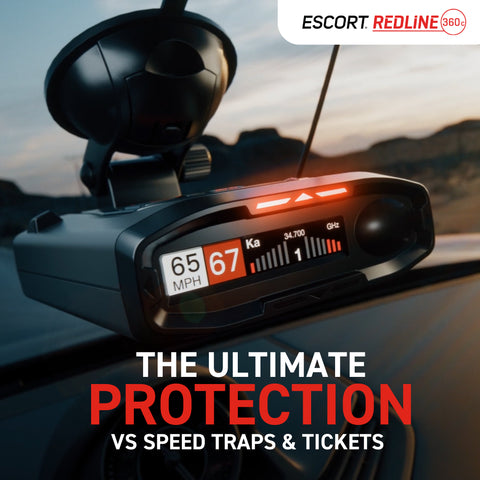
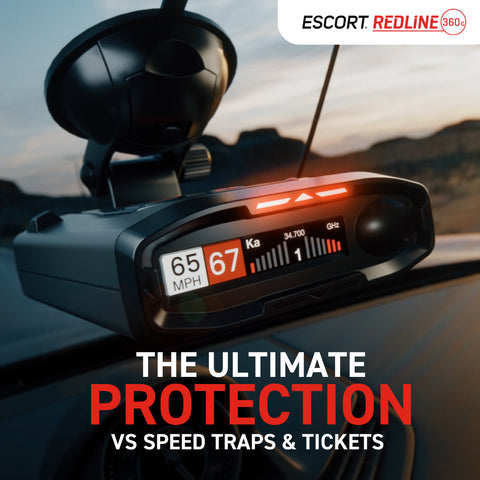
A radar detector is a device that senses radio signals used by police speed measurement tools. Most modern units can alert you to X band, K band, Ka band, and sometimes laser signals. Some advanced models also use GPS, Bluetooth, and filtering tools to cut down false alerts.
The big idea is simple. The detector gives you an early warning so you can check your speed and stay alert. It does not tell you where police are at all times, and it cannot protect you from every speed trap or every type of enforcement.
From my own experience, the biggest mistake new users make is expecting instant certainty. A radar detector is more like a weather app than a crystal ball. It helps you prepare, but you still need to watch the road and make good decisions.
How to use a radar detector step by step
Using a radar detector is easier than most people think. The trick is to set it up well and learn what the alerts mean. Once you do that, the device starts to feel like a natural part of your driving routine.
1. Mount it in the right spot
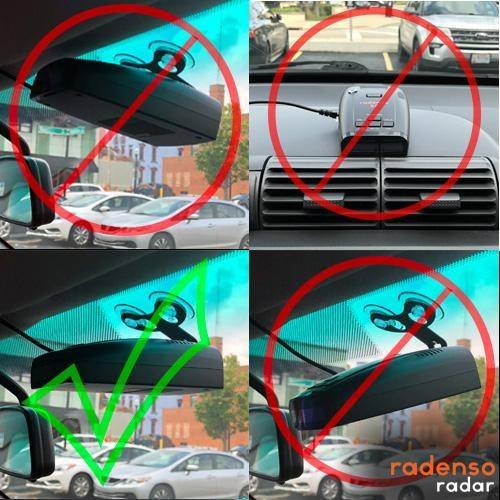
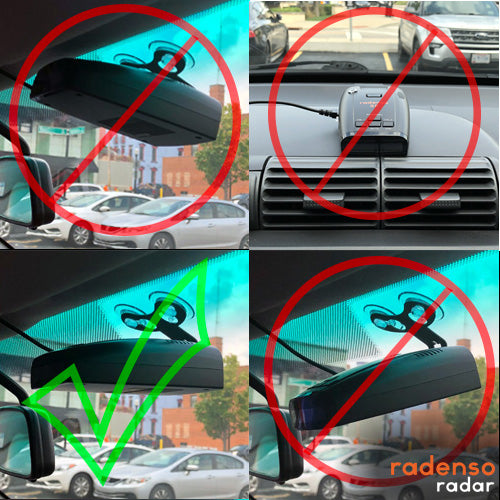
Place the detector high on the windshield or low on the dash, depending on the model and your local laws. A clear forward view matters because tint strips, mirrors, and metal objects can block signals. You want the unit to face the road with as little obstruction as possible.
A common mistake is hiding the detector too low or too far to one side. That can reduce range and make alerts come in late. I learned this the hard way during an early road trip when a poor mount caused weak warnings in heavy traffic.
2. Power it on before you start driving
Turn the detector on before you leave the parking spot. Give it a few seconds to boot up and complete any GPS lock, if your model uses GPS. Many drivers skip this step and then wonder why the first few alerts seem slow or incomplete.
If your detector has startup voice prompts or a self-test, listen to them. They can help you confirm that the device is working and that no settings were reset. That small check has saved me from driving with a muted or half-configured unit more than once.
3. Set the correct sensitivity mode
Most radar detectors offer modes like Highway, City, Auto, or Auto Mute. Highway mode usually gives the longest range, while City mode reduces false alerts from store doors and blind-spot systems. Auto mode tries to balance both.
Use the mode that fits where you drive most often. If you are on open interstates, higher sensitivity makes sense. If you spend time in a busy urban area, filtering becomes more important than maximum range.
4. Learn the alert types
Your detector may warn you with beeps, voice alerts, tones, or on-screen band labels. Learn the difference between radar bands and laser warnings so you can react faster. In many setups, the band and the signal strength will tell you how close or how strong the source may be.
Here is a simple way to think about it:
- A weak, brief alert may be a distant source or a false signal
- A stronger alert that grows faster often means you are getting closer
- A laser warning usually means you have less reaction time
Do not panic when you hear a beep. Check your speed first, then scan the road calmly. That habit matters more than any fancy feature.
5. Match the alert to the driving situation
A radar detector works best when you connect the alert to what is happening around you. Look for patrol cars, median locations, side roads, and traffic flow patterns. If the detector alerts in an area with no obvious threat, keep watching. Some signals are false, but some are reflections from hidden sources.
I always tell friends to treat the detector like a second set of eyes. It helps, but it does not replace common sense. If traffic suddenly slows and your detector goes off, that is a clue to pay attention immediately.
6. Use GPS and lockout features if available
Many modern radar detectors include GPS-based features like red light camera alerts, speed camera warnings, and false alert lockouts. These tools are very useful in cities with lots of automatic door sensors. Over time, the detector can learn recurring false signals and ignore them.
That said, do not over-rely on automation. If you drive in new areas often, your detector may not know the local patterns yet. It still needs your judgment to separate real threats from harmless noise.
7. Keep the unit updated
If your radar detector supports firmware or database updates, install them regularly. Manufacturers often improve filtering, fix bugs, and refine GPS alert lists. An outdated unit can miss new camera locations or handle signals less efficiently.
I’ve seen drivers blame the detector when the real problem was stale software. Think of updates like changing the oil in your car. They are not exciting, but they help everything run better.
8. Test it in a safe way
You do not need to test it on the highway to know it works. Start by checking power, display brightness, volume, and voice alerts in a driveway or parking lot. If you want a deeper test, compare alerts in areas with known false signals and learn how your unit reacts.
A good test helps you build confidence before you depend on the device in real traffic. That makes the learning curve much smoother.
Best practices for getting accurate alerts
Getting the best performance from a radar detector is not just about the device itself. It is also about driving habits, placement, and how well you understand your route. Small details can make a big difference.
Keep the windshield clear
A dirty windshield can interfere with visibility and make it harder to notice where the detector is mounted. It also makes it harder to spot police vehicles, which is half the game. Clean glass and a stable mount help you stay alert and informed.
Avoid blocking the antenna
Metalized tint, dashcams, toll tags, and mirrors can reduce signal reception. If your detector seems weak, check the line of sight first. A better mount location often solves the problem faster than changing settings.
Learn local enforcement patterns
Radar use varies by area. Some regions rely more on instant-on radar, while others use laser or aircraft enforcement. Knowing the local style helps you understand how much warning a detector can realistically give.
Do not ignore false alerts
False alerts are part of the experience. Automatic doors, collision avoidance systems, and other vehicles can all trigger warnings. Learn the common false sources in your area so you can respond calmly instead of tuning out the device completely.
Use it as part of safe driving
A radar detector should support safe driving, not risky driving. Keep a steady speed, use turn signals, and stay aware of traffic around you. The best protection is still disciplined driving.
Common mistakes to avoid
Many first-time users make the same mistakes, and most are easy to fix. Once you know what they are, you can avoid frustration and get better results right away.
- Mounting the detector too low or behind tinted glass
- Leaving it in the wrong mode for the driving environment
- Ignoring updates and database changes
- Assuming every alert means a police car is right there
- Treating the detector as permission to speed aggressively
- Turning the volume too low to notice alerts in real traffic
One of the biggest lessons I learned is that overconfidence creates problems. If a driver starts “trusting the gadget” more than the road, mistakes happen fast. A radar detector should make you more careful, not more careless.
What radar detectors can and cannot do
It helps to be realistic. A radar detector can be very useful, but it has clear limits. Understanding those limits keeps your expectations grounded and helps you use the device the right way.
What it can do
- Detect some police radar signals at a distance
- Warn you about laser threats in some cases
- Reduce surprise on open highways
- Filter many false alerts with the right settings
- Improve awareness of nearby enforcement patterns
What it cannot do
- Detect every police speed measurement method
- Guarantee you will never get a ticket
- Provide much warning against instant-on radar if traffic is light
- Always catch laser in time to slow down
- Replace safe speed, judgment, or legal compliance
This balance is important. A good radar detector is useful, but it is not invincible. Think of it as a smart tool, not a shield.
Choosing settings for different driving conditions
Different roads call for different setups. If you use the same settings everywhere, you may get too many false alerts or not enough warning. Adjusting the detector to the situation makes a real difference.
Highway driving
Use higher sensitivity and longer range. Highway driving usually gives you more space and fewer false signals than city driving. This is where a detector often performs at its best.
City driving
Use strong filtering or city mode. Urban areas are full of automatic doors, blind-spot monitors, and other noise. A quieter detector helps you focus on the signals that matter.
Rural roads
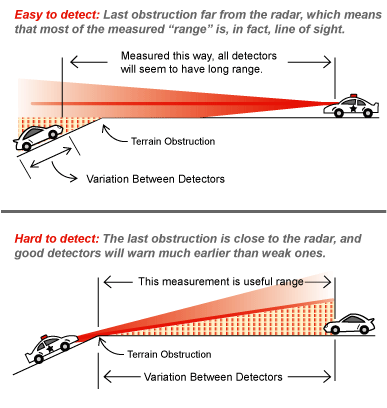
Use a balanced mode and stay extra aware of hidden enforcement spots. Roads with hills, curves, and less traffic can make signal behavior less predictable. A detector is helpful here, but terrain can limit warning time.
Night driving
Keep the screen brightness lower and the volume clear enough to hear. At night, visual alerts matter less if the detector is too bright or too dim. I like a setup that does not distract me but still gets my attention immediately.
How to stay legal and responsible
Radar detector laws are not the same everywhere. In many U.S. states, passenger cars can legally use them, but some places restrict them in commercial vehicles or specific jurisdictions. Always check local and state rules before you use one.
If you drive across state lines, do not assume the rules stay the same. That is a common trap. A quick check before a trip can save money and hassle later.
Responsible use also means respecting other drivers. The point is not to turn driving into a game. The point is to stay informed, reduce surprises, and make safer choices on the road.
Frequently Asked Questions of How to use a radar detector
Do radar detectors work everywhere?
No, they do not work perfectly in every situation. They are most useful on open roads with radar-based enforcement, but they may offer less warning against instant-on radar, laser, or certain hidden setups.
Can a radar detector detect police from far away?
Sometimes, yes, but not always. Detection range depends on terrain, traffic, signal type, and how the officer is using the equipment. Open roads usually give you better range than crowded city streets.
Should I use city mode or highway mode?
Use city mode in busy urban areas and highway mode on open roads. City mode cuts false alerts, while highway mode gives you the longest possible range. If your detector has auto mode, that can be a good middle ground.
Are expensive radar detectors worth it?
Often, yes, if you drive a lot. Higher-end models usually offer better range, stronger filtering, GPS features, and better laser handling. If you only drive occasionally, a midrange model may be enough.
How often should I update my radar detector?
Update it whenever the manufacturer releases new firmware or database files. Regular updates help improve performance, especially for GPS alerts and false alert filtering. If your model has no update feature, check it for proper function before long trips.
Can a radar detector stop me from getting a ticket?
No device can guarantee that. A radar detector can give you a warning, but your speed, road conditions, and enforcement method still matter. Safe driving is always the real protection.

Conclusion
Using a radar detector the right way comes down to three things: proper setup, good judgment, and steady attention. Once you know how to mount it, read alerts, and adjust settings for the road, it becomes a useful driving tool instead of a confusing gadget.
The best results come when you treat it as a helper, not a shortcut. Learn your device, keep it updated, and use it with calm focus every time you drive. If you want to make a smarter choice on the road, start with those basics today and keep learning as you go.
If this guide helped, explore more road safety tips, compare detector features before buying, and share your own experience in the comments.