ANCEL AD530 Troubleshooting: Quick Fixes For Common Issues
Most ANCEL AD530 problems come from weak power, poor vehicle compatibility, loose connections, or outdated scanner software.
The ANCEL AD530 is a useful OBD2 diagnostic tool, but even a good scanner can show errors, fail to connect, or display confusing data. This guide explains ANCEL AD530 troubleshooting in clear steps, based on common OBD2 faults, safe testing methods, and practical scan-tool use.

What the ANCEL AD530 Does
The ANCEL AD530 reads diagnostic trouble codes from many vehicles that follow OBD2 or EOBD standards. It can help you check engine faults, view live data, clear codes, review freeze-frame data, and check emissions readiness.
Common functions may include:
• Reading and clearing check engine codes
• Viewing live sensor data
• Checking I/M readiness monitors
• Displaying freeze-frame information
• Testing oxygen sensor data on supported vehicles
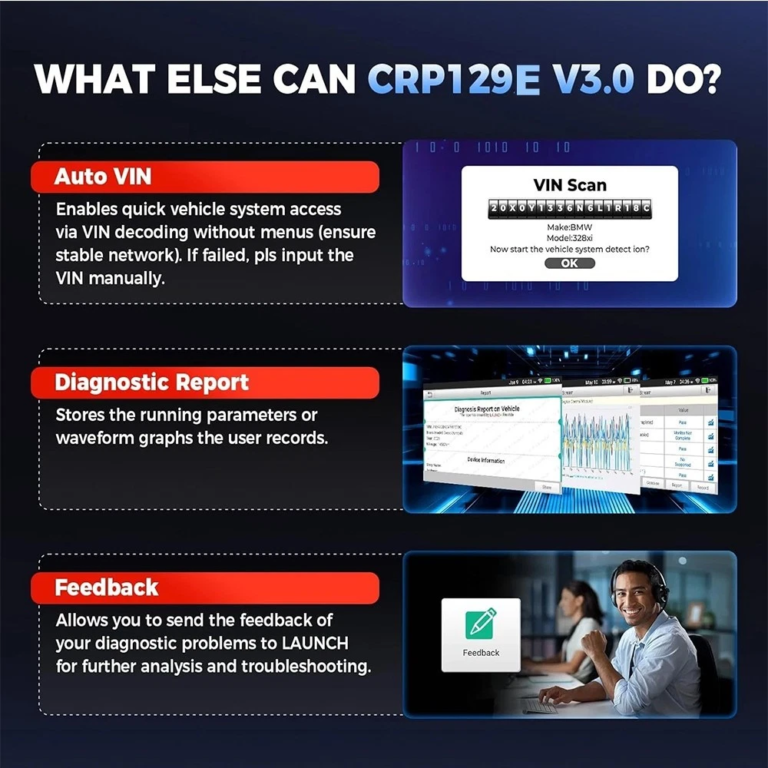
• Checking vehicle information, such as VIN
• Showing battery or module voltage
The exact functions depend on the vehicle, model year, engine, and communication system. A scanner may support a feature in general but still lack access to that feature on a specific car.
Think of the AD530 as a translator. Your car speaks through control modules and data networks. The scanner reads that data and turns it into codes and numbers you can understand. If the connection, power, or language does not match, the translation fails.

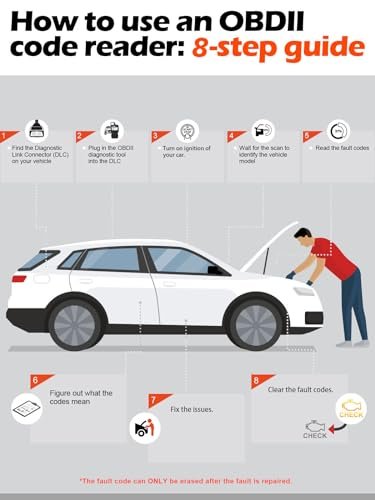
ANCEL AD530 Troubleshooting: Scanner Will Not Turn On
If the ANCEL AD530 screen stays dark, start with the vehicle power supply. The scanner usually receives power through the OBD2 port, so it does not need a separate battery for normal use.
Try these steps:
-
Turn the ignition key to the ON position without starting the engine.
-
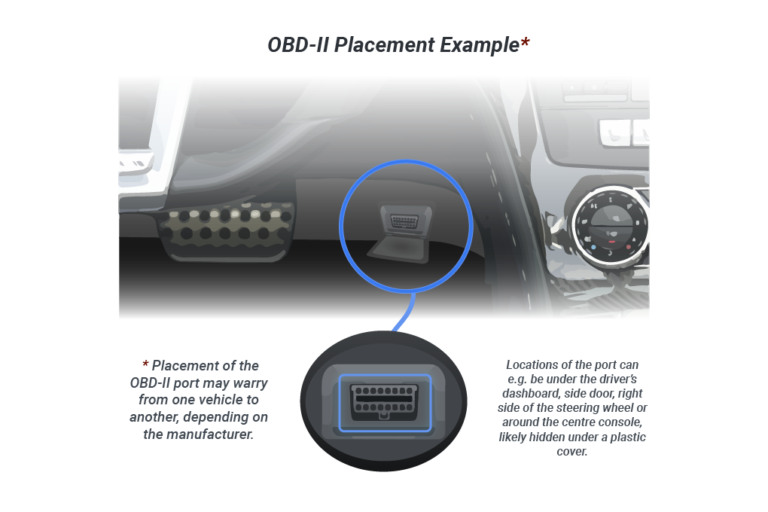
Plug the scanner firmly into the OBD2 port.
-
Check whether the screen lights up.
-
Try the scanner on another compatible vehicle.
-
Inspect the connector for bent, dirty, or pushed-back pins.
-
Check the vehicle fuse linked to the diagnostic connector.
Most OBD2 ports have a power pin and ground pins. If the power supply is missing, the scanner may appear dead. A blown accessory fuse is a common cause, especially after installing a radio, dash camera, or aftermarket device.
If the AD530 works on another vehicle, the scanner is likely fine. Focus on the first vehicle’s fuse, wiring, or diagnostic port. If it fails on every vehicle, inspect the cable and contact the seller or manufacturer before opening the unit.
A mistake I often see during basic scan checks is testing with the ignition fully off. The scanner may receive no power until the key is turned to ON. This small step saves a great deal of confusion.

ANCEL AD530 Cannot Connect to the Vehicle
A connection error means the scanner cannot communicate with one or more vehicle control modules. It does not always mean the car has a serious fault.
Use this process:
• Confirm that the vehicle supports OBD2 or EOBD.
• Turn the ignition to ON.
• Keep the engine off during the first connection attempt.
• Disconnect other devices from the OBD2 port.
• Push the scanner straight into the port.
• Select the correct vehicle menu, if the scanner asks for one.
• Try again after turning the ignition off for 30 seconds.
Some vehicles use a different communication protocol than others. Most US cars sold from the 1996 model year onward support OBD2 for emissions diagnosis. However, support for body, transmission, airbag, or anti-lock brake systems can vary.
A damaged OBD2 port can also block communication. Look for loose terminals, corrosion, water, or an aftermarket alarm system. Do not force the connector, because bent terminals can create a second problem.
If the AD530 connects to the engine but not ABS or SRS, that may be a support limit rather than a fault. Many basic scanners read engine codes well but do not access every manufacturer-specific module.

ANCEL AD530 Reads No Codes
A “no codes” result does not always mean the vehicle has no problem. It means the scanner found no stored or pending emissions-related codes in the system it checked.
Check the following:
• Is the check engine light on?
• Did the problem happen only once?
• Are the codes pending rather than confirmed?
• Has someone recently cleared the codes?
• Is the issue related to ABS, airbag, body, or transmission control?
• Is the engine running poorly without meeting the code-setting limit?
Some faults need several drive cycles before the computer stores a confirmed code. A sensor can also work poorly while staying within the computer’s expected range. For example, a slow oxygen sensor may affect fuel use before it sets a clear fault.
Do not clear codes before writing them down. Clearing codes removes useful clues and resets emissions monitors. It can also make a vehicle appear ready for inspection when it is not.
When the AD530 shows no code, review live data and freeze-frame information if available. Look for unusual coolant temperature, fuel trim, engine speed, oxygen sensor activity, or throttle position.

ANCEL AD530 Displays an Error Message
Error messages can appear for several reasons. The wording matters, so write it down before trying random fixes.
Common causes include:
• Low vehicle voltage
• Ignition switched off
• Unsupported vehicle system
• Poor connector contact
• Communication interrupted
• Incomplete software data
• A scanner firmware issue
Start by turning the ignition off. Remove the scanner, wait about 30 seconds, and reconnect it. Then turn the ignition to ON and try the scan again.
If the car battery is weak, voltage may drop during the scan. A healthy resting battery often measures near 12.6 volts, while a much lower reading may suggest a discharged or aging battery. Voltage readings vary with temperature and battery condition, so use a proper multimeter for confirmation.
Never disconnect the vehicle battery just to remove an error message unless the repair procedure specifically calls for it. Battery removal can erase learned settings, reset monitors, and create new warning lights.

ANCEL AD530 Cannot Clear a Trouble Code
The AD530 can usually clear a code only when the ignition is on and the engine is off. Some vehicles also require a stable connection during the erase process.
Follow these steps:
-
Record every stored and pending code.
-
Read the freeze-frame data.
-
Repair the cause of the fault.
-
Turn the ignition to ON with the engine off.
-
Connect the AD530.
-
Choose the code-clear function.
-
Confirm the erase command.
-
Turn the ignition off, wait, and rescan.
If the code returns at once, the problem is still present. If it returns after a short drive, the computer may have detected the same fault again. Clearing a code does not repair the vehicle. It only removes the warning from memory until the system runs its checks again.
Some permanent codes cannot be erased with a scan tool. They disappear only after the vehicle completes its required drive cycles and confirms that the fault is fixed.
This is one of the most important lessons in ANCEL AD530 troubleshooting: do not treat code clearing as a repair. A code is a clue, much like a fever is a clue. Removing the number does not cure the cause.

ANCEL AD530 Shows Incorrect Live Data
Live data can look wrong when the engine is cold, the sensor is operating normally, or the scanner uses a different display format. Always compare readings with engine temperature and operating conditions.
Useful checks include:
• Coolant temperature should usually rise smoothly after startup.
• Engine speed should match the actual idle speed.
• Throttle position should change as the pedal moves.
• Fuel trim should not remain extremely high or low without a reason.
• Oxygen sensor readings should respond when the engine changes load.
• Intake air temperature should be close to the surrounding air when the engine is cold.
Do not diagnose a sensor from one number alone. A coolant sensor may show a sensible value at idle but fail during a cold start. A throttle sensor may look normal at rest but produce gaps as the pedal moves.
Fuel trim data also needs care. Positive trim means the computer is adding fuel. Negative trim means it is removing fuel. Vacuum leaks, low fuel pressure, dirty injectors, and exhaust leaks can all affect the reading.
The AD530 displays data from the vehicle computer. It cannot confirm whether a sensor, wire, connector, or control module is physically good. Use a wiring diagram, a multimeter, and a service manual for final testing.
ANCEL AD530 Software and Firmware Troubleshooting
Some versions of the AD530 may need updates to improve vehicle coverage or correct software issues. Update instructions can vary by hardware version, region, and seller.
Before updating:
• Confirm the exact scanner model.
• Use the official update method for that model.
• Charge or power the computer used for the update.
• Use a reliable USB cable if one is required.
• Do not unplug the scanner during the update.
• Keep the update software open until it confirms completion.
A failed update can leave the tool unable to start or unable to recognize vehicles. If an update stops, do not repeatedly disconnect the device. Save the error message and follow the recovery instructions for your specific unit.
Be careful with unofficial update files. A file for another ANCEL model may not work on the AD530. Product names can look similar, but the internal software may be different.
ANCEL AD530 Troubleshooting for ABS, SRS, and Transmission Codes
The AD530 may not access every module on every vehicle. Engine and emissions diagnostics are the most consistent part of OBD2. ABS, SRS, transmission, body, and manufacturer-specific systems often require extra coverage.
If the scanner cannot read an ABS or airbag system:
-
Check the product specifications for that vehicle.
-
Confirm the warning light is active.
-
Try the correct system menu instead of generic OBD2.
-
Check battery voltage.
-
Inspect related fuses and wiring.
-
Use a professional or brand-specific scanner if needed.
Never probe airbag wiring casually. SRS circuits can contain stored energy, even after the ignition is off. Follow the vehicle service instructions and disconnect the battery only when the repair procedure requires it.
A code reader limitation is not the same as a vehicle fault. Many owners replace good parts because they assume “no communication” means the module is dead. Check power, ground, network wiring, and tool compatibility first.
How to Read ANCEL AD530 Codes Correctly
A code such as P0301 has a standard structure. The first letter identifies the system, while the numbers add more detail.
The main code groups include:
• P codes for powertrain systems
• B codes for body systems
• C codes for chassis systems
• U codes for communication faults
The final digits help identify the fault area. For example, P0301 usually points to a cylinder one misfire. It does not prove that the cylinder’s spark plug is bad. The cause could be ignition, fuel, compression, air, or wiring.
Use a logical test order:
-
Read all codes.
-
Look for related codes.
-
Check freeze-frame data.
-
Inspect simple causes first.
-
Test the suspected circuit.
-
Repair the confirmed cause.
-
Clear the code and complete a road test.
-
Rescan the vehicle.
Online code definitions can be useful, but generic descriptions may miss vehicle-specific details. Always treat the code as a starting point, not a verdict.
ANCEL AD530 I/M Readiness Problems
The I/M readiness screen shows whether the vehicle’s emissions monitors have completed their self-tests. A monitor may show ready, not ready, or unsupported.
Monitors can reset when:
• Trouble codes are cleared
• The battery is disconnected
• The battery becomes fully discharged
• The control module loses memory power
A vehicle may need a specific drive cycle before all monitors become ready. The cycle can include cold starts, steady highway speed, city driving, deceleration, and extended idle. The exact pattern varies by vehicle.
Do not drive in an unsafe way just to complete a monitor. Follow the manufacturer’s drive-cycle instructions and local inspection rules. Some regions allow one monitor to remain incomplete, while others have stricter requirements.
The AD530 can show readiness status, but it cannot force a monitor to complete. If a monitor stays incomplete, look for a pending code, unusual sensor data, or a vehicle condition that prevents the test.
A Safe ANCEL AD530 Diagnostic Workflow
A repeatable process helps prevent wrong repairs. Use this simple workflow whenever the check engine light appears.
-
Park safely and apply the parking brake.
-
Check the battery condition.
-
Inspect the OBD2 port and scanner plug.
-
Turn the ignition to ON.
-
Connect the AD530.
-
Read stored, pending, and permanent codes.
-
Save freeze-frame and live data.
-
Search for related technical information.
-
Inspect wires, connectors, hoses, fuses, and fluid levels.
-
Test the suspected part before replacing it.
-
Clear codes only after the repair.
-
Road-test the vehicle and scan it again.
This method reduces guesswork. In practical diagnostic work, the most expensive mistakes often come from replacing a part before checking a loose connector or broken wire.
Keep notes during the test. Record the outside temperature, engine temperature, code status, and conditions when the fault occurred. Small details often connect the dots later.
Common Mistakes to Avoid
ANCEL AD530 troubleshooting is easier when you avoid common scan-tool errors.
• Do not scan with the ignition off.
• Do not clear codes before recording them.
• Do not assume every code identifies a failed part.
• Do not ignore battery voltage.
• Do not use a random firmware file.
• Do not force the OBD2 connector.
• Do not test airbag circuits without proper safety steps.
• Do not erase a code before checking freeze-frame data.
• Do not assume a “no code” result proves the car is healthy.
• Do not rely on one live-data value without testing its pattern.
A scanner is a diagnostic aid, not a crystal ball. It gives better answers when you combine its information with visual checks, electrical tests, and sound repair methods.
When to Stop DIY Troubleshooting
Some problems need professional help. Stop and seek qualified service when you find damaged wiring, repeated communication faults, airbag warnings, high-voltage hybrid components, or signs of module damage.
You should also get help when:
• The same code returns after a verified repair.
• Multiple modules show communication errors.
• The vehicle will not start after electrical work.
• The battery voltage is unstable.
• The scan tool cannot identify a known-compatible vehicle.
• The repair requires programming or security access.
A professional technician may use a factory scan tool, oscilloscope, wiring diagrams, and module test equipment. The AD530 remains useful, but its limits matter. Good troubleshooting includes knowing when the next test is beyond the tool.
Frequently Asked Questions About ANCEL AD530 Troubleshooting
Why will my ANCEL AD530 not turn on?
Check the ignition position, OBD2 fuse, scanner plug, and port terminals. Test the AD530 on another compatible vehicle to determine whether the fault is in the scanner or the car.
Can the ANCEL AD530 clear all vehicle codes?
It can usually clear supported engine and emissions codes, but coverage varies by vehicle and system. ABS, SRS, transmission, body, and permanent codes may require extra coverage or a professional scan tool.
Why does the ANCEL AD530 say no communication?
The cause may be low voltage, a blown fuse, a damaged OBD2 port, an incorrect ignition position, or unsupported vehicle coverage. Disconnect other OBD devices and test the scanner on another compatible vehicle.
Why does a code return after I erase it?
The code returns when the vehicle detects that the original fault still exists. Inspect and test the related circuit or part instead of repeatedly clearing the warning.
Can I use the ANCEL AD530 with a diesel vehicle?
Compatibility depends on the vehicle’s OBD2 or EOBD system and model year. Check the scanner’s supported vehicle list before buying or using it for a specific diesel model.
Does clearing codes fix the car?
No. Clearing codes only removes stored information and resets some monitors. The warning will return if the underlying fault remains.
How do I update the ANCEL AD530?
Use the update method provided for your exact AD530 hardware version. Avoid unofficial files, and do not disconnect the scanner during an active update.
Conclusion
ANCEL AD530 troubleshooting starts with simple checks: confirm vehicle power, use the correct ignition position, inspect the OBD2 port, and verify compatibility. Read and save codes before clearing them, then use freeze-frame data, live readings, visual checks, and electrical tests to find the real cause.
The scanner can save time, but it cannot replace careful diagnosis. Use this guide as a step-by-step plan, know the tool’s limits, and seek professional help for safety systems or complex network faults. Explore your vehicle’s service information, keep useful scan notes, and share your results if this guide helped you.