70mai Dash Cam Vs Garmin: Best Choice For Drivers
70mai often wins on video value, while Garmin leads in software polish, safety features, and simple daily use.
Choosing between the 70mai Dash Cam vs Garmin is not just a question of image quality. Both brands make capable cameras, but they serve different drivers. 70mai often packs stronger hardware into a lower price, while Garmin focuses on compact design, dependable controls, and a smooth user experience. This guide compares video quality, night driving, features, storage, apps, reliability, and value so you can choose with confidence.
70mai Dash Cam vs Garmin: Quick Comparison
The 70mai Dash Cam vs Garmin debate usually comes down to value versus convenience. 70mai models often offer higher video resolution, larger screens, or more advanced parking features for the money. Garmin cameras tend to feel more refined and easier to use from the first drive.
The right choice also depends on the model. A premium 70mai A810 should not be compared with a basic Garmin Mini 2. Likewise, a Garmin Dash Cam X310 has features that a budget 70mai camera may not match.
| Feature | 70mai | Garmin |
|---|---|---|
| Main strength | High value and strong video hardware | Ease of use and polished software |
| Video resolution | Often 2K, 4K, or dual-channel options | Commonly 1080p, 2K, or 4K, depending on model |
| App experience | Feature-rich but may need more setup | Clean and simple on supported models |
| GPS | Available on many models | Common on mid-range and premium models |
| Parking mode | Often requires a hardwire kit | Available on selected models and kits |
| Voice control | Available on some models | Available on selected newer models |
| Cloud features | Varies by model and region | Garmin Vault is available on supported cameras |
| Best for | Drivers seeking maximum hardware value | Drivers who want a simple, polished system |
The 70mai Dash Cam vs Garmin choice is similar to choosing between a feature-packed phone and a simpler premium phone. One may give you more tools, while the other may reduce daily friction.
70mai Dash Cam vs Garmin: Brand Differences
70mai is known for offering many dash cam models at different price points. Its range includes small front cameras, dual-channel systems, 4K models, and cameras with unusual designs, such as the Omni series with a rotating lens.
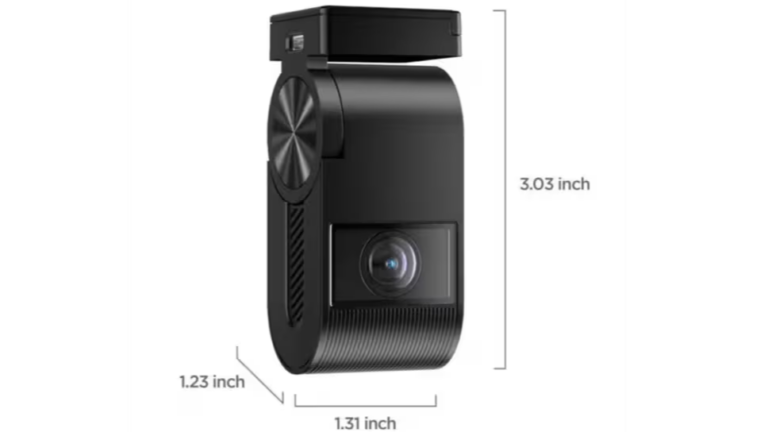
Garmin takes a more focused approach. Its lineup includes compact models such as the Dash Cam Mini 2, standard models such as the Dash Cam 57 and 67W, and newer premium options such as the Dash Cam X310. Garmin also connects its cameras with a wider ecosystem of navigation and vehicle accessories.
In practical use, 70mai often gives you more specifications for your money. Garmin usually gives you fewer setup decisions and a more consistent experience.
That difference matters after installation. A dash cam should record every trip without demanding attention. A camera with impressive features is less useful if the app is confusing, the memory card fails, or the power cable gets in the way.
Which brand has better build quality?
Both brands make well-built cameras, but the exact model matters more than the logo. Garmin products often have a compact, sturdy feel and clear physical controls. 70mai cameras can also feel solid, though some lower-cost models use more basic mounts and plastic finishes.
Heat is a major factor for every dash cam. A camera mounted behind the windshield may sit in extreme temperatures during summer. Use a high-quality microSD card, keep the lens clean, and check the manufacturer’s operating limits.
Video Quality and Image Detail
Video quality is one of the most important parts of the 70mai Dash Cam vs Garmin comparison. A dash cam must capture readable details such as license plates, road signs, traffic lights, and lane markings.
70mai often has the edge in resolution. Models such as the A810 can record in 4K, while other models offer 2K video at a lower cost. Higher resolution can preserve more detail, especially when a vehicle is a few car lengths away.
Garmin also offers high-resolution cameras, but some popular models record at 1080p or 1440p. Good image processing can make up for some resolution differences. A well-tuned 1440p camera may produce more useful footage than a poorly tuned 4K camera.
Resolution is not the whole story. Look for:
- A wide dynamic range for bright skies and dark roads
- A strong image sensor for night scenes
- A fast shutter response for moving vehicles
- Good lens clarity at the edges of the frame
- Stable video without excessive vibration
- A suitable field of view without heavy distortion
A wide lens captures more of the road, but an extremely wide lens can make distant objects look smaller. This is why a balanced field of view often works better than the widest possible view.
70mai video strengths
70mai often targets drivers who want more detail at a lower cost. A 2K or 4K model can give you extra room to crop video after an incident. Some models also support front and rear recording, which creates a fuller view of a collision.
The tradeoff is storage. High-resolution video uses more space. A 4K camera may fill a memory card faster than a 1080p model, especially when you use a rear camera too.
Garmin video strengths
Garmin’s video quality is usually consistent and easy to access. Its cameras are designed for everyday recording rather than complex production work. Many drivers will find Garmin footage clear enough for insurance evidence and routine road incidents.
Garmin’s premium models may offer improved detail, HDR, and advanced driver assistance features. However, you should check the exact model before buying because specifications vary across the lineup.
Night Vision and Low-Light Recording
Night recording is where many dash cams show their limits. A camera may look excellent in daylight but lose plate detail when headlights, street lamps, and dark roads compete in the same frame.
The 70mai Dash Cam vs Garmin night-performance result depends on the sensor and software in each model. Some 70mai cameras use Sony STARVIS sensors, which are known for strong low-light performance. Garmin also uses capable sensors and image processing in selected models.
In real driving, exposure control matters greatly. A camera that overexposes headlights may create large white spots. A camera that makes the whole scene too dark may hide pedestrians, signs, or vehicles.
For better night footage:
- Mount the camera close to the center of the windshield.
- Clean the glass inside and outside.
- Remove stickers or tint that sit in front of the lens.
- Turn off cabin lights that reflect on the windshield.
- Use a quality memory card to prevent corrupted files.
- Review test footage from your own type of roads.
A personal testing lesson is simple: do not judge a dash cam only from a short daytime sample. Drive past parked cars, oncoming traffic, and unlit streets at night. That is where the real difference appears.

Features: GPS, Wi-Fi, Voice Control, and Parking Mode
Modern dash cams do more than record video. The 70mai Dash Cam vs Garmin comparison also includes GPS data, phone access, voice commands, and parking surveillance.
GPS tracking
GPS can record speed, location, and travel direction. This information may help explain where an event happened, but it can also raise privacy concerns. Check whether GPS can be disabled if you prefer video without location data.
Garmin includes GPS in many of its mid-range and premium cameras. 70mai offers GPS on selected models, sometimes through a separate GPS mount or built-in hardware.
Wi-Fi and smartphone apps
Wi-Fi lets you download clips without removing the memory card. This is useful after a crash because you can save the file before the camera overwrites it.
The 70mai app usually offers many controls and settings. Garmin’s app experience is often simpler. Neither approach is automatically better. Drivers who enjoy customization may prefer 70mai, while drivers who want fewer menus may prefer Garmin.
Voice control
Voice control can help you save a video without touching the camera. This is useful when you cannot safely reach for your phone.
Garmin supports voice commands on selected models. 70mai also includes voice control on some newer cameras, but supported languages and commands can vary by region.
Parking mode
Parking mode monitors the vehicle while it is parked. It may use motion detection, impact detection, time-lapse recording, or buffered recording.
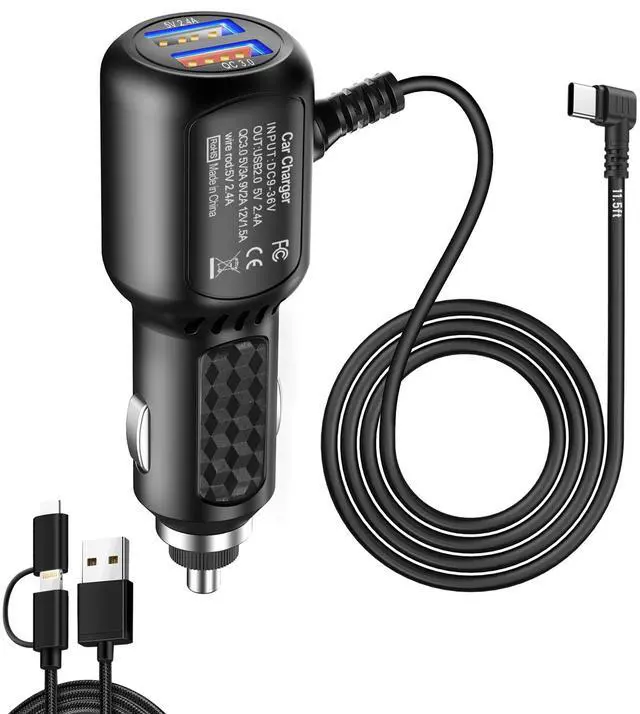
Most parking modes need constant power. A hardwire kit connects the camera to the vehicle’s fuse box and should include low-voltage protection. Without that protection, a camera could drain the car battery.
Parking mode is helpful, but it is not magic. A camera may miss an event if the view is blocked, the vehicle is hit outside the detection zone, or the system loses power. Always check local laws before recording in private parking areas.

App Experience and Ease of Use
The best dash cam is one you can operate without frustration. This is a major part of the 70mai Dash Cam vs Garmin decision.
70mai apps often provide detailed controls, firmware tools, and camera settings. The interface may feel busy at first, especially if the camera supports multiple recording modes. Once configured, many drivers rarely need to open the app.
Garmin generally focuses on a cleaner workflow. You can connect to the camera, view clips, and manage settings with fewer steps. Garmin’s broader ecosystem may also appeal to people who already use Garmin navigation products.
In my comparison checklist, I would test these tasks:
- Connect the phone to the camera
- Download a one-minute clip
- Find an emergency recording
- Change the recording resolution
- Update the firmware
- Format the memory card
- Turn parking mode on or off
If a camera makes these basic tasks hard, its advanced features will not save the experience. Ask yourself whether you want a camera that feels like a small computer or one that behaves more like an appliance.
Storage, Memory Cards, and File Safety
Dash cams record in a loop. When the card becomes full, the camera normally deletes the oldest regular files and keeps emergency files protected.
High-resolution video creates large files. A 4K 70mai camera may need more storage than a basic Garmin 1080p camera. A 128GB card can provide useful recording time, but the exact amount depends on resolution, frame rate, audio, and whether a rear camera is connected.
Use a high-endurance microSD card designed for continuous recording. Standard cards may work for a while but can fail sooner under constant write cycles and heat.
Follow these habits:
- Buy a card from a trusted retailer.
- Use the capacity listed in the camera manual.
- Format the card inside the camera when possible.
- Replace the card when errors or missing files appear.
- Save important clips to another device quickly.
- Check the camera after installing a new card.
One common mistake is assuming that a large card is always better. Some cameras support only certain capacities or file systems. Compatibility matters more than maximum size.

Installation and Daily Reliability
Installation should be simple, but small mistakes can affect recording quality. Place the lens behind the rear-view mirror if possible. This keeps the camera out of your main view while giving it a clear road scene.
A suction mount is easy to move between vehicles. An adhesive mount usually creates a cleaner, more stable installation. Before sticking the mount down, test the viewing angle and make sure the windshield is warm and clean.
The 70mai Dash Cam vs Garmin installation experience is often similar. Both brands may use USB power, a 12-volt adapter, and optional hardwire kits. Cable routing is usually the part that takes the most time.
Avoid these errors:
- Mounting the lens too high or too low
- Leaving the polarizing filter dirty
- Hiding the GPS antenna under metal
- Routing the cable near airbags
- Using a loose power adapter
- Forgetting to test recording after installation
A reliable camera should start recording every time the vehicle starts. Check the status light, listen for the startup sound, and review a short clip once a month.
Safety Features and Driver Alerts
Some Garmin and 70mai models offer driver assistance alerts. These may include forward collision warnings, lane departure warnings, front vehicle movement alerts, or traffic light notifications.
These tools can support attention, but they do not replace it. A dash cam cannot reliably understand every road scene. False alerts may occur in poor weather, heavy traffic, construction zones, or on winding roads.
Garmin has a strong reputation for navigation and driver-focused technology. Its alerts may appeal to drivers who want a familiar safety system. 70mai also offers advanced assistance features on selected models, often at a lower price.
Treat alerts as reminders, not as an automated driving system. Keep your eyes on the road and follow local laws about phone use and windshield-mounted devices.
Privacy, Legal Use, and Insurance Evidence
Dash cam rules vary by state and country. In the United States, windshield placement, audio recording, and privacy rules may differ by location. Do not block your view, and check local rules before recording conversations.
Video may help document an accident, but it does not automatically prove fault. Keep the original file, preserve metadata when possible, and avoid editing the only copy.
Cloud storage can add another layer of protection. Garmin Vault is available on supported products and plans. 70mai cloud availability depends on the model and region. Review subscription terms before treating cloud backup as essential.
Insurance companies may accept dash cam video as supporting evidence, but policies vary. Ask your insurer whether video can help with a claim. A clear file with a visible timestamp, road position, and surrounding traffic is usually more useful than a dramatic clip with missing context.

Price and Overall Value
Price changes often, so compare current package contents rather than relying on a list price. A camera may look cheaper until you add a GPS mount, rear camera, hardwire kit, memory card, and polarizing filter.
The 70mai Dash Cam vs Garmin value equation often favors 70mai for buyers who want maximum specifications. You may get 2K or 4K recording, a rear camera, and parking support for less than a comparable premium system.
Garmin may offer better value for drivers who prioritize simple operation and brand ecosystem support. Spending more can be worthwhile if it helps you install the camera correctly and use it for years.
Think about total cost:
- Front camera
- Rear camera
- High-endurance memory card
- Hardwire kit
- Installation
- Replacement adhesive mounts
- Cloud storage, if needed
A lower price is not a bargain if the camera is difficult to use. A higher price is not automatically better if you only need basic front recording.
Best Choice for Different Drivers
The 70mai Dash Cam vs Garmin decision becomes easier when you match the camera to your daily needs.
Choose 70mai if you want:
- Strong video resolution for the price
- More model choices
- Front and rear coverage
- Advanced parking options
- More control over settings
- A compact camera with modern features
Choose Garmin if you want:
- A polished and simple app
- Compact hardware
- Straightforward controls
- Reliable GPS on supported models
- A strong navigation technology ecosystem
- Less time spent adjusting settings
Consider another brand if you need:
- Professional fleet management
- Strong commercial cloud tools
- Specialized interior recording
- A large dealer and installer network
- Guaranteed local support for a business fleet
No brand wins every category. The best choice is the camera that meets your needs and remains reliable in your climate.

How to Choose the Right Model
Start with your driving pattern. A city driver who parks on a public street may value parking mode and rear coverage. A highway driver may care more about plate detail, GPS, and wide dynamic range.
Use this process:
- Decide whether you need front-only or front-and-rear recording.
- Choose 1080p, 2K, or 4K based on your budget and storage needs.
- Confirm the camera supports the memory card capacity you plan to use.
- Check whether GPS is built in or requires a separate mount.
- Add the cost of a hardwire kit for parking mode.
- Read the warranty terms for your country.
- Watch sample footage from day and night drives.
- Confirm that the app works with your phone.
- Check the camera’s size and mounting position.
- Test every function during the return period.
Do not buy based on resolution alone. Sensor quality, software, heat control, mounting stability, and file reliability all affect the final result.
Common Mistakes to Avoid
Many dash cam problems come from setup rather than defective hardware. A camera may record blurry footage because the protective film remains on the lens. Another may stop recording because the memory card is too slow or worn out.
Avoid placing the camera behind a tinted section of glass. Avoid pointing it at the sky, since this can make the road too dark. Also, do not assume that an emergency file is safe forever; copy important evidence to a phone or computer.
The biggest mistake in the 70mai Dash Cam vs Garmin debate is comparing brand names instead of exact models. Compare the sensor, resolution, frame rate, field of view, parking system, warranty, and included accessories.
Frequently Asked Questions About 70mai Dash Cam vs Garmin
Is 70mai better than Garmin for video quality?
70mai often offers higher resolution at a lower price, especially in its 2K and 4K models. Garmin can still produce clear footage, and its premium cameras may compete closely with 70mai in image quality.
Is Garmin more reliable than 70mai?
Garmin has a strong reputation for dependable consumer electronics and a polished user experience. Reliability also depends on the exact camera, memory card, heat exposure, installation, and firmware.
Which is better for night recording, 70mai or Garmin?
The answer depends on the model and sensor. Compare real night samples, because resolution labels alone cannot show how well a camera handles headlights, dark roads, and moving vehicles.
Does 70mai have GPS like Garmin?
Many 70mai cameras offer GPS, either built in or through a GPS-enabled mount. Garmin includes GPS on many models, but you should confirm the specification for the exact camera you plan to buy.
Do both brands support parking mode?
Selected models from both brands support parking mode. A hardwire kit is often required, and low-voltage battery protection is important to reduce the risk of draining your vehicle battery.
Which brand has the better dash cam app?
Garmin usually has a simpler and more polished app experience. 70mai often provides more settings and tools, which can be useful but may take longer to learn.
Can a dash cam lower my insurance cost?
Some insurers may offer discounts, but this is not guaranteed. Dash cam footage may help support an accident claim, so ask your insurance provider about its current policy.
What memory card should I use with either brand?
Use a high-endurance microSD card that matches the camera manufacturer’s recommended capacity. Format it in the camera and replace it when recording errors or corrupted clips begin to appear.
Conclusion
The 70mai Dash Cam vs Garmin choice depends on what you value most. 70mai is often the stronger pick for high resolution, extra features, and lower upfront cost. Garmin is often better for drivers who want a compact camera, simple controls, reliable GPS, and a refined software experience.
Compare exact models, not just brands. Check night footage, storage limits, parking requirements, app quality, warranty support, and the full installation cost before you buy.
Choose the camera you will install correctly, maintain regularly, and trust to record every trip. Explore current model specifications, select a high-endurance memory card, and share your dash cam experience with other drivers.