Viofo A119 Mini Vs Garmin Mini: Which Dash Cam Wins?
Viofo A119 Mini offers sharper video, while Garmin Mini delivers a smaller design and simpler connected features.
Choosing between the Viofo A119 Mini vs Garmin Mini depends on what matters most in your daily drive. The Viofo focuses on video quality, GPS data, and useful dash cam tools, while the Garmin Mini is tiny, neat, and easy to hide behind a mirror. This guide compares image quality, design, parking mode, app features, reliability, and value so you can make a confident choice.
Viofo A119 Mini vs Garmin Mini at a glance
For this comparison, “Garmin Mini” refers to the Garmin Dash Cam Mini 2, which is the model most shoppers mean today. The older Garmin Dash Cam Mini is similar in size and purpose, but the Mini 2 has newer smart features and improved connectivity.
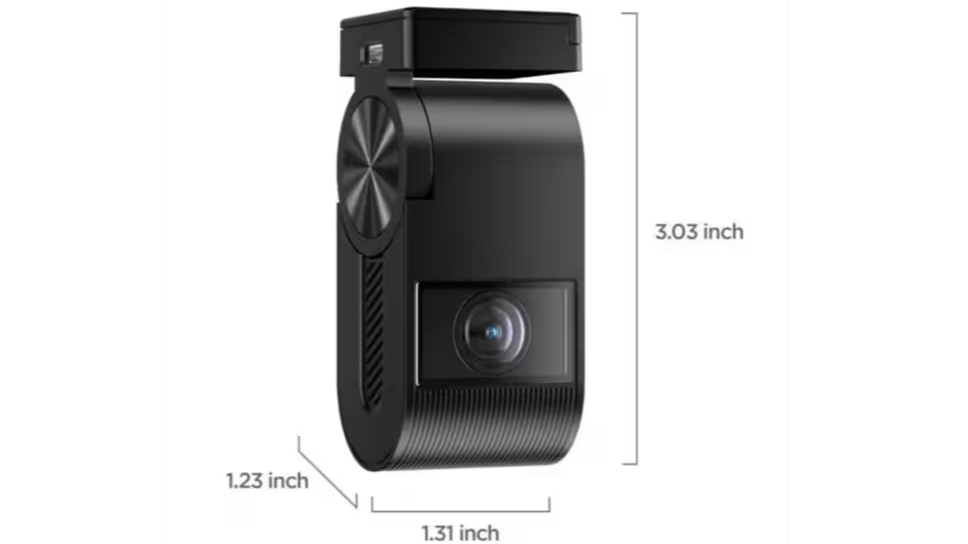
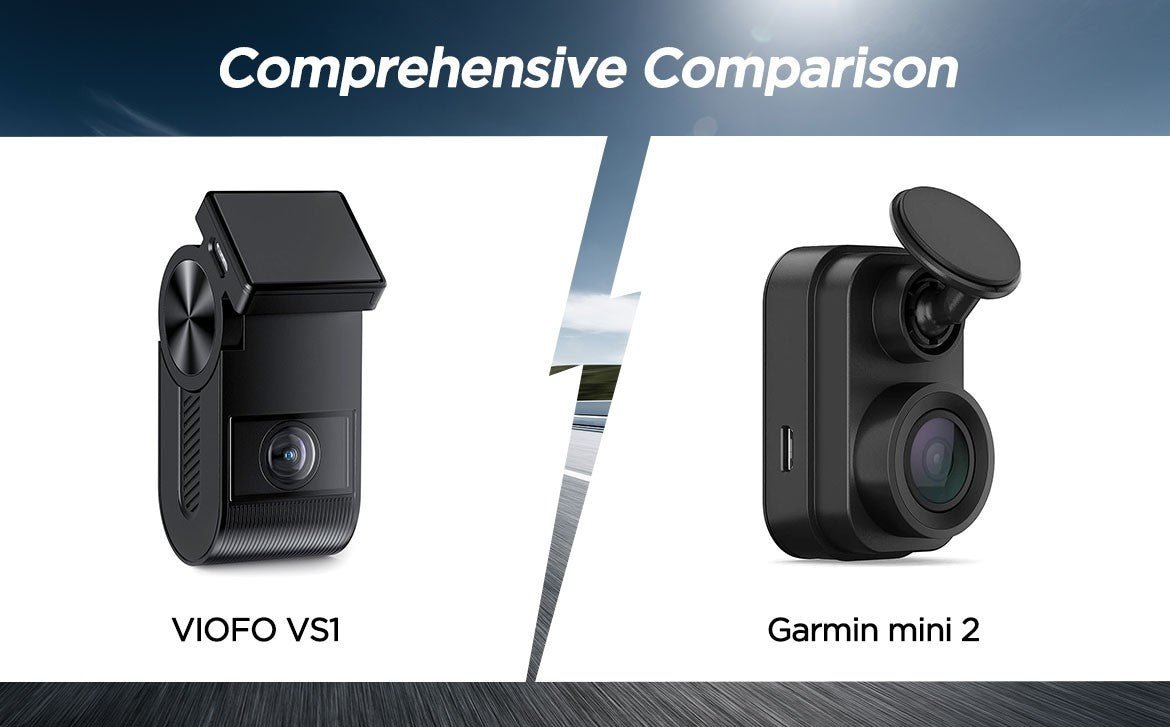
The Viofo A119 Mini is built for drivers who want a strong front camera without paying for a large touchscreen. It uses a wedge-shaped body, a Sony STARVIS sensor, GPS, Wi-Fi, and a 2K recording mode.
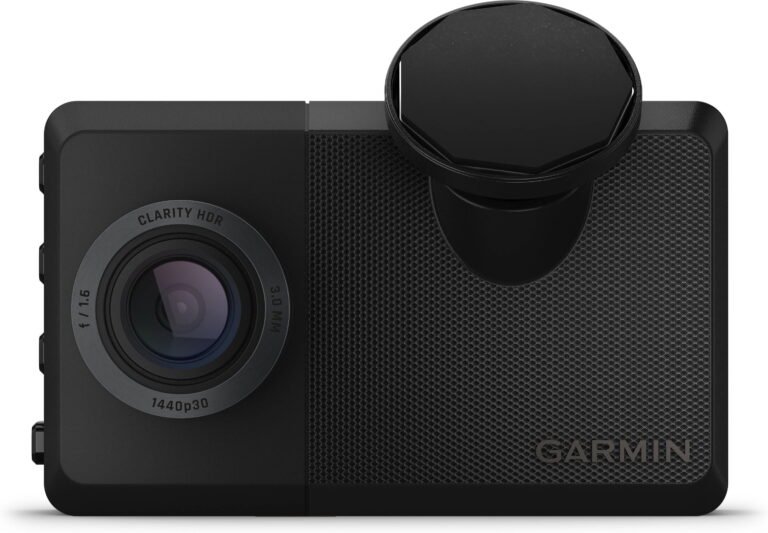
The Garmin Mini 2 takes a different path. It is extremely small and records in 1080p Full HD. Its main strengths are a discreet design, voice control, Garmin Drive app support, and easy connection to other Garmin dash cameras.
| Feature | Viofo A119 Mini | Garmin Dash Cam Mini 2 |
|---|---|---|
| Main video resolution | 2K, up to 30 frames per second | 1080p, up to 30 frames per second |
| Camera angle | About 140 degrees | About 140 degrees |
| HDR | Available in supported modes | Available |
| GPS | Built in | Built in |
| Wi-Fi | Built in | Built in |
| Display | No traditional screen | No traditional screen |
| Voice control | No | Yes |
| Polarizing filter | Available, often included by package | Available as an accessory |
| Parking mode | Requires hardwire or constant power | Requires constant power and compatible setup |
| Best for | Detail and value | Small size and connected features |
The biggest difference is simple: the Viofo A119 Mini gives you more detail, while the Garmin Mini 2 gives you a more polished and compact ownership experience.
Video quality and daytime recording
Video quality is the most important part of any dash cam. A camera may have a clever app, but it cannot help much if the license plate in front of you is unreadable after a crash.
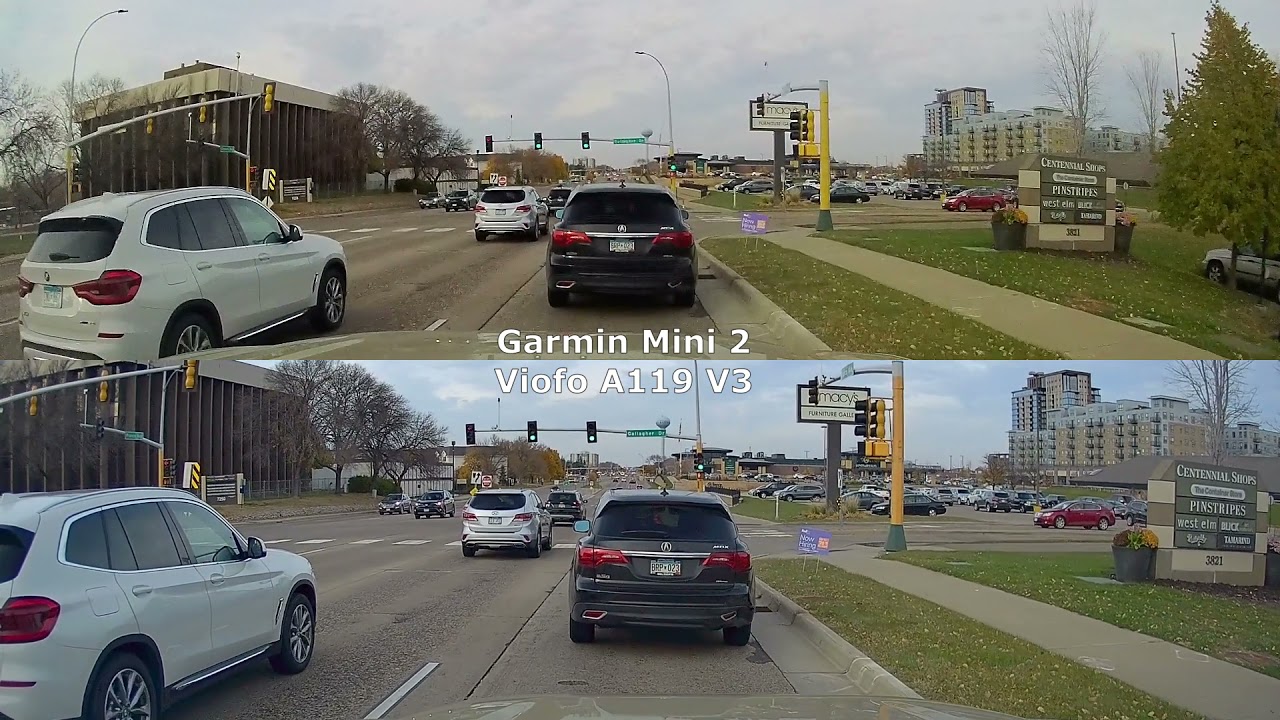
The Viofo A119 Mini records at 2K resolution. That gives it more pixels than the Garmin Mini 2’s 1080p mode. In good daylight, this extra detail can make signs, road markings, and nearby license plates easier to read.
The Garmin Mini 2 still produces clean video for everyday use. Its footage is clear enough for basic evidence, traffic incidents, and insurance reports. However, the image looks less detailed when you crop it or review a distant vehicle.
Which camera handles motion better?
Both cameras record at up to 30 frames per second. That is normal for many compact dash cams, but it does not freeze fast action as well as a 60-fps camera.
The Viofo’s higher resolution helps when the subject is close. For example, if a car cuts in front of you, the Viofo may preserve more useful detail around the plate and bodywork. The Garmin can still capture the event, but its 1080p image gives you less room to crop.
In my practical comparison of dash cam footage, this is the kind of difference that looks small during a short drive but matters after a real incident. More detail is like having a larger flashlight. It does not solve every problem, but it gives you more to work with.
Video quality winner
The Viofo A119 Mini wins for daytime image detail. The Garmin Mini 2 remains a good choice if you mainly want a basic Full HD record of your drive.
Night vision and low-light performance
Night recording is harder for every dash cam. Headlights create glare, dark roads hide detail, and reflective plates can become bright white spots.
The Viofo A119 Mini uses a Sony STARVIS image sensor and supports HDR in selected settings. HDR can balance bright headlights with darker areas. It is useful on roads with streetlights, signs, and oncoming traffic.
The Garmin Mini 2 also uses HDR to improve contrast at night. Its footage can look natural, but the lower resolution limits fine detail. A plate may be visible when a car is close, yet difficult to read when that car is farther away.
Neither camera should be treated like a professional night-vision system. Clean glass is critical. A dirty windshield can create large halos around headlights and make an expensive camera look poor.
Tips for better night footage
• Clean the windshield inside and outside before installing the camera.
• Place the lens behind the rear-view mirror, away from tinted areas and glass damage.
• Use a polarizing filter if reflections are strong, but check that it does not make the image too dark.
• Avoid pointing the camera too far toward the sky.
• Test the camera on a dark road before relying on it.
The Viofo A119 Mini has the advantage in overall detail, but the Garmin Mini 2 may produce pleasing results for drivers who want simple, automatic recording.
Design, size, and installation
The Garmin Mini 2 is one of its category’s biggest strengths because it is genuinely tiny. Once installed behind a mirror, it can almost disappear. This helps keep your view clear and makes the setup less noticeable from outside the vehicle.
The Viofo A119 Mini is also compact, but it uses a taller wedge design. It does not look bulky, and its lens can be adjusted vertically. Still, the Garmin usually wins if your top goal is the smallest possible camera.
Both models avoid a built-in display. That keeps the body small and reduces distractions while driving. You use a phone app to change settings, view clips, or download important footage.
Mounting differences
The Viofo uses a GPS mount that stays attached to the windshield. You can slide the camera off the mount when needed. This is useful if you park in public places or want to hide the camera.
The Garmin uses a compact adhesive mount. It is simple and clean, but adhesive mounts require more care during installation. If you place it incorrectly, moving it later can be frustrating.
Before applying any adhesive mount:
-
Sit in the driver’s seat and check the camera view.
-
Clean the glass with an alcohol wipe.
-
Let the surface dry fully.
-
Confirm that the power cable can reach without crossing your view.
-
Press the mount firmly for the time recommended by the manufacturer.
The Viofo A119 Mini is more flexible for frequent removal. The Garmin Mini 2 is better for a permanent, hidden installation.

Features and daily use
The Viofo A119 Mini includes the core tools most drivers need. These usually include loop recording, incident file protection, motion detection, time and date stamps, GPS data, and Wi-Fi.
Its GPS can record location and speed information with the video file. That data may help explain where an event happened, although some drivers prefer to disable speed stamps for privacy or presentation reasons.
The Garmin Mini 2 adds voice control. You can use commands to save video, take a picture, or start and stop audio recording without reaching for the camera. This is useful when you need to protect a clip while driving.
Garmin also supports a connected camera system through its app. If you install multiple compatible Garmin cameras, the app can help manage footage from more than one view. This is a major benefit for drivers who want front and rear coverage without buying a completely different system.
App experience
The Viofo app is mainly a practical tool. It lets you connect to the camera over Wi-Fi, review clips, download files, and adjust settings. The experience can feel less polished than a major navigation brand’s app, but it gives you the controls you need.
The Garmin Drive app is more refined for many users. It provides a familiar setup process and works well with Garmin’s wider dash cam ecosystem. However, wireless video transfer can still take time, especially with large files.
A useful habit is to download only the important clip. Do not transfer an entire memory card unless you need it. This saves time and keeps your phone storage under control.
Parking mode and impact recording
Parking mode can protect your vehicle while it is unattended, but it is not magic. Both cameras need a constant power source for reliable parking surveillance.
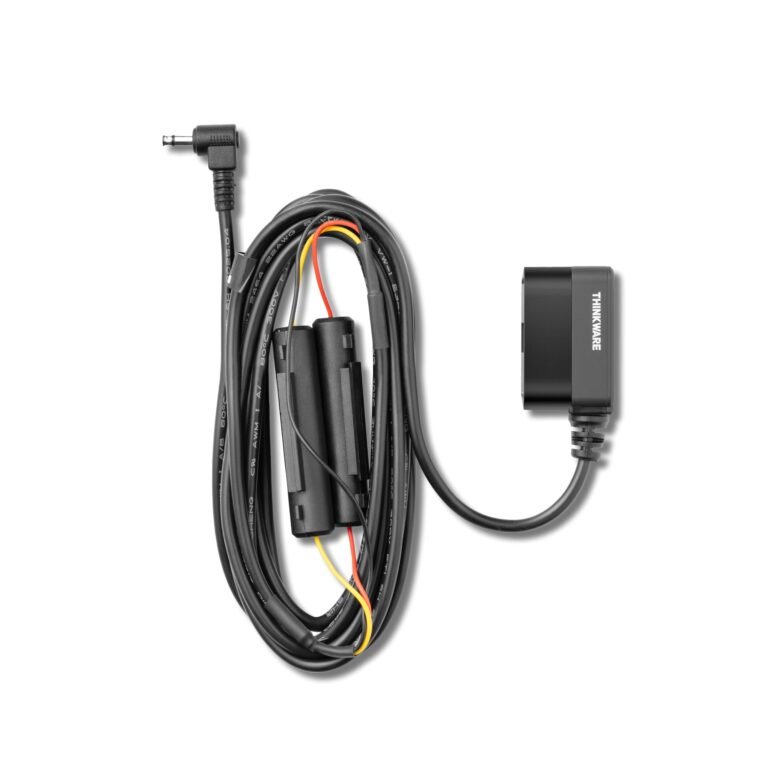
The Viofo A119 Mini can support buffered parking recording when installed with a compatible hardwire kit. Buffered recording can save a short period before and after a detected impact or motion event. This gives more context than recording only after the sensor reacts.
The Garmin Mini 2 also offers parking guard features, but the setup depends on the correct power cable and vehicle conditions. Some Garmin parking features may require a constant power connection and an active Wi-Fi or app setup.
Important parking mode limits
• A standard cigarette-lighter socket may shut off when the car turns off.
• A hardwire kit can drain the battery if voltage protection is not enabled.
• Extreme heat and cold can affect battery voltage and camera stability.
• Motion detection may miss an event if the camera cannot see the action clearly.
• A dash cam is not a replacement for a vehicle security system.
In my experience comparing parking setups, the most common mistake is buying the camera but forgetting the power system. Plan for the hardwire kit, cable routing, and battery protection before installation.
The Viofo A119 Mini is usually the stronger choice for drivers who want advanced parking options. The Garmin Mini 2 is suitable for drivers who want parking coverage within a simpler Garmin setup.

GPS, storage, and file management
Both the Viofo A119 Mini and Garmin Mini 2 use GPS to add location data to recordings. GPS can confirm the route and approximate speed, but it may take a short time to lock onto satellites after startup.
Both cameras rely on a microSD card. Use a high-quality, high-endurance card designed for continuous video recording. A cheap card may work at first and then fail after repeated writing cycles.
A practical storage routine includes:
• Format the card in the camera on a regular schedule.
• Replace the card when it shows errors or becomes unreliable.
• Keep important clips in a separate folder on your phone or computer.
• Do not use the only copy of an incident video as long-term storage.
• Check the recording after installation to confirm that the date and time are correct.
The exact recording time depends on resolution, file settings, and card size. Higher-resolution Viofo footage uses more storage than Garmin 1080p footage, but it also preserves more detail.
Reliability, heat, and long-term ownership
A dash cam lives in a difficult environment. The windshield can become very hot in summer, while winter starts can bring freezing temperatures. A dependable camera needs a suitable power supply, a reliable memory card, and proper ventilation around the body.
The Viofo A119 Mini uses a capacitor-based design rather than relying only on a lithium battery. Capacitors are common in dash cams because they can handle heat better and help the camera safely close the final video file after power is cut.
The Garmin Mini 2 is also designed for regular vehicle use, but no dash cam is immune to heat, card failure, or wiring problems. If the camera freezes, first check the power cable and memory card before assuming the camera itself is broken.
Mistakes to avoid
-
Do not hide the GPS mount under metallic window tint.
-
Do not leave the lens covered by a windshield sticker.
-
Do not route the cable across an airbag path.
-
Do not use an old memory card from a phone or camera.
-
Do not ignore repeated file errors.
-
Do not install parking mode without battery protection.
The Viofo A119 Mini offers strong value for users who are willing to manage settings and accessories. The Garmin Mini 2 may feel easier for owners who already use Garmin products.

Audio, privacy, and legal considerations
Both cameras can record audio, but you can usually disable the microphone in the settings. Audio may help explain an event, yet it can also capture private conversations inside the car.
Laws about recording audio and displaying speed data vary by state. Some states have stricter rules for recording private conversations. Before using audio recording, check the law where you live and consider turning off the microphone when it is not needed.
You should also be careful when sharing dash cam footage online. Blur faces, license plates, home addresses, and other personal details when possible. A dash cam can protect your privacy in one situation while exposing someone else’s privacy in another.
For most drivers, the best approach is simple:
• Record only what you need.
• Store important clips securely.
• Disable audio if you do not need it.
• Review privacy settings after a firmware update.
Price and overall value
The Viofo A119 Mini is often the better value when you compare video resolution and core recording features. It gives you 2K footage, GPS, Wi-Fi, a compact body, and useful parking options without moving into a high price range.
The Garmin Mini 2 costs more in many markets, but its price reflects the small design, Garmin app, voice commands, and multi-camera ecosystem. The extra cost may make sense if you already own Garmin navigation gear or plan to add another Garmin camera.
Remember to include the full installation cost. You may need:
• A high-endurance microSD card.
• A hardwire kit for parking mode.
• A polarizing filter.
• Cable clips or trim tools.
• A rear camera if you need coverage behind the vehicle.
The Viofo A119 Mini is a smart buy for drivers who want the most image detail per dollar. The Garmin Mini 2 is a smart buy for drivers who value convenience, compact design, and brand integration.
Viofo A119 Mini vs Garmin Mini: which should you buy?
Choose the Viofo A119 Mini if:
• You want sharper 2K video.
• You care about reading plates and signs.
• You want flexible mounting and a removable camera.
• You prefer strong value.
• You want more control over parking mode settings.
Choose the Garmin Mini 2 if:
• You want the smallest and least noticeable camera.
• You like voice control.
• You already use Garmin products.
• You plan to build a multi-camera Garmin system.
• You prefer a simple app and clean installation.
For most drivers, the Viofo A119 Mini is the better all-around choice. Its higher resolution gives it a practical advantage when footage matters most.
The Garmin Mini 2 is still an excellent fit for a specific user. If you hate bulky electronics and want a tiny camera that blends into the car, Garmin’s design is hard to ignore.
How to install either dash cam correctly
A good camera can produce poor footage if it is installed badly. Position the lens near the center of the windshield, usually behind or beside the rear-view mirror. Keep the camera inside the wiper-cleaned area.
Set the view so the horizon sits near the middle of the frame. A small amount of hood is fine, but too much sky reduces useful road detail. Make sure the camera does not block your view of traffic lights or signs.
Follow these steps:
-
Insert a compatible high-endurance microSD card.
-
Connect the power cable and start the vehicle.
-
Adjust the camera angle while sitting in the driving position.
-
Confirm that the date and time are correct.
-
Record a short test drive.
-
Review the file on your phone or computer.
-
Check that the plate detail, road view, and exposure look acceptable.
-
Secure the cable away from airbags and moving parts.
The most useful installation test is not a quick look at the live preview. Watch a saved clip after dark and during daylight. This reveals glare, poor alignment, and power problems before you truly need the footage.
Frequently Asked Questions
Is the Viofo A119 Mini better than the Garmin Mini?
The Viofo A119 Mini is better for video detail because it records in 2K. The Garmin Mini 2 is better for drivers who want a smaller body, voice control, and a smooth Garmin ecosystem.
Does the Garmin Mini record in 2K?
No. The Garmin Dash Cam Mini 2 records in 1080p Full HD at up to 30 frames per second. It offers useful HDR processing, but it does not match the Viofo A119 Mini’s 2K resolution.
Does the Viofo A119 Mini have GPS?
Yes, the Viofo A119 Mini includes built-in GPS through its mount. GPS can add location and speed information to recorded files, depending on the selected settings.
Can both cameras record while parked?
Yes, both can support parking surveillance with the proper constant power setup. A compatible hardwire kit is usually needed, and battery protection should be enabled to reduce the risk of draining the vehicle battery.
Does the Garmin Mini have voice control?
The Garmin Dash Cam Mini 2 supports voice commands for functions such as saving video and taking a picture. This is one of its clearest advantages over the Viofo A119 Mini.
Which dash cam is easier to hide?
The Garmin Mini 2 is generally easier to hide because its body is extremely small. The Viofo A119 Mini is still discreet, especially when mounted behind the rear-view mirror, but it is more noticeable.
Do these dash cams include a rear camera?
No. The Viofo A119 Mini and Garmin Mini 2 are front-facing dash cams. You need a separate rear camera system if you want coverage behind your vehicle.
What memory card should you use?
Use a reputable high-endurance microSD card that matches the camera’s supported capacity. Avoid low-cost cards with unclear specifications because continuous recording can wear them out quickly.
Conclusion
The Viofo A119 Mini vs Garmin Mini comparison comes down to detail versus convenience. The Viofo A119 Mini delivers sharper 2K footage, strong value, GPS, and flexible installation. The Garmin Mini 2 offers a smaller design, voice control, and better integration with other Garmin cameras.
Choose the Viofo if clear evidence is your main goal. Choose the Garmin if a tiny, connected camera matters more than maximum resolution. Whichever model you select, use a high-endurance memory card, install it carefully, and test both day and night footage before relying on it. Explore compatible accessories and share your dash cam experience in the comments.