How To Use An OBD2 Scanner: Easy Step-By-Step Guide
An OBD2 scanner reads your car’s trouble codes and live data, helping you find problems fast.
If you have ever seen a check engine light and felt that sinking feeling, you are not alone. Learning how to use an OBD2 scanner gives you a simple way to understand what your car is trying to tell you. I have used these scanners on daily drivers, older used cars, and even cars that seemed “fine” until a hidden code pointed to a real issue. Once you know the steps, the process is much easier than most people expect.

What an OBD2 scanner is and why it matters
An OBD2 scanner is a tool that connects to your car’s onboard diagnostic system. OBD2 stands for On-Board Diagnostics, version 2. It lets you read fault codes, check emissions data, and view live sensor readings from many vehicles made since 1996 in the U.S.
In plain words, it is like a translator for your car. Instead of guessing why a warning light came on, you can read the code and narrow down the cause. That can save time, reduce stress, and keep you from replacing the wrong part.
Most drivers first use an OBD2 scanner for a check engine light. But it can also help with rough idling, poor gas mileage, hard starts, and emissions test failures. The real value is that it turns vague symptoms into data you can use.
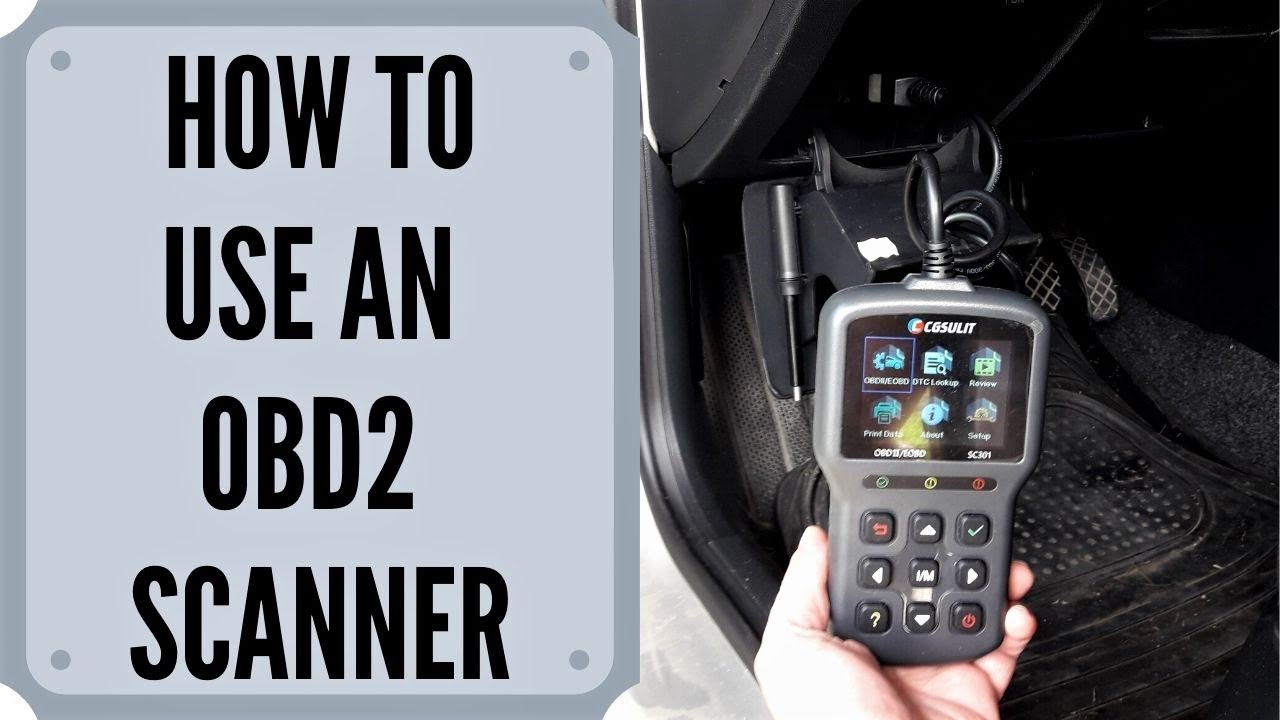
How to use an OBD2 scanner step by step
Using an OBD2 scanner is simple once you know where to look. I still remember the first time I used one on a friend’s sedan. The car felt weak, and everyone assumed it needed a new battery. The scanner showed a misfire code instead, which saved time and money.
Follow these steps:
-
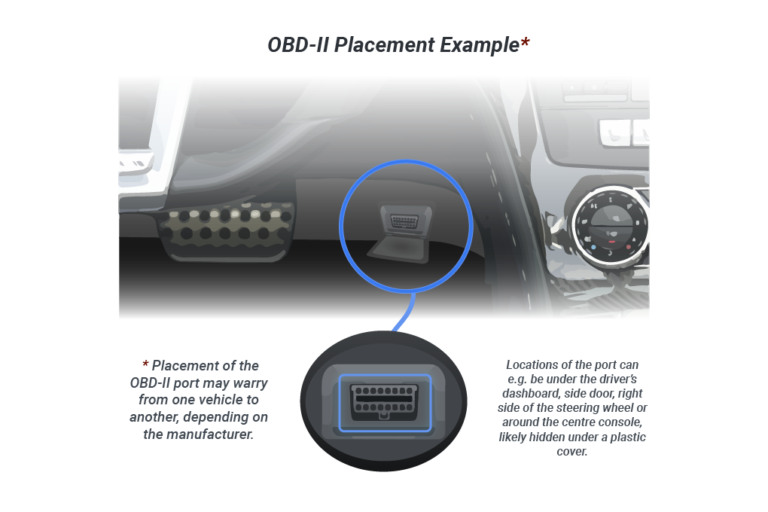
Find the OBD2 port
The port is usually under the dashboard, near the steering wheel. On most cars, it sits above the pedals or just to the left or right of the steering column. -
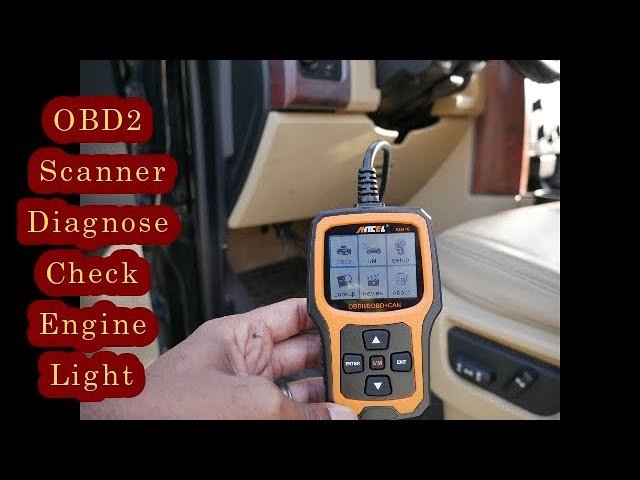
Plug in the scanner
Turn the ignition off first, then connect the scanner firmly to the port. The tool should power on if it gets power from the vehicle. -
Turn the ignition to ON
You do not always need to start the engine. Many scanners work with the key in the ON position so the car’s systems are active. -
Select the right menu option
Choose options like Read Codes, Scan Codes, or Diagnostics. Some scanners also let you view live data, freeze frame data, and readiness monitors. -
Read the trouble codes
The scanner will show codes such as P0300 or P0420. These are standardized codes that point to the system or issue that needs attention. -
Write the codes down
Do not rely on memory. I always suggest writing the code, the symptom, and the date so you can track the problem later. -
Look up the meaning
Use the code description in the scanner manual or a trusted repair source. One code often has more than one possible cause, so do not jump to conclusions too fast. -
Clear the code only after fixing the problem
If you clear the light without fixing the issue, it may come back. Clearing codes is useful after a repair, but it is not a repair by itself.
A scanner is most helpful when you treat it like a guide, not a magic wand. It points you in the right direction, but it does not always tell the whole story.
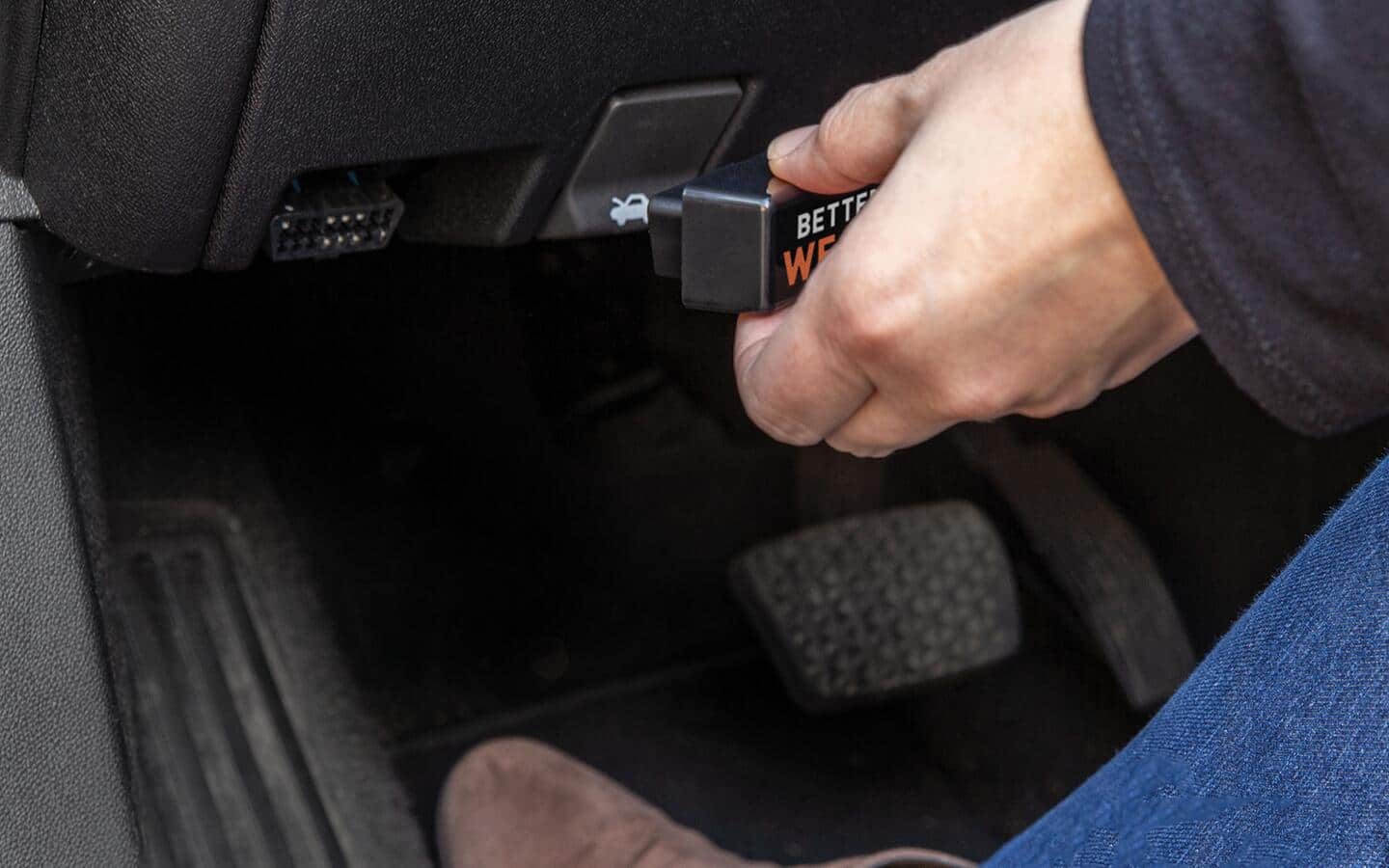
How to find the OBD2 port in your car
Finding the port is usually the first small win. On most vehicles, the OBD2 connector is a 16-pin trapezoid-shaped plug under the dash.
Common places include:
- Under the steering wheel near the fuse box
- Above the gas pedal area
- Near the hood release lever
- Under a small cover panel on the driver side
- Around the center console in some models
If you still cannot find it, check the owner’s manual. In my experience, most people miss it the first time because they are looking too high or too low. It is usually close to where your knees would be when sitting in the driver seat.
What the codes mean
OBD2 codes usually start with a letter and four numbers. The letter tells you the system:
- P means Powertrain
- B means Body
- C means Chassis
- U means Network or communication
Powertrain codes are the most common ones drivers see. These often involve the engine, transmission, fuel system, or emissions system.
Here are a few examples:
- P0300: Random or multiple cylinder misfire
- P0420: Catalyst system efficiency below threshold
- P0171: System too lean
- P0455: Large evaporative emissions leak
A code is not a final diagnosis. Think of it like a clue in a mystery. It tells you where to start looking, not always exactly what part to replace.
How to read live data and freeze frame data
Many scanners do more than just show trouble codes. They can also display live data, which means real-time sensor information from the vehicle.
Useful live data items include:
- Engine RPM
- Coolant temperature
- Oxygen sensor readings
- Fuel trim values
- Mass air flow readings
- Throttle position
Freeze frame data is also very useful. It shows the conditions when the code was set, such as speed, temperature, and engine load. That snapshot can help you understand what was happening when the problem occurred.
I have found freeze frame data especially helpful with intermittent issues. Sometimes a car runs fine in the driveway but fails under load or at highway speed. Freeze frame data often gives that missing clue.
How to clear codes the right way
Clearing a code is easy, but you should do it carefully. If you clear the code before fixing the cause, you may lose helpful information and delay the real repair.
Before clearing a code:
- Record the code first
- Note any symptoms
- Check for obvious causes like loose gas caps, damaged wires, or vacuum leaks
- Make sure the repair is complete
After the repair, use the scanner’s Clear Codes or Erase Codes function. Then drive the car normally and see whether the light returns. If it comes back, the issue may still be there.
One thing I learned early: never clear codes just to “make the light go away” before an inspection or sale. That may reset readiness monitors and can create bigger problems later.
How to use an OBD2 scanner for common car problems
An OBD2 scanner is handy for more than just warning lights. It can help you sort out several common issues.
Here are a few examples:
- Rough idle: Check misfire codes, fuel trims, and sensor data
- Poor gas mileage: Look at fuel trim, oxygen sensor readings, and coolant temperature
- Hard starting: Check battery voltage, crank sensor signals, and fuel system codes
- Emissions test failure: Review readiness monitors and emissions-related trouble codes
- Stalling: Look for misfire codes, throttle issues, or airflow problems
This is where the scanner really earns its keep. It helps you move from guessing to testing. That alone can prevent a lot of wasted money.
Best practices when using an OBD2 scanner
A scanner is only as useful as the person using it. Good habits make the results much more reliable.
Keep these tips in mind:
- Read the code before erasing anything
- Check for more than one code
- Review freeze frame data
- Use the scanner with the ignition setting your vehicle requires
- Verify repair results after clearing codes
- Compare live data to normal values when possible
I also recommend not trusting the first online answer you see. A single code can point to a sensor, wiring issue, vacuum leak, or mechanical failure. Good diagnosis means checking the whole picture.
Common mistakes to avoid
A lot of scanner problems are really user mistakes. I have made a few of them myself, and they are easy to avoid once you know what to watch for.
Common mistakes include:
- Plugging in the scanner loosely
- Trying to scan with a dead car battery
- Clearing codes before writing them down
- Replacing parts based on code meaning alone
- Ignoring pending codes
- Forgetting to check readiness monitors after clearing codes
Pending codes matter because they can warn you before the check engine light turns on. If your scanner shows them, pay attention. They often help catch issues early.
When an OBD2 scanner is enough, and when it is not
An OBD2 scanner is a powerful first step, but it does not fix every problem. It tells you what the car’s computer sees, not everything a mechanic can measure.
A scanner may be enough if you are dealing with:
- A loose gas cap
- A simple emissions code
- A clear misfire pattern
- A basic sensor fault
- A reset after a known repair
You may need more testing if:
- The problem is intermittent
- There are multiple codes
- The car has mechanical damage
- The wiring may be faulty
- The issue returns after clearing
That is where experience matters. A scanner can point to a direction, but a multimeter, smoke test, compression test, or professional inspection may still be needed.
Choosing the right OBD2 scanner
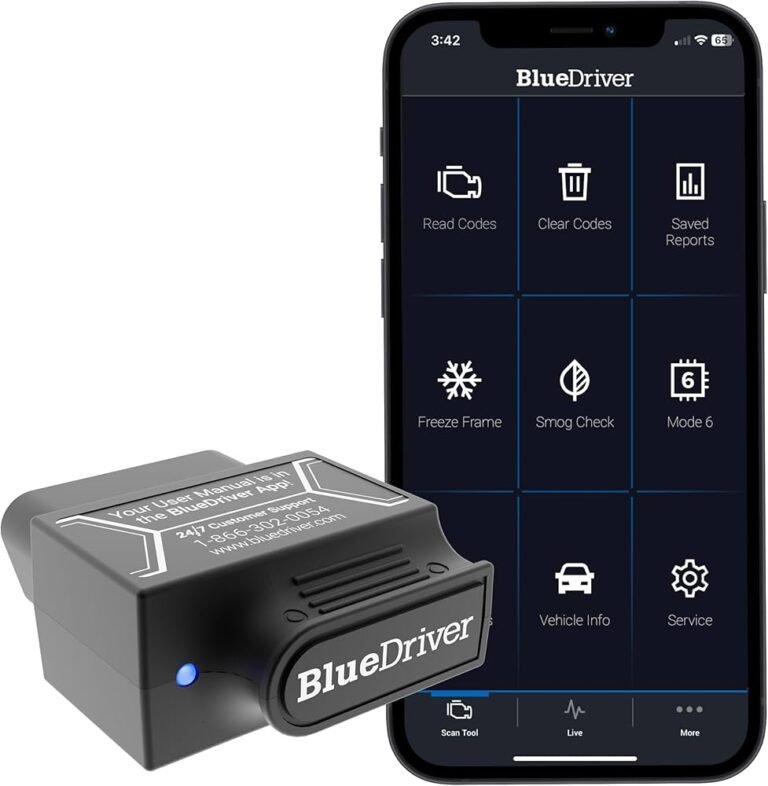
Not all OBD2 scanners are the same. Basic code readers are fine for simple jobs, while advanced scan tools offer much deeper data.
Here is a simple way to think about it:
- Basic code reader: Reads and clears codes
- Mid-range scanner: Shows live data and freeze frame info
- Advanced scan tool: Adds graphing, reset functions, and system-specific diagnostics
If you only want to check warning lights on your own car, a basic model may be enough. If you work on several vehicles or want better diagnostic detail, a more advanced scanner can be worth it.
Look for features like:
- Vehicle compatibility
- Freeze frame data
- Live graphing
- Readiness monitor status
- Easy-to-read screen
- Clear menu navigation
Frequently Asked Questions of How to use an OBD2 scanner
Where is the OBD2 port located?
The OBD2 port is usually under the dashboard on the driver’s side. In most cars, it is near the steering column or above the pedals.
Can I use an OBD2 scanner with the engine off?
Yes, in many vehicles you can scan with the ignition on and the engine off. Some live data functions may work better with the engine running, depending on the scanner and the test you want to perform.
Will an OBD2 scanner fix my car?
No, the scanner only reads data and codes. It helps you find the problem, but you still need to repair the actual fault.
Can I drive with a check engine light on?
Sometimes, but it depends on the cause. If the light is flashing or the car runs badly, stop driving and get it checked soon because serious damage can happen.
Why does the code come back after I clear it?
If the code returns, the problem was likely not fixed. It can also come back if the issue is intermittent or if the part, wiring, or system still has a fault.
Do all cars use the same OBD2 scanner?
Most gas vehicles sold in the U.S. since 1996 use the OBD2 standard. However, some vehicles may need special features or manufacturer-specific tools for deeper diagnostics.
Conclusion
Learning how to use an OBD2 scanner is one of the easiest ways to understand your car better. It helps you read trouble codes, view live data, and make smarter repair decisions without guessing. The more you use it, the more confident you become when warning lights appear.
If you take one thing from this guide, let it be this: read the code, note the symptoms, and use the scanner as a starting point, not the final answer. That simple habit can save time, money, and frustration.
If this helped you, keep exploring diagnostic basics and practice on your own vehicle. The more you learn now, the easier future repairs will feel, so consider bookmarking this guide or sharing it with someone who could use it.