Best Inkjet Printers: 6 Picks for Home and Office in 2027
Most inkjet printers look alike on a store shelf. The real split comes down to three things: how much paper they hold, whether they come with ink, and how much work they ask of you. Some are built for a family that prints a few pages a week. Others are made for a home office that runs every day. Knowing which group you fall into will save you the most trouble.
Best for simple home printing: HP DeskJet 2923. Its listing describes a basic control panel and a 60-sheet tray, so there’s less to learn.
Best for a busy home office: HP OfficeJet Pro 8125. Its listing shows fast color speeds and a 225-sheet tray for heavier use.
This guide is for people who want to pick one printer and be done with it.
How We Picked
We looked at the Amazon listings for these printers before choosing the picks here. To earn a place, a listing had to state clear facts, such as print speeds, tray sizes, included ink, or connection type.
A printer with a stated 225-sheet tray and 20 ppm black speed can be judged against another with a 60-sheet tray and 7.5 ppm, but a product that says only “fast printing” gives you nothing to compare. Those listings were set aside, not ranked lower.
Everything you read below comes from what each seller wrote on the product page. We didn’t test the printers ourselves, so the figures are the manufacturers’ own claims, and some trial offers, such as ink subscriptions, carry terms that depend on the seller’s program.
Comparison Table
All 6 products side by side — scroll sideways to see every column.
| Top Pick | Best for Families | Best for Home Office | Best for Large Paper | Best for Fast Printing | ||
| Preview | 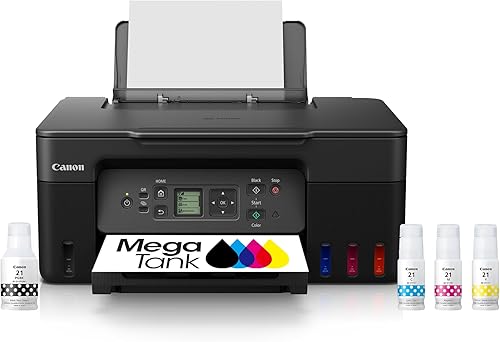 |  |  |  |  |  |
|---|---|---|---|---|---|---|
| Product | Canon MegaTank G3270 | HP DeskJet 2923 | HP OfficeJet Pro 8125 | Canon PIXMA TS7720 | Brother INKvestment 6960 | HP OfficeJet Pro 9135 |
| Brand | Canon | HP | HP | Canon | Brother | HP |
| Best for | Best Overall | Best for Families | Best for Home Office | — | Best for Large Paper | Best for Fast Printing |
| The listing says | Wireless print, copy and scan Up to 2 years of ink included | Prints everyday color documents like letters and recipes Color print, copy, scan, 60-sheet input tray | Prints up to 20 ppm black, 10 ppm color 3-month Instant Ink trial included, then monthly fee | Print, copy and scan functions Prints about 15 black and 10 color images per minute | Prints, copies, scans and faxes up to 11×17 paper Includes 1,800-page black and 750-page color cartridges | Prints up to 25 ppm black, 20 ppm color 3-month Instant Ink trial included, then monthly fee |
| More information | Check Price on Amazon | Check Price on Amazon | Check Price on Amazon | Check Price on Amazon | Check Price on Amazon | Check Price on Amazon |
1. Canon MegaTank G3270 All-in-One Wireless Color Printer
Best for: Buyers who print a lot and want to avoid frequent ink purchases.
The listing says up to 2 years of ink is included and that it can print up to 6,000 black and white or 7,700 color pages on one set of inks. That’s a big deal if you print often, because you’ll be buying ink far less. The 1.35-inch square LCD is small, so setup takes a bit more patience than with a touchscreen.
It isn’t the right pick if you need double-sided printing, since the listing says it’s single-sided only. If that matters to you, look at the HP OfficeJet Pro 8125 instead.
Pros
- Up to 2 years of ink included
- Prints up to 7,700 color pages per ink set
- Wireless print, copy, and scan
Cons
- Single-sided printing only
- Small 1.35-inch LCD display
2. HP DeskJet 2923 Color Inkjet Printer
Best for: Families or students who print basic documents like letters and recipes.
The listing describes color printing, copying, and scanning with a 60-sheet input tray. Speeds are listed as up to 7.5 pages per minute in black and 5.5 in color, which is fine for everyday documents. The control panel is simple, which makes it friendly for people who don’t want to dig through menus.
The listing also says the printer handles web pages and emails with HP AI, which removes unwanted content so you don’t waste pages on awkward layouts. That’s useful if you often print things from the web, such as recipes with ads and sidebars around them.
The listing includes a 6-month trial of Instant Ink. Ink is sent to your door before you run out, and the listing says this can reduce how often you need to buy ink by up to 50%. After the trial, a monthly fee applies unless you cancel, so decide before the trial ends whether you want to keep the plan or stop it.
The HP DeskJet 2923 is a lighter choice than the Canon MegaTank G3270 if you don’t need the same volume. It suits a household that prints a few pages at a time rather than large batches.
Pros
- Simple, easy-to-use control panel
- Wireless printing with dual-band Wi-Fi
- HP app for printing from a phone
Cons
- Slower print speeds than the business models
- Instant Ink fee applies after the trial
3. HP OfficeJet Pro 8125 Wireless All-in-One Color Inkjet Printer
Best for: Home offices that print reports, presentations, and flyers.
The listing gives speeds of up to 20 pages per minute in black and 10 in color, along with auto two-sided printing and a 225-sheet tray. Those numbers make it a good fit for steady work. Auto two-sided printing matters most when you regularly produce multi-page reports. The 225-sheet tray means you can load a large stack and walk away while a long job runs.
The 2.7-inch touchscreen is large enough to navigate without much guesswork. The listing describes it as a phone-like interface, so anyone used to a smartphone should find the menus familiar.
It also includes a 3-month trial of Instant Ink and HP Wolf Essential Security for protecting your network. The Instant Ink trial is worth planning around. Per the listing, a monthly fee applies after three months unless you cancel, so set a reminder before the trial ends if you don’t want to keep the subscription. If you only print a few pages a month, the DeskJet 2923 will be enough.
Pros
- Auto two-sided printing
- 225-sheet input tray
- Fast color printing with a large touchscreen
Cons
- Instant Ink fee applies after the 3-month trial
4. Canon PIXMA TS7720 Wireless All-in-One Color Inkjet Printer
Best for: Buyers who want a full set of features in a compact printer.
The listing shows print, copy, and scan with auto duplex printing, plus speeds of about 15 pages per minute in black and 10 in color. Setup is listed as quick, and the ink uses just two cartridges, which keeps replacements simple. The 2.7-inch LCD is a comfortable size for everyday use.
Auto duplex is the feature most worth checking against your own habits. If you regularly print multi-page documents, having both sides done automatically saves paper and time, since you never have to flip pages by hand and feed them back in. If you mostly print single pages, this feature matters less, and the rest of the list should carry more weight in your decision.
The listing mentions the PIXMA Print Plan with Moderate and Frequent tiers, but the plans are a subscription, so read the terms before you sign up. Check which tier matches your printing volume, since the savings the listing describes depend on how much you print.
Compared with the HP OfficeJet Pro 8125, this one is a bit more basic on tray capacity. That difference matters most if you print in batches, because a smaller tray means more frequent refilling.
Pros
- Auto duplex printing
- Quick, streamlined setup
- Only two ink cartridges to replace
Cons
- Subscription plans need to be checked before signing up
- Smaller paper capacity than the business models
5. Brother INKvestment 6960 Wireless Color Inkjet All-in-One Printer with 11”x17”
Best for: Small businesses that need large paper and high volume.
This is the one for bigger jobs. The listing says it prints on paper up to 11 by 17 inches and holds 500 sheets across two trays plus a 100-sheet multipurpose tray. Speeds are listed at up to 31 pages per minute in black and 30 in color. It also prints and scans to cloud apps like Google Drive and Dropbox.
The listing includes ink yields of 1,800 pages for black and 750 for each color. Because it’s built for heavier work, it’s a bigger machine than most home printers. If you only need letter-size paper, a smaller model will do the job.
Pros
- Prints up to 11 by 17-inch paper
- 500-sheet capacity plus a multipurpose tray
- Fast print speeds in black and color
Cons
- Built for heavier volume, with 11 by 17-inch paper support and a 500-sheet capacity.
- Overkill if you only print standard letter pages
6. HP OfficeJet Pro 9135 Wireless All-in-One Color Inkjet Printer
Best for: Offices that need fast printing, faxing, and high paper capacity.
This is the most business-ready pick on the list. The listing gives speeds of up to 25 pages per minute in black and 20 in color, plus two 250-sheet trays. Those trays matter most when several people share one printer, because a larger supply of paper means fewer refills during a busy day. The printer also prints presentations, brochures, and flyers in professional-quality color, so it suits offices that produce those documents regularly.
It adds fax, which some offices still need. The 4.3-inch touchscreen is larger than the one on the 8125 and uses a phone-like interface, so staff who already use smartphones should find it easy to navigate.
It also does more than most home users will ever need, so its extra capacity may go unused at home. The HP OfficeJet Pro 8125 covers most home office work at a smaller footprint. If you rarely print in volume or never send faxes, the 9135’s extra capacity and features are likely to go unused.
Pros
- Two 250-sheet input trays
- Fax included
- Large 4.3-inch touchscreen
Cons
- Instant Ink fee applies after the 3-month trial
Also Worth Considering
Brother Smart Wireless Color Inkjet is a solid option for basic home printing with wireless connection. Check its listing for tray size and speeds to see if it fits your needs. The listing gives only a title, so it doesn’t confirm tray size or speed; those details need to come from the full product page before you decide.
Canon TS6520 Color Inkjet Printer has a small 1.42-inch OLED display and a clean white design. It’s a good match for a light household that prints occasionally.
Brother Color Touchscreen Paper Trays adds a 2.7-inch color touchscreen and two paper trays. It’s worth a look if you want more paper capacity than a basic model offers. Two trays suggest you can keep letter paper loaded in one and another paper type or size in the other, so you don’t have to swap paper for every job. The listing doesn’t give the tray capacities, so confirm them directly.
How to Choose in Sixty Seconds
Decide how much you print
Start with your monthly volume. If you print a few pages a week, a basic model like the HP DeskJet 2923 is enough. If you print daily, look at the Canon MegaTank G3270 for its included ink, or the HP OfficeJet Pro 8125 for speed. Matching the printer to your volume matters more than any single feature.
Check paper size and tray capacity
Look at the largest paper you need. Standard letter size works on most models. The Brother INKvestment 6960 is the one on this list that lists support for the largest common office sheets. Also check the tray size so you don’t refill it every day.
Confirm the ink plan before ordering
Several listings mention Instant Ink trials or subscription plans. Read the terms on the product page before you order. A free trial is useful, but make sure you know what happens after it ends and whether you can cancel easily.
Related guides
- Is Tonal Smart Home Gym Worth It: Honest Review
- 7 Best OBD2 Scanner For Home Mechanics: Top Picks 2026
- RitFit M1 Pro Smith Machine Review: Honest Home Gym Verdict
Frequently Asked Questions
Do I need an ink subscription?
Not always. Several models, including the HP DeskJet 2923, HP OfficeJet Pro 8125, and HP OfficeJet Pro 9135, mention Instant Ink trials that convert to a monthly fee unless you cancel. If you prefer to buy ink when you need it, check the listing for the ink cartridge type and skip the subscription.
Is wireless printing reliable?
Most of the listings on this page mention dual-band Wi-Fi or a Wi-Fi Direct option. Dual-band Wi-Fi is listed on the HP models, and the Brother INKvestment 6960 lists Wi-Fi Direct for printing without a network. Wireless setup depends on your home network, so confirm your router supports the same band the printer uses.
Which printer handles the most paper?
The Brother INKvestment 6960 holds 500 sheets across two trays plus a 100-sheet multipurpose tray, and it supports paper up to 11 by 17 inches. The HP OfficeJet Pro 9135 has two 250-sheet trays. For everyday use, the 60-sheet tray on the HP DeskJet 2923 is enough.
Can I print on both sides of the paper?
Yes, on several models. The HP OfficeJet Pro 8125, HP OfficeJet Pro 9135, and Canon PIXMA TS7720 all list automatic two-sided printing. The Canon MegaTank G3270 is single-sided only, so check the listing before you order if double-sided printing matters to you.
Closing
If you print a few pages a week, the Canon MegaTank G3270 makes the most sense, because its listing says up to 2 years of ink is included and it can print up to 6,000 black-and-white or 7,700 color pages on one set of inks. The listed yield of up to 6,000 black-and-white pages is large, so it suits buyers who print regularly. Its single-sided printing and small 1.35-inch display are the trade-offs to weigh against that ink value.
If your home office prints more often and you need double-sided pages, the HP OfficeJet Pro 8125 fits better. Its listing includes auto 2-sided printing, an auto document feeder, and a 225-sheet input tray, which means fewer trips to refill paper during a busy week. The 3-month Instant Ink trial is short, though, and a monthly fee applies after that unless you cancel, so check the plan terms and how much ink you typically use.
Your own monthly volume is the deciding factor, so count the pages you printed last month before choosing between these two.